Freed Off
P-15 = -1 (Freed) allows the drive's terminal functions to be configured manually. Digital and analog inputs can be assigned as required using the available function selections within Group 2 parameters, providing maximum application flexibility.
Important
When using Freed Off mode, ensure that the configuration provides the required run command and speed reference for the application. Any reassigned inputs must be commissioned and tested before the drive is placed into service.
Set P-15 to -1 (Freed).
Set the required control source in P-12.
Set P-14 to 101 to access the Advanced Parameter Groups.
Navigate to Group 2 and assign the required input functions:
P2-01 - DI1 Input Function Select
P2-02 - DI2 Input Function Select
P2-03 - DI3 Input Function Select
P2-04 - DI4 Input Function Select
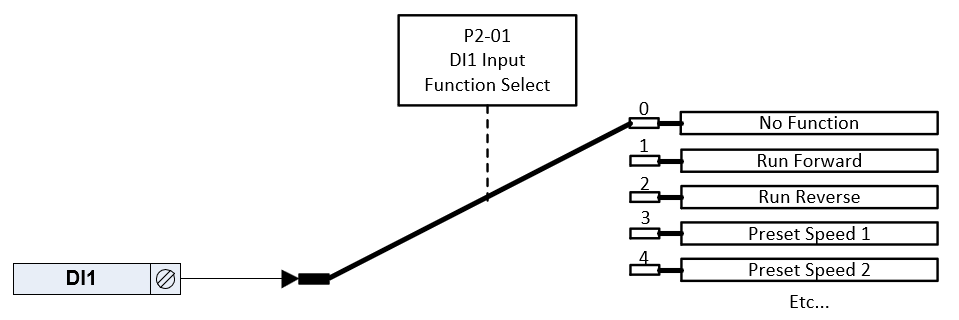
Configure any additional parameters required by the selected functions.
Verify the terminal assignments and test the operation of each assigned function before placing the drive into service.
Required Terminal Function
Terminal | Switch Open | Switch Closed |
|---|---|---|
DI1 | Stop | Run |
DI2 | Run Motor Forward | Run Motor Reverse |
DA3 | No Action | Trip Reset |
DA4 | Analog Speed Reference (0-10Vdc) |
Solution Parameter Settings
Parameter | Function | Setting |
|---|---|---|
P2-01 (Advanced parameter Group) | DI1 Function Select | 1 : Run Forward |
P2-02 (Advanced parameter Group) | DI2 Function Select | 26 : Direction (0-Fwd, 1-Rev) |
P2-03 (Advanced parameter Group) | DA3 Function Select | 7: Reset |
P2-04 (Advanced parameter Group) | DA4 Function Select | 25: Analog Mode |
Once configured, verify the operation of each assigned input before placing the drive into service.
Important Notes
Select a speed reference function in Freed. If no speed reference selected, the drive may run the motor at 0Hz.
Analog is only available on DA3 (Analog 2) and DA4 (Analog 1) and requires a DI to select the Analog reference.
If using Pulse run inputs, ensure stop method is considered.
Some Run command combinations are incompatible. For example, 30: Run Forward (Pulse) cannot be used with 2: Run Reverse, and 19: Run Forward with Edge Reset & Run cannot be used with 31: Run Reverse (Pulse).
Selection Number | Functionality | Description | Default Logic | |||||||||||||||
|---|---|---|---|---|---|---|---|---|---|---|---|---|---|---|---|---|---|---|
0 | No function | No function to the drive | - | |||||||||||||||
1 | Run Forward | When the selected Run input is active, the drive runs forward. Following a trip, the first activation of the Run input resets the drive but does not start it. Activate the Run input again to run the drive. | 0 = Stop 1 = Run | |||||||||||||||
2 | Run Reverse | When the selected Run input is active, the drive runs reverse. Following a trip, the first activation of the Run input resets the drive but does not start it, Activate the Run input again to run the drive. | 0 = Stop 1 = Run | |||||||||||||||
3 | Preset Speed 1 | Selects Preset Speed 1, set by P-20. When active, the drive uses P-20. When inactive, the drive returns to the Primary Speed Reference selected in P-12.1. If the selected primary reference is unavailable, the drive may operate at 0 Hz. | 0 = Primary Speed Reference (P-12.1) 1 = Preset Speed 1 (P-20) | |||||||||||||||
4 | Preset Speed 2 | Selects Preset Speed 2, set by P-21. When active, the drive uses P-21. When inactive, the drive returns to the Primary Speed Reference selected in P-12.1. If the selected primary reference is unavailable, the drive may operate at 0 Hz. | 0 = Primary Speed Reference (P-12.1) 1 = Preset Speed 2 (P-21) | |||||||||||||||
5 | Preset Speed 3 | Selects Preset Speed 3, set by P-22. When active, the drive uses P-22. When inactive, the drive returns to the Primary Speed Reference selected in P-12.1. If the selected primary reference is unavailable, the drive may operate at 0 Hz. | 0 = Primary Speed Reference (P-12.1) 1 = Preset Speed 3 (P-22) | |||||||||||||||
6 | Preset Speed 4 | Selects Preset Speed 4, set by P-23. When active, the drive uses P-23. When inactive, the drive returns to the Primary Speed Reference selected in P-12.1. If the selected primary reference is unavailable, the drive may operate at 0 Hz. | 0 = Primary Speed Reference (P-12.1) 1 = Preset Speed 4 (P-23) | |||||||||||||||
7 | Reset | Used in conjunction with function 9: External Trip. If the drive trips, activating this input will reset the trip, provided the fault condition has been cleared. | 0 = No reset 1 = Reset Trip | |||||||||||||||
9 | External Trip | Trips the drive with E-Trip when the input changes to logic 0. The drive can only be reset once the External Trip condition has been removed. | 0 = E-trip 1 = Healthy | |||||||||||||||
13 | External Trip (Active High) | Trips the drive with E-Trip when the input changes to logic 1. The drive can only be reset once the External Trip condition has been removed. | 0 = Healthy 1 = E-trip | |||||||||||||||
14 | Preset Bit 0 | Bit 0 of the binary preset selection. Selects between Preset Speed 1 (P-20) and Preset Speed 2 (P-21). | 0 = Preset Speed 1 (P-20) 1 = Preset Speed 2 (P-21) | |||||||||||||||
15 | Preset Bit 1 | Bit 1 of the binary preset selection. Selects between Preset Speed 1 (P-20) and Preset Speed 3 (P-22). | 0 = Preset Speed 1 (P-20) 1 = Preset Speed 3 (P-22) | |||||||||||||||
14 + 15 Combination | Preset Bit 0 & Preset Bit 1 | When both Preset Bit 0 and Preset Bit 1 are configured, the input states combine to select between Preset Speeds 1–4.
| ||||||||||||||||
19 | Run Forward with Edge Reset & Run | Commands the drive to run forward when active. If the drive is tripped, the fault is reset first. Restart behaviour is determined by P-30.6. | 0 = Stop 1 = Run Forward | |||||||||||||||
20 | Run Reverse with Edge Reset & Run | Commands the drive to run reverse when active. If the drive is tripped, the fault is reset first. Restart behaviour is determined by P-30.6. | 0 = Stop 1 = Run Reverse. | |||||||||||||||
25 | Analog Mode | Sets the input into Analog mode, allowing it to be used as an Analog speed reference, thermistor input, or other supported Analog function. NoteAnalog Inputs can only be selected on DA3 and DA4. | Analog signal type set by parameter (e.g. 0–10 V / 4–20 mA). Analog Input 1 - P-16 Analog Input 2 - P-47 | |||||||||||||||
26 | Direction (0-FWD, 1 - REV) | Changes the motor direction according to the input state. | 0 = Run Forward 1 = Run Reverse | |||||||||||||||
30 | Run Forward (Pulse) | A rising edge commands the drive to run forward. The Run command remains latched after the input is removed. Restart behaviour is determined by P-30.6. | 0 = No Action 1 = Run Forward | |||||||||||||||
31 | Run Reverse (Pulse) | A rising edge commands the drive to run reverse. The Run command remains latched after the input is removed. Restart behaviour is determined by P-30.6. | 0 = No Action 1 = Run Reverse | |||||||||||||||
32 | Forward Limit Switch | When active, prevents further movement in the forward direction. | 0 = Forward Movement Permitted 1 = Forward Movement Prevented | |||||||||||||||
33 | Reverse Limit Switch | When active, prevents further movement in the reverse direction. | 0 = Reverse Movement Permitted 1 = Reverse Movement Prevented | |||||||||||||||
34 | Fieldbus Control Enable | Enables drive control via the fieldbus control word. When mapped to a control word bit, the bit must be set to allow the drive to run. | 0 = Fieldbus Control Disabled 1 = Fieldbus Control Enabled | |||||||||||||||
35 | Stop Command (Pulse) | A rising edge commands the drive to stop. The Stop command is latched. | 0 = No Action 1 = Stop (Rising Edge) | |||||||||||||||
40 | Control User Bit 1 | Sets or clears User Bit 1, which can be used as a source to control a digital output or relay. | 0 = User Bit 1 Cleared 1 = User Bit 1 Set | |||||||||||||||
41 | Control User Bit 2 | Sets or clears User Bit 2, which can be used as a source to control a digital output or relay. | 0 = User Bit 2 Cleared 1 = User Bit 2 Set | |||||||||||||||
42 | Fast Stop Command | When active, the drive is commanded to ramp to stop using Fast Deceleration Ramp (P-24) | 0 = No Fast Stop 1 = Fast Stop | |||||||||||||||
43 | Fast Stop Command (Inverted) | When deactivated, the drive is commanded to ramp to stop using Fast Deceleration Ramp (P-24). Input must be active for drive to run | 0 = Fast Stop 1 = Run Permitted | |||||||||||||||
44 | Fire Mode | Activates Fire Mode when the input is inactive. Fire mode settings can be selected in P-30.3 to P-30.5. | 0 = Fire Mode Active 1 = Fire Mode Inactive | |||||||||||||||
45 | Fire Mode and Run at Set Speed | When active, enables Fire Mode and commands the drive to run at the Fire Mode Speed set in P-30.5. If no speed set, it will run at selected speed reference. Fire mode settings can be selected in P-30.3 to P-30.5. | 0 = Fire Mode Inactive 1 = Fire Mode Active and Run | |||||||||||||||
46 | Run Forward with Fast Stop | Commands the drive to run forward. When used with Run Reverse with Fast Stop (47), Fast Stop is commanded when both inputs are in the Stop state. | 0 = No Action 1 = Run Forward Fast Stop when P-46 & P-47 = 1 | |||||||||||||||
47 | Run Reverse with Fast Stop | Commands the drive to run reverse. When used with Run Forward with Fast Stop (46), Fast Stop is commanded when both inputs are in the Stop state. | 0 = No Action 1 = Run Reverse Fast Stop when P-46 & P-47 = 1 | |||||||||||||||
48 | Run Forward with Fast Stop (Edge Detect) | Commands the drive to run forward. Use with function 49; when both inputs are active, Fast Stop is commanded. | 0 = No Action 1 = Run Forward (Latched) Fast Stop when P-48 & P-49 = 1 | |||||||||||||||
49 | Run Reverse with Fast Stop (Edge Detect) | Commands the drive to run reverse. Use with function 48; when both inputs are active, Fast Stop is commanded. | 0 = No Action 1 = Run Reverse (Latched) Fast Stop when P-48 & P-49 = 1 | |||||||||||||||
50 | Run at Max Speed | When active, sets the speed reference to the Maximum Frequency / Speed Limit (P-01). Alternative Speed Reference required to be set, otherwise when 50 = 0, drive may run motor at 0Hz. | 0 = No Action 1 = Runs At Maximum Speed (P-01) | |||||||||||||||
51 | Motorised Pot Up | Increases the Motorised Pot speed while the input is active. P-12.0 must be set to 1: Keypad Control (uni-directional) or 2: Keypad Control (bi-directional) P-12.1 must be set to 1: Keypad/MPOT for functionality. | 0 = No Increase 1 = Increase Speed | |||||||||||||||
52 | Motorised Pot Down | Decreases the Motorised Pot speed while the input is active. P-12.0 must be set to 1: Keypad Control (uni-directional) or 2: Keypad Control (bi-directional) P-12.1 must be set to 1: Keypad/MPOT for functionality. | 0 = No Decrease 1 = Decrease Speed | |||||||||||||||
53 | Motorised Pot Step Up | On a rising edge, increases the Motorised Pot speed by the step value set in P-31.2. P-12.0 must be set to 1: Keypad Control (uni-directional) or 2: Keypad Control (bi-directional) P-12.1 must be set to 1: Keypad/MPOT for functionality. | 0 = No Action 1 = Increase Speed by One Step (Rising Edge) | |||||||||||||||
54 | Motorised Pot Step Down | On a rising edge, decreases the Motorised Pot speed by the step value set in P-31.2. P-12.0 must be set to 1: Keypad Control (uni-directional) or 2: Keypad Control (bi-directional) P-12.1 must be set to 1: Keypad/MPOT for functionality. | 0 = No Action 1 = Decrease Speed by One Step (Rising Edge) | |||||||||||||||
55 | Motorised Pot Reset | Resets the Motorised Pot speed to the start speed defined by P-31.0. If P-31.0 is set to 1: Previous Speed or 2: Current Speed, activating the input may result in no change to the speed. P-12.0 must be set to 1: Keypad Control (uni-directional) or 2: Keypad Control (bi-directional). P-12.1 must be set to 1: Keypad/MPOT. | 0 = No Action 1 = Reset Motorised Pot Speed | |||||||||||||||
62 | Use Secondary Reference Source | When active, selects the Secondary Speed Reference defined in P-12.2. When inactive, the Primary Speed Reference in P-12.1 is used. | 0 = Primary Speed Reference (P-12.1) 1 = Secondary Speed Reference (P-12.2) | |||||||||||||||
63 | Binary Preset | When active, the speed reference is selected using Preset Bit 0 and Preset Bit 1 (Freed 14 + 15). When inactive, the drive uses the Primary Speed Reference (P-12.1). | 0 = Primary Speed Reference (P-12.1) 1 = Binary Preset Selection (Freed 14+15) | |||||||||||||||
64 | Coast to Stop | When active, the drive coasts to stop instead of Ramp to Stop | 0 = Normal Stop 1 = Coast to Stop | |||||||||||||||