DC Injection Braking
Overview
DC Injection Braking is a motor stopping method that injects DC current into the motor to provide a controlled braking effect.
When DC Injection Braking is active, the drive display shows "DC-I".
Before You Begin
Confirm the motor has been fully commissioned.
Verify all control and motor wiring connections are correct.
Ensure a valid run command is available to start the motor.
Verify the motor rated current has been entered correctly in P-08.
Configure DC Injection Braking
Caution
Higher DC Injection current settings produce greater braking torque but increased motor heating.
Excessive braking current or extended braking duration may cause motor overheating.
Monitor motor temperature and reduce the current or duration if excessive heating occurs.
Enable DC Injection at Motor Start
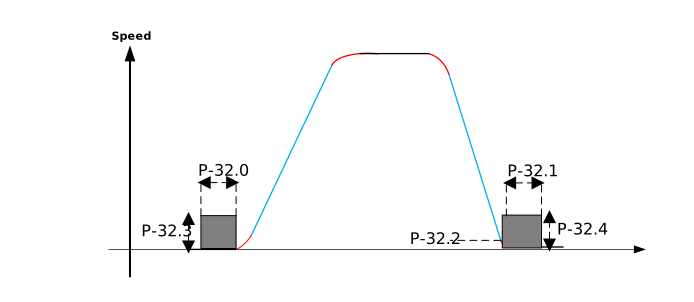
Set P-32.0 (DC Injection Start Duration) to the required braking time.
Set P-32.3 (DC Injection Start Current) to the required braking current level.
Note
If P-32.0 = 0, start-up DC Injection Braking is disabled.
Enable DC Injection at Motor Stop
Set P-32.1 (DC Injection Stop Duration) to the required braking time.
Set P-32.2 (DC Injection on Stop Speed) to define when DC braking should activate during deceleration.
Set P-32.4 (DC Injection Stop Current) to the required braking current level.
Note
If P-32.1 = 0, stop DC Injection Braking is disabled.
Display and Indicators
DC-I is shown on the drive display whenever DC Injection Braking is active
Troubleshooting and FAQs
Problem/Question | Solution |
|---|---|
Braking effect is weak | Increase P-32.4 gradually |
Motor vibration during braking | Reduce P-32.3 (At Start) or P-32.4 (At Stop) |
Drive never displays "DC-I" | Check P-32.1 and P-32.2 settings |
Motor overheating during braking | Reduce braking current and/or duration |