Motorised Potentiometer
What is Motorised Potentiometer (MOP)?
The Motorised Potentiometer (MOP) function provides an electronic alternative to a mechanical speed potentiometer.
Motor speed is increased or decreased using assigned digital inputs:
MOP Up – Increase speed reference
MOP Down – Decrease speed reference
Before Starting
Ensure motor data parameters have been entered.
The below guidance assumes all other parameters are in a default state.
The motor will not run until a valid start command is applied, (e.g. DI1).
The below is an example of the wiring required.
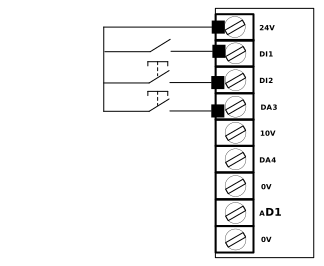
Note
DI1 starts the Motor, DI2 Increases speed, DA3 Decreases speed.
Set Control Source To enable the MOP functionality,
Set P-12.0 to :
1: PAd-1 - Uni-Directional speed control. (motor only runs forward)
or
2: PAd-2 - Bi-Directional speed control. (Reverse command can be used to run reverse)
Set Start Source to be DI1
Set P-12.4 = 2.
Enable free assignment of Terminals
Set P-14 = 101
Set P-15 = FrEEd (-1)
Assign Digital Inputs
Parameter
Function
Terminal Assignment
P2-01 (Advanced Parameter Group)
19 Run Forward with Edge reset and Run
DI1
P2-02 (Advanced Parameter Group)
51 : Motorised pot Up
DI2
P2-03 (Advanced Parameter Group)
52 : Motorised pot down
DA3
Note
Any of the digital inputs can be used for the Motorised Potentiometer function.
Start Source Selection
Set P-12.4 :
Value | Behavior |
|---|---|
0 | Drive is Started and Stopped from the drive keypad buttons only. |
1 | Drive will start only when : A Digital Input assigned as run command (e.g Run Forward) has been activated and Drive keypad start button has been pressed. Drive is stopped by either : The drive keypad Stop button or Opening the digital Input assigned as a run command (e.g Run Forward) |
2 | Drive is Started and Stopped from the drive digital Input assigned as a run command (e.g Run Forward). |
Start Speed Behavior (after Stop Command)
Set P-31.0 :
Value | Behavior |
|---|---|
0 | Minimum Speed (Value set in P-02 "Minimum Speed") |
1 | Previous Speed |
2 | Current Speed |
3 | Preset Speed 4 (Value set in P-23 "Preset Speed 4") |
Setting where the MOP speed up/down signal comes from
Set P-31.1 :
Value | Source |
|---|---|
0 | Keypad only - Use the keypad up and down buttons to select desired motor speed. |
1 | Keypad and Digital Inputs - Use the keypad up and down buttons or the digital inputs to select desired motor speed. |
2 | Digital Inputs Only - Use only the digital inputs as per assigned to the Motorised Pot function. e.g P2-02 = 51 |
Speed Step Adjustment
Parameter | Function | Terminal Assignment |
|---|---|---|
P-31.2 | MOP Steps (Defines speed change per input action) | N/A |
P2-02 (Advanced Parameter Group) | 53 : Motorised pot step Up | DI2 |
P2-03 (Advanced Parameter Group) | 54 : Motorised pot step down | DA2 |
Note
To access the advanced parameter group see TBC link to method to access
Any of the digital inputs can be used for the Motorised Potentiometer function,
Problem | Solution |
|---|---|
MOP does not work from keypad | Ensure P-12.0 is on setting 1 or 2. |
Ensure P-31.1 is on setting 0 or 1. | |
What is the ramp used between speed steps ? | TBC |
For start speed behavior (After Stop Command) setting 1 (Previous speed), what value will the speed run at after a power cycle ? | The previous speed prior to the power down |
What if I want to run the motor in a different direction ? | TBC |