Skip Frequency
What is Skip Frequency?
Skip Frequency allows the drive to avoid operating continuously at speeds that cause mechanical resonance, vibration, or excessive noise.
When the drive speed reaches a configured skip frequency, the drive automatically moves through the prohibited operating band and continues to the requested speed reference.
Example
If vibration occurs around 25 Hz, a skip frequency can be configured so the drive operates below or above this speed, but not within the specified range.
Before You Begin
Ensure the motor has been commissioned.
Identify any speeds that cause excessive vibration or resonance.
Verify the machine can safely accelerate through the skip frequency range.
Record the frequencies at which vibration occurs.
Related Parameters
Parameter | Description | Minimum | Maximum | Default | Units |
|---|---|---|---|---|---|
P-26 | Skip Frequency Hysteresis Band | 0.00 | P-01 | 0.00 | Hz |
P-27 | Skip Frequency Centre Point | 0.00 | P-01 | 0.00 | Hz |
Configure Skip Frequency
Step 1 – Identify the Resonance Frequency
Run the motor through its normal operating speed range
Identify the speed at which excessive vibration or noise occurs.
Record the operating frequency shown on the drive.
Example :
If vibration occurs at approximately 25 Hz, use this value as the skip frequency.
Step 2 - Set the Skip Frequency Centre Point
Navigate to P-27 (Skip Frequency Centre Point).
Enter the frequency to be avoided.
Example
P-27 = 25 Hz
Step 3 -Set the Skip Frequency Band
Navigate to P-26 (Skip Frequency Hysteresis Band).
Enter the required band around the skip frequency.
Example
P-27 = 25 Hz
P-26 = 2 Hz
The drive will avoid operating between:
24 Hz and 26 Hz
How Skip Frequency Works
The drive follows the acceleration and deceleration ramps set by P-03.x and P-04.x
When the speed reference falls within the configured skip frequency band, the drive automatically operates at the nearest permitted frequency outside the excluded range.
Example
P-27 = 25 Hz
P-26 = 10 Hz
This creates a skip band from 20Hz to 30Hz.
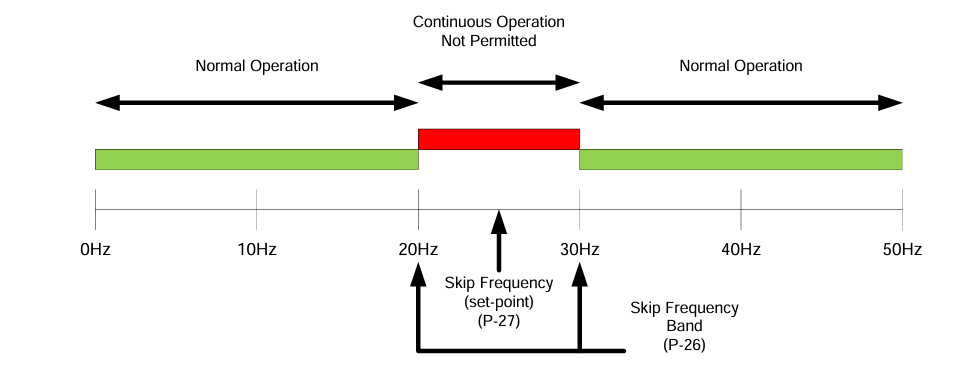
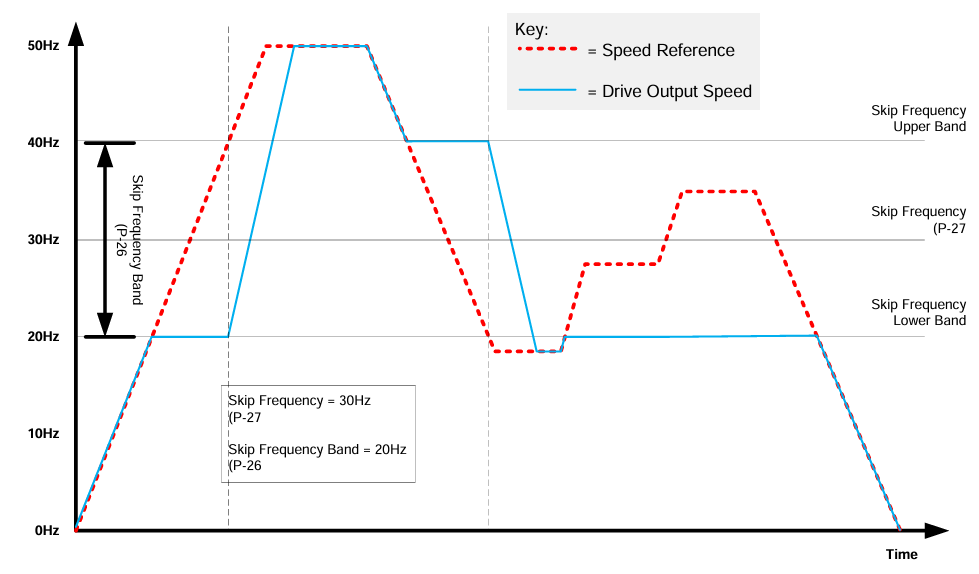
A speed reference of 23 Hz results in the drive operating at 20 Hz.
A speed reference of 26 Hz results in the drive operating at 30 Hz.
Once the reference moves outside the skip band, the drive resumes normal operation.
If the speed is negative, the skip frequency bands are mirrored. With the same settings as shown above, a skip frequency band between -20Hz and -30Hz, centred on -25Hz will also be in place.
If ramping up to a value outside of the hysteresis band, the drive will ramp in line with the times set in P-03.x and P-04.x
If ramping within the hysteresis band, the drive will ramp up to the lower limit, until the reference point passes the centre point. After passing the centre point, the drive will rise to the upper limit, and stay there until the set hysteresis band has been passed. The drive will then continue as normal.
Applications
Minimum speed defines the lowest frequency at which the drive is permitted to operate, where as skip frequency defines a frequency range that the drive will not dwell in. For certain applications that are experiencing instability or vibration at certain low speed ranges, or when operation below that range is still required, skip frequency can be used, instead of minimum speed.
Note
Skip frequency is not a replacement for minimum speed.
If the motor or application should not operate below a certain speed, minimum speed should be used.
Skip frequency should only be applied to avoid resonance or known unstable operating points.
Troubleshooting & FAQs
Problem | Solution |
|---|---|
My application is vibrating a lot at specific frequency. | Ensure problem frequency is set in P-27, and the hysteresis band around that value is set in P-26. |