Brake Resistor
Brake Resistor Connections and Protection
The drive must be fitted with an external braking resistor (purchased separately).
Brake Resistor Connections
Brake Resistor Terminal Connections 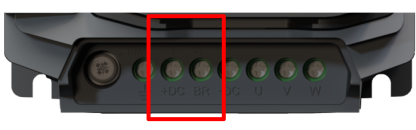 |
CautionThe brake resistor must be connected between the +DC and BR Terminals of the drive as shown in the image. Failure to do so can result in damage to the Drive/Brake resistor. DangerThe voltage level at these terminals may exceed 800V DC. Stored charge may be present after disconnecting the mains power. Allow a minimum of 10 minutes discharge after power off before attempting any connection to these terminals. |
Caution
The correct values must be entered into parameters P3-04 and P3-05 for the drive to protect the brake resistor against overload. this will ensure that it does not operate outside of its design limits.
To enable the built-in brake resistor overload protection follow the below steps :
Enter the resistance of the brake resistor in P3-04 (Ω)
Enter the power of the brake resistor in P3-05 (kW)
Caution
It is highly recommended to equip the drive with a main contactor in order to provide an additional thermal overload protection for the braking resistor.
The contactor should be wired so that it will open when the resistor overheats, otherwise the drive will not be able to interrupt the main supply if the brake chopper remains closed (short-circuited) in a fault situation.
It is also recommended to wire the thermal overload protection to a digital input of the drive as an External Trip.
The diagram below shows a recommended circuit for removing mains power from the drive in the event of brake resistor overload.
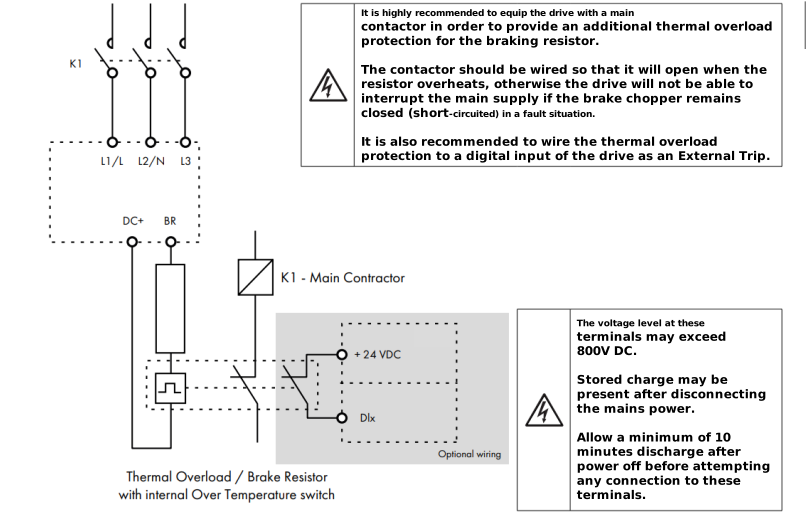
The output from the thermal overload relay/thermal switch can be wired into a digital input, that way the drive can react accordingly in the event of an overload situation.
To enable a digital input as brake resistor monitoring input follow the steps below:
Set P3-06 (Brake Resistor Temperature Monitoring Enable) to a 1 (Enabled)
Set P3-07 (Brake Resistor Temperature Monitoring trip reaction) to the required reaction as per the table below.
Setting | Function | Reaction Details |
|---|---|---|
0 | Stop then Trip | Drive stops normally then trips |
1 | Trip Immediately | Immediate trip, apply motor brake |
2 | Warning Only | Warning only, no trip. |
Parameter Number | Parameter Name | Units | Default | Available Settings | Access | Change During Run | Scaling | Size (Bytes) | CAN Register | CAN Sub Index | Modbus Register |
|---|---|---|---|---|---|---|---|---|---|---|---|
P3-04 | Brake Resistor Resistance | ohms | Rating Dependent | 0 ... 60000 ohms | RW | Y | N/A | 2 | 2130h | 0 | 304 |
P3-05 | Brake Resistor Power | kW | 0.0kW | 0.0 ... 6000.0 kW | RW | Y | 1 = 1W | 2 | 2131h | 0 | 305 |
P3-06 | Brake Resistor Temperature Monitor Enable | N/A | 0: Disabled | 0: Disabled 1: Enabled | RW | Y | N/A | 1 | 2132h | 0 | 306 |
P3-07 | Brake Resistor Temperature Monitoring trip reaction | N/A | 0 : Normal Stop, Trip After stopping | 0: Normal Stop, Trip After stopping 1 : Immediate Trip, Apply motor Brake 2: Warning Only No Trip | RW | Y | N/A | 1 | 2133h | 0 | 307 |
Enter external Brake Resistor resistance in ohms.
For software protection of the connected brake resistor, enter the rated power and resistance of the resistor into the relevant parameters. The drive will then monitor the brake resistor to ensure that it does not operate outside of its designed limits. Where an external thermal protection device is fitted, and software protection is not required. Setting parameter P3-05 to zero will disable the software protection feature.
This parameter is used when a brake resistor thermal switch is wired back to a Digital Input set for External Trip and tells the drive that the drive should trip on a brake resistor feedback fault (Ot-br)rather than an external trip.
This parameter defines the drive’s reaction when the Brake Resistor Overload function has been triggered (Ot-br)
Setting | Function | Reaction Details |
|---|---|---|
0 | Stop then Trip | Drive stops normally then trips |
1 | Trip Immediately | Immediate trip, apply motor brake |
2 | Warning Only | Warning only, no trip. |
Brake Resistor Selection
The Resistor power ratings shown are guideline only, the values should be calculated based on the individual application, considering the braking power and duty cycle of the elevator.
The resistance of the braking resistor must not be less than the minimum values shown in the table below.
Model Code | Recommended Brake Resistance (Minimum) (Ω) | Resistor power rating (W) |
|---|---|---|
ODL-3-220105-142SB# | 35 (20) | 1000 |
ODL-3-220180-342SB# | 20 (20) | 1000 |
ODL-3-220240-342SB# | 20 (20) | 1500 |
ODL-3-320300-342SB# | 20 (12) | 2000 |
ODL-3-240095-342SB# | 100 (40) | 1000 |
ODL-3-240140-342SB# | 75 (40) | 1500 |
ODL-3-340180-342SB# | 50 (22) | 2000 |
ODL-3-340240-342SB# | 40 (22) | 3000 |
ODL-3-340300-342SB# | 50 (22) | 4000 |