Elevator Core Reference Guide

Phase Orientation Select Function

Phase Orientation Selection

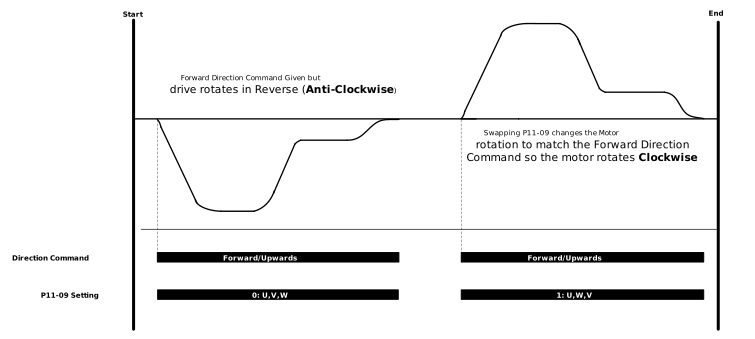
By default the drive assumes the motor phase sequence is U,V,W. When the drive receives a forward direction signal, this normally results in the elevator car moving in the Up direction (normally clockwise looking direct at the front face of the motor sheave). If this is not the case then parameter P11-09 can be set to 1 to swap the output phase sequence e.g. U,W,V.

In the case where an Encoder with incremental signals is used and the drive receives a forward direction signal then the drive expects to see the the pulses from the encoder in the following sequence (A channel high then B channel high), if this is not the case then parameter P6-02 can be set to a 1 to allow for the encoder feedback signal sequence to be swapped e.g (B channel high then A channel high)

The two functions negate the need of rewiring of the motor or encoder terminals and allows for easy retrofits or replacements.

The sections below detail the process of how to check that the orientation of the motor phases vs the encoder signal sequence (if operating with an Encoder) is correct.

Tip

Typically if the motor Phase sequence and Encoder pulse sequence are opposite then you will see nuisance Sp-Err or O-I faults on the drive.

Geared Induction Motor - Open Loop

When operating a Geared Induction Motor without an encoder the way to change the motor phase orientation without re-wiring the drive is to use parameter P11-09.

Steps to Change the Motor Phase Orientation

  1. Make sure the drive is stopped. Showing either inhibit or Stop on the display

  2. Set P11-09 to the opposite of the current setting.

    The default value of P11-09 is 0: U,V,W and can be change to 1: U,W,V

  3. At a reduced speed give a direction command and check the drive rotation matches the direction command given using the table below:

    Direction Command

    Correct Motor Direction (when facing the sheave)

    Forward

    Clockwise or Upwards

    Reverse

    Anti-Clockwise or Downwards

Motor Phase Orientation Diagram

Features_and_Functions_-_Phase_Orientation_-_Direction_Selection_Diagram.svg
Geared Induction Motor - Closed Loop

When operating a Geared Induction Motor with an encoder you need to match the encoder direction to the motor direction.

If the Motor and Encoder direction are opposite the drive will trip.

Steps to match the Motor and Encoder direction

  1. Put the drive into Open Loop operation by setting P6-05 to 0.

  2. Monitor P0-18, P0-19 and the motor sheave direction. Check that the signs for each parameter match.

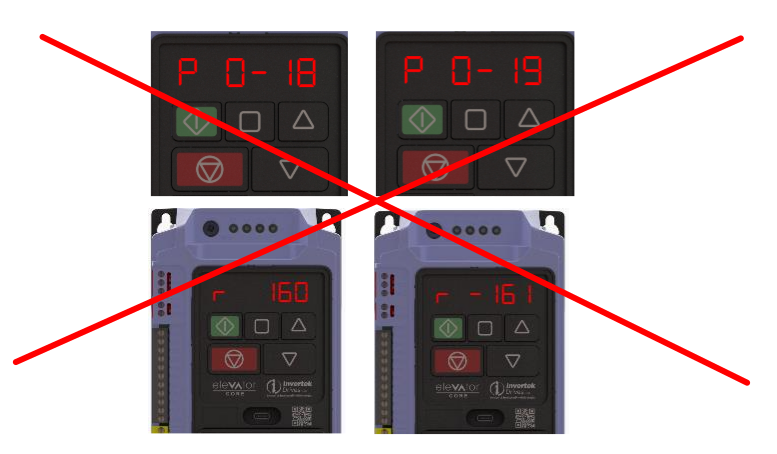
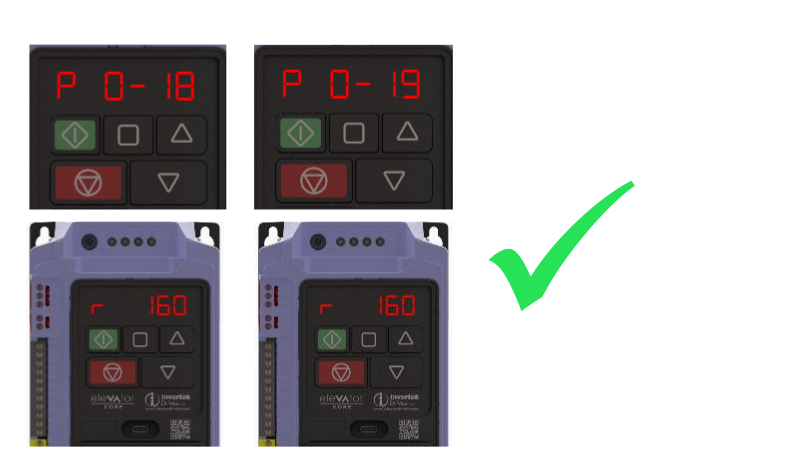
  3. If P0-18 and P0-19 have different signs like the image on the right then either P11-09 or P6-02 needs to be changed to get the signs to match. When to change each is detailed below:

    Parameter to Change

    When to Change

    P6-02

    If P0-18 matches the motor direction and P0-19 is the opposite sign.

    Forward Command = Motor Rotates Clockwise or Upwards - P0-18 is Positive

    Reverse Command = Motor Rotates Anti-Clockwise or Downwards - P0-18 is Negative

    P11-09

    If P0-18 does not match the Motor Direction

    Forward Command = Motor Rotates Anti-Clockwise or Downwards - P0-18 is Negative

    Reverse Command = Motor Rotates Clockwise or Upwards - P0-18 is Positive

  4. Set P6-05 back to 1 to enable closed loop operation and run the drive at a reduced speed to check the signs of P0-18 and P0-19 now match.

Motor and Encoder Direction Check

Features_and_Functions_-_Phase_Orientation_-_Drive_Display.svg
Features_and_Functions_-_Phase_Orientation_-_Drive_Display_Correct.svg
Gearless Permanent Magnet Motor - Closed Loop

When operating a Gearless Permanent Magnet Motor with an encoder you need to match the encoder direction to the motor direction.

Steps to match the Motor and Encoder direction

  1. With the Ropes Removed put the drive into Open Loop operation by setting P6-05 to 0.

  2. Monitor P0-18, P0-19 and the motor sheave direction. Check that the signs for each parameter match.

  3. If P0-18 and P0-19 have different signs like the image on the left then either P11-09 or P6-02 needs to be changed to get the signs to match. When to change each is detailed below:

    Parameter to Change

    When to Change

    P6-02

    If P0-18 matches the motor direction and P0-19 is the opposite sign.

    Forward Command = Motor Rotates Clockwise or Upwards - P0-18 is Positive

    Reverse Command = Motor Rotates Anti-Clockwise or Downwards - P0-18 is Negative

    P11-09

    If P0-18 does not match the Motor Direction

    Forward Command = Motor Rotates Anti-Clockwise or Downwards - P0-18 is Negative

    Reverse Command = Motor Rotates Clockwise or Upwards - P0-18 is Positive

  4. Set P6-05 back to 1 to enable closed loop operation and run the drive at a reduced speed to check the signs of P0-18 and P0-19 now match.

Motor and Encoder Direction Check

Features_and_Functions_-_Phase_Orientation_-_Drive_Display.svg
Features_and_Functions_-_Phase_Orientation_-_Drive_Display_Correct.svg

Note

If you are using a Gearless Permanent Magnet Motor the encoder offset (P6-09) will be different when P6-02 or P11-09 is changed. An Encoder Offset Auto-tune will need to be performed to re-calculate the encoder offset when P6-02 or P11-09 is changed. To do this you will need to Auto-tune the drive again by setting P4-08 to 2.