Smooth Start Feature
Smooth Start Function
The Smooth Start function allows the starting comfort to be improved. Normally used in applications with high stiction.
The Smooth Start function provides an extra ramp at the start of travel before accelerating to the provided speed reference form the controller.
By adding a extra ramp before the normal travel curve you will feel reduced vibrations and a better quality start.
Smooth Start Description
The Smooth Start function is disabled by default and needs to be enabled via parameterisation. To do this follow the steps listed below:
Step Number | Steps to activate Smooth Start | Description |
|---|---|---|
1 | Commission the drive following the standard commissioning procedure. | |
2 | Set the Smooth Start Time in P9-08. | This will be the period that the drive runs at Smooth Start Speed for. |
3 | Then set the Smooth Start Speed in P9-09. | This will be the speed that the drive will initially accelerate to and then run at for the time set in P9-08. |
4 | Once Smooth Start is active set the ramp time in P9-10. | This will be the time it takes to accelerate from 0 to your chosen speed set in P9-09. |
Note
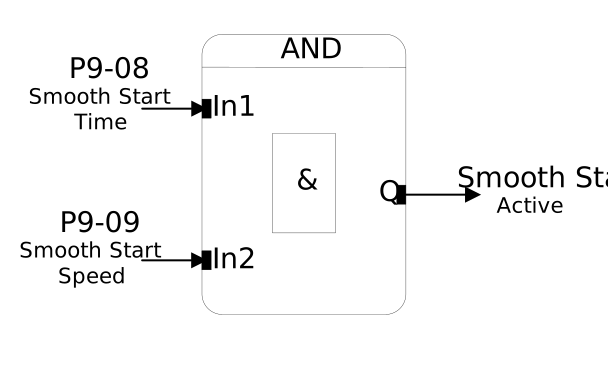
Both Steps 3 and 4 must be completed for Smooth Start to be active. If either parameters have a value of 0, then Smooth Start will be disabled.
Smooth Start Active Conditions | Smooth Start Timing Diagram |
|---|---|
 | 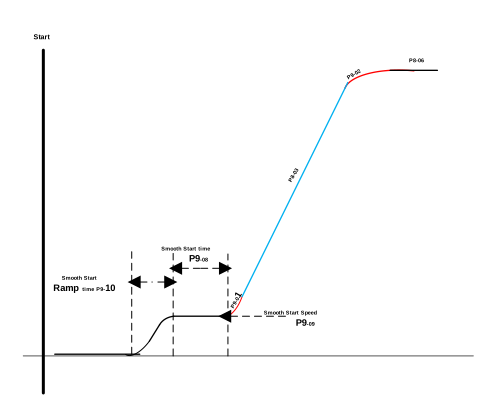 |
NoteSmooth Start does not replace the normal S-Ramp but instead adds an extra one. Once Smooth Start finishes the standard acceleration parameters are used. | |
Parameter Number | Parameter Name | Units | Default | Available Settings | Access | Change During Run | Scaling | Size (Bytes) | CAN Register | CAN Sub Index | Modbus Register |
|---|---|---|---|---|---|---|---|---|---|---|---|
P9-08 | Smooth Start Time | sec | 0.0s | 0.0 ... 5.0s | RW | Y | 1 = 0.1s | 1 | 238Ch | 0 | 908 |
P9-09 | Smooth Start Speed | Hz / rpm / Linear | 0.00Hz | 0.00 ... P8-01 | RW | Y | 1 = 0.01Hz | 2 | 238Dh | 0 | 909 |
P9-10 | Smooth Start Ramp Time | sec | 0.50s | 0.00 ... 600.00s | RW | Y | 1 = 0.01s | 2 | 238Eh | 0 | 910 |
Sets the time that the Smooth Start Function is active for once the drive reaches the speed set in P9-09.
Must have a value > 0 for Smooth Start to be active.
Sets the target speed for the drive during the Smooth Start Function.
Must have a value > 0 for Smooth Start to be active.
Sets the ramp time to reach the target speed set in P9-09.
Below is the answers to some commonly asked questions about the Smooth Start function.
Question | Answer |
|---|---|
Will the Smooth Start Ramp happen on every enable? | Yes, if Smooth Start is active the ramp will always be present. |
Is Smooth Start available while controlling the drive via Modbus or CANopen | Yes, as long as Smooth Start is active then the drive will follow the extra ramp even while controlled over comms. |