Travel Profile Details - Speed Loop Gains Transition Points
The Drive has 5 different sets of Speed Loop Gains available so the Travel Profile can be fully tuned.
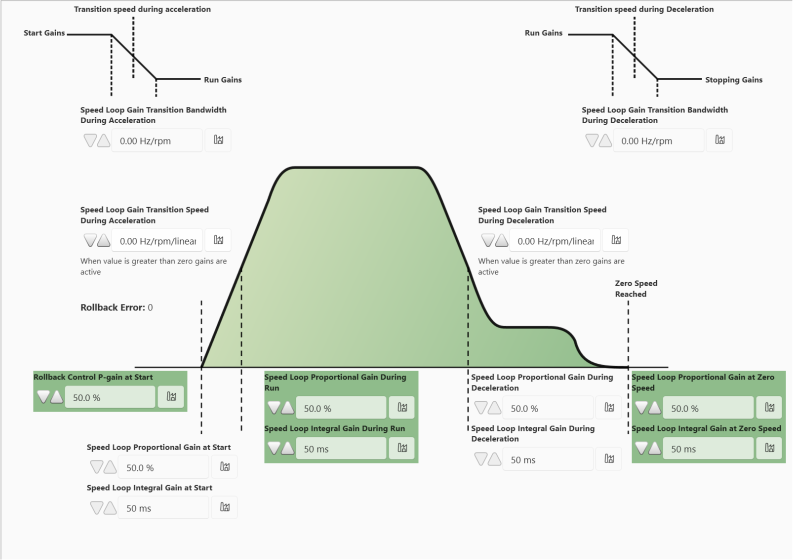
From default only 3 sets of Speed Loop Gains are active. These are:
P9-16 - Rollback Control P-Gain at Start
P9-27 - Speed Loop Proportional Gain during Run & P9-28 - Speed Loop Integral Gain during Run
P9-34 - Speed Loop Proportional Gain during Stop & P9-35 - Speed Loop Integral Gain during Stop
Speed Loop Gains - State at Default
The table below shows which speed loop gains are active at default parameter settings.
Speed Loop Gain Set | Parameters | Active when Parameters are Default |
|---|---|---|
Rollback Gain during Start | P9-16 - Rollback Control P-Gain at Start | Yes |
Speed Loop Gains during Start | P9-23 - Speed Loop Proportional Gain at Start P9-24 - Speed Loop Integral Gain at Start | No |
Speed Loop Gains during Run | P9-27 - Speed Loop Proportional Gain during Run P9-28 - Speed Loop Integral Gain during Run | Yes |
Speed Loop Gains during Deceleration | P9-30 - Speed Loop Proportional Gain during Deceleration P9-31 - Speed Loop Integral Gain during Deceleration | No |
Speed Loop Gains during Stop | P9-34 - Speed Loop Proportional Gain during Stop P9-35 - Speed Loop Integral Gain during Stop | Yes |
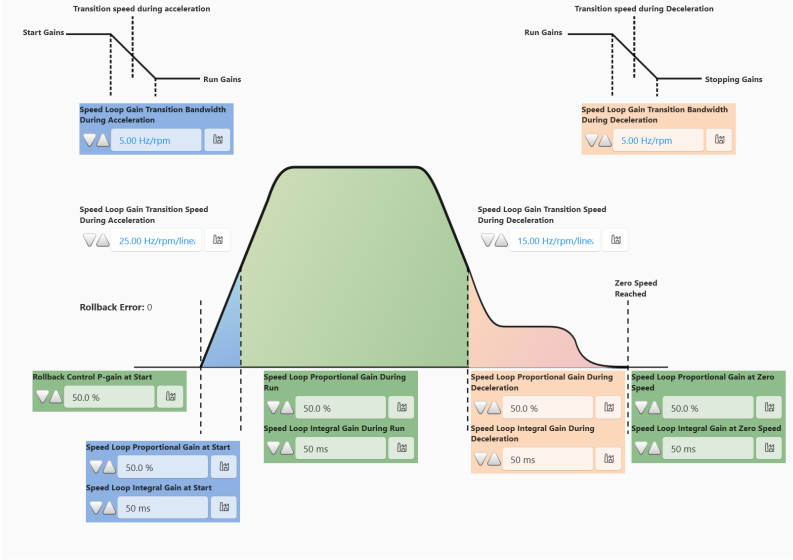
To activate the inactive speed loop gains you need to set a value in the speed transition point parameters > 0. These are used to switch between multiple sets of gains during travel. The table below shows the transition point parameters:
Parameter | Part of Travel Curve | Speed Loop Gains Activated |
|---|---|---|
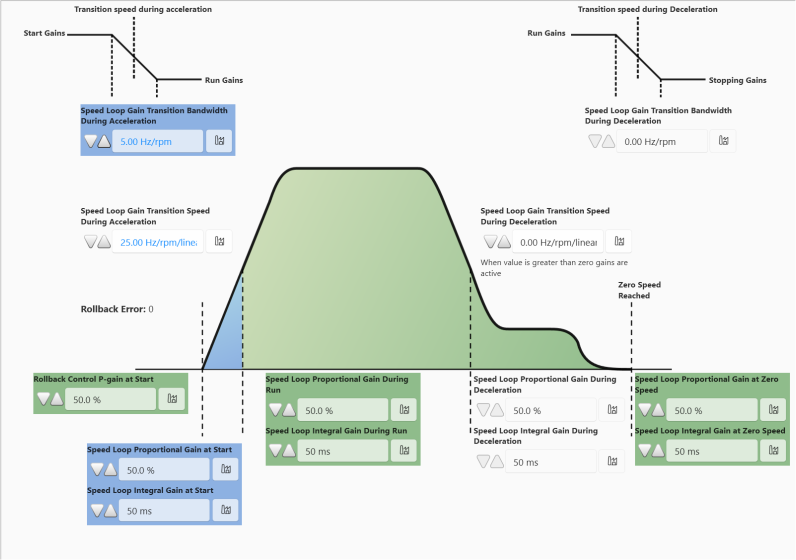
P9-25 - Speed Loop Gain Transition Speed During Acceleration | Acceleration Ramp | P9-23 - Speed Loop Proportional Gain at Start P9-24 - Speed Loop Integral Gain at Start |
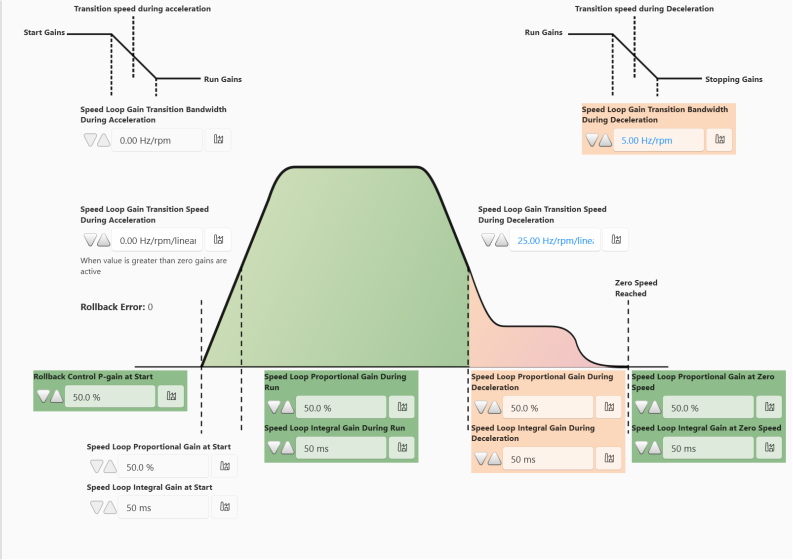
P9-32 - Speed Loop Gain Transition Speed Durign Deceleration | Deceleration Ramp | P9-30 - Speed Loop Proportional Gain during Deceleration P9-31 - Speed Loop Integral Gain during Deceleration |
The transition point should be set if the default set of gains are not sufficient for the whole travel curve.
For example the Run Gains may be suitable to reduce High Speed overshoot but may cause undershoot when transitioning to levelling speed.
In this case you would need to split the gains and set a transition speed higher than your levelling speed. This will allow time for the gains to activate and take effect when reaching the levelling speed. Using this method you can tune the whole travel curve by splitting it into individual sections making it easier to target problems areas.
The images below shows how the transition points can be used to separate the speed loop gains.
Default Gains Active | |
|---|---|
 |
|
Start and Run Gains Active | |
 |
|
Run and Deceleration Gains Active | |
 |
|
All Speed Loop Gains Active | |
 |
|
Each Speed Loop Gain Transition Speed has it's own associated bandwidth parameter. These are used to provide a specific bandwidth for when the gains transition. This allows for the user to set a broader transition seep rather than being precise.
Parameter Number | Parameter Name | Units | Default | Available Settings | Access | Change During Run | Scaling | Size (Bytes) | CAN Register | CAN Sub Index | Modbus Register |
|---|---|---|---|---|---|---|---|---|---|---|---|
P9-25 | Speed Loop Gain Transition Speed During Acceleration | Hz / rpm / Linear | 0.00Hz | 0.0 ... P8-01 | RW | Y | 1 = 0.01Hz | 2 | 239Dh | 0 | 925 |
P9-26 | Speed Loop Gain Transition Bandwidth During Acceleration | Hz / rpm / Linear | 0.00Hz | 0.0 ... P8-01 | RW | Y | 1 = 0.01Hz | 2 | 239Eh | 0 | 926 |
P9-32 | Speed Loop Gain Transition Speed During Deceleration | Hz / rpm / Linear | 0.00Hz | 0.0 ... P8-01 | RW | Y | 1 = 0.01Hz | 2 | 23A4h | 0 | 932 |
P9-33 | Speed Loop Gain Transition Bandwidth During Deceleration | Hz / rpm / Linear | 0.00Hz | 0.0 ... P8-01 | RW | Y | 1 = 0.01Hz | 2 | 23A5h | 0 | 933 |