Travel Counter Feature
Travel Counter
The travel counter can be used to view the total number of travels since the drive was installed.
Each time the drive is run the travel counter increases by 1.
Travel Counter Operation
Timing Diagram for Travel Counter Change |
|---|
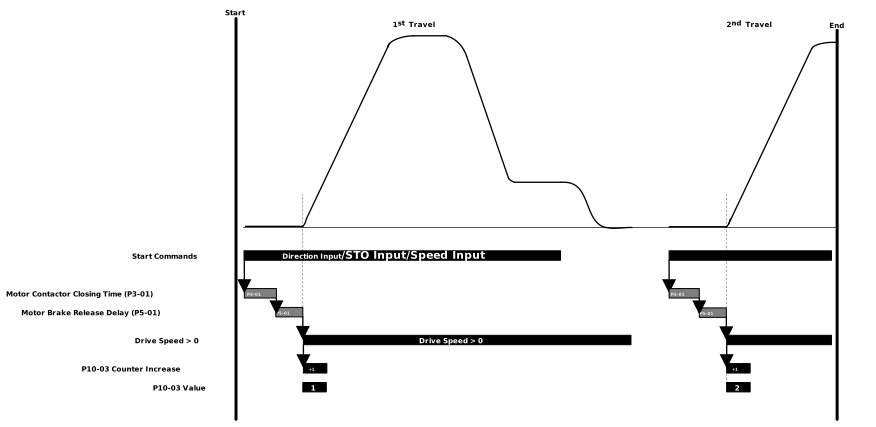 |
Below are the conditions for the Travel Counter to increase: |
|
Parameter Number | Parameter Name | Units | Default | Available Settings | Access | Change During Run | Scaling | Size (Bytes) | CAN Register | CAN Sub Index | Modbus Register |
|---|---|---|---|---|---|---|---|---|---|---|---|
P10-03 | Travel Direction Change Counter (non-resettable) | N/A | 0 | 0 ... 4294967295 | RO | N | N/A | 4 | 23EBh | 0 | 1003 |
P10-07 | Number of travels | N/A | 0 | 0 ... 4294967295 | RO | N | N/A | 4 | 23EFh | 0 | 1007 |
Counts up by 1 every time there is a change in travel direction. This parameter is not reset with a factory/user default.
Displays the total number of travels. The count increases by 1 each time a new run command is given. The condition to increase P10-07 is a direction input received from a Digital Input while the Safe Torque Off inputs are closed.