Early Door Opening Feature
Early Door Opening
The Early Door Opening function is used to provide the elevator controller with a signal (from a Digital or Relay Output) at a set speed to open the elevator doors prior to reaching the floor (saving time at stop to open the doors).
The Early Door Opening speed is set with P10-02 (Early Door Opening Speed Threshold) and is a percentage of parameter P4-06 (Motor Rated Speed).
To enable Early Door Opening set a value > 0 in P10-02 & set the Motor Rated Speed from the Motor Nameplate in P4-06.
Early Door Opening - Output Signal
The signal from the drive to the controller to indicate that the Early Door Opening speed has been reached is done with either a Digital or Relay Output. The table below details the parameters to assign an Output the Early Door Opening function.
Output | Drive Terminal Labels | Parameters | Parameter Setting | |
|---|---|---|---|---|
Digital Output 1 | DA1 | P1-15 | 16: Door Zone | Setting Early Door Opening via OptiTools Pro 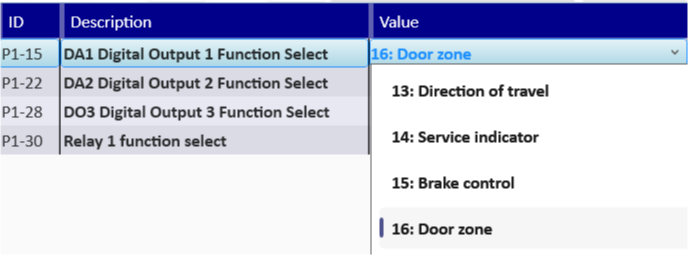 |
Digital Output 2 | DA2 | P1-22 | ||
Digital Output 3 | DO3 | P1-28 | ||
Relay 1 | 1-C 1NO or 1NC | P1-30 |
Note
If you would like to change the Logic of the Digital Outputs so the state changes from 1 to 0 when the early door speed is reached then you will need to invert the logic of the Digital Output assigned to early door opening. For Full details on Logic see topic I/O Logic Select - Outputs.
Early Door Opening - Operation Guide
Early Door Opening Setup
| Early Door Opening Example This image shows how once the drive has reached a speed that is set in P10-02 then the relay changes state to signal to the controller to open the doors and only changes state back to 0 (low) once the travel profile has finished. 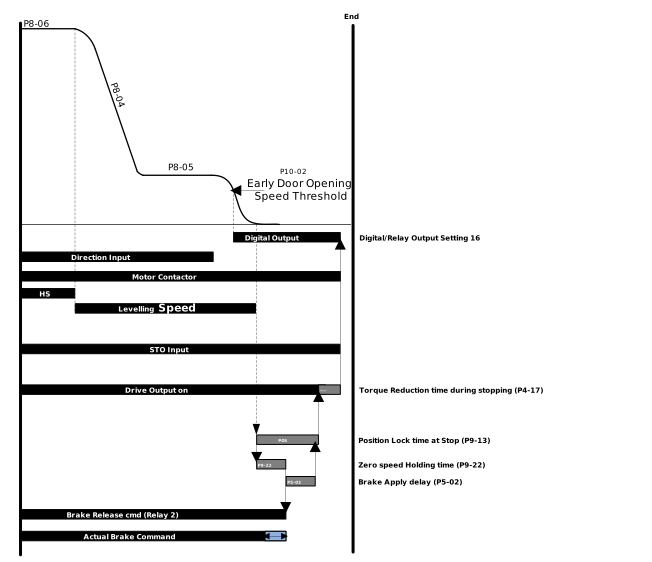 |
NoteThe Early Door Opening only works during the deceleration part of the travel curve (Deceleration Ramp P8-04) when the speed set is passed during acceleration (Acceleration Ramp P8-03) the Digital or Relay Output will not change state. | |
Parameter Number | Parameter Name | Units | Default | Available Settings | Access | Change During Run | Scaling | Size (Bytes) | CAN Register | CAN Sub Index | Modbus Register |
|---|---|---|---|---|---|---|---|---|---|---|---|
P1-15 | DA1 Digital Output 1 Function Select | N/A | 1: Drive Healthy | 0 ... 20 | RW | Y | N/A | 1 | 2073h | 0 | 115 |
P1-22 | DA2 Digital Output 2 Function Select | N/A | 0: Drive Enabled (Running) | 0 ... 20 | RW | Y | N/A | 1 | 207Ah | 0 | 122 |
P1-28 | DO3 Digital Output 3 Function Select | N/A | 12: Motor Shorting Contactor | 0 ... 20 | RW | Y | N/A | 1 | 2080h | 0 | 128 |
P1-30 | Relay 1 Function Select | N/A | 11: Motor Contactor Control | 0 ... 20 | RW | Y | N/A | 1 | 2082h | 0 | 130 |
P4-06 | Motor Rated Speed | rpm | 0rpm | 0 ... 3000rpm | RW | N | 1 = 1rpm | 2 | 2196h | 0 | 406 |
P10-02 | Early Door Opening Speed Threshold | % | 0.0% | 0.0 ... 100.0% | RW | Y | 1 = 0.1% | 2 | 23EAh | 0 | 1002 |
P1-15 - DA1 Digital Output 1 Function Select
This defines the output function when terminal DA1 is configured in digital mode (P1-14 = 0).
Setting | Status/Function Source | Conditions for Status |
|---|---|---|
16 | Door Zone | Logic 1 when motor speed equals (P10-02 Early Door Opening Speed Threshold). |
P1-22 - DA2 Digital Output 2 Function Select
Selects the function of the DA2 output when configured in digital mode.
Setting | Status/Function Source | Conditions for Status |
|---|---|---|
16 | Door Zone | Logic 1 when motor speed equals (P10-02 Early Door Opening Speed Threshold). |
P1-28 - DO3 Digital Output 3 Function Select
The settings of the DO3 terminal are listed below:
Setting | Status/Function Source | Conditions for Status |
|---|---|---|
16 | Door Zone | Logic 1 when motor speed equals (P10-02 Early Door Opening Speed Threshold). |
P1-30 - Relay 1 Function Select
The settings of Relay 1 are listed below.
Setting | Status/Function Source | Conditions for Status |
|---|---|---|
16 | Door Zone | Logic 1 when motor speed equals (P10-02 Early Door Opening Speed Threshold). |
Enter the rated (nameplate) speed of the motor in rpm.
When controlling a Geared Induction Motor: Allows drive calculation of the rated slip of the motor (in V/F Mode only).
All motors: Changes all speed related parameter values to rpm. This parameter is also required for operating in Linear units.
The Early Door opening function is used to provide the elevator controller with a signal (From a Digital Output) at a set speed to open the elevator doors prior to reaching the exact floor level (saving time at stop to open the doors).
Any of the drives Digital Outputs or Relay 1 can be set to give an output when the door zone speed condition has been met (setting 16). A full list of parameters to set the Digital or Relay Outputs can be found in: Group 1 User IO - Parameter List.
The Digital/Relay Output with Setting 16: Door Zone as a function, will only come on during deceleration approaching the floor and will not change state during acceleration even if the trigger speed is passed.
Below is the answers to some commonly asked questions about the Early Door Opening function.
Question | Answer |
|---|---|
Can any Output be used as the Early Opening Signal? | Only Digital Outputs 1 - 3 or Relay Output 1 can be used. |
Why does the Door not open at the correct time? | Make sure that P10-02 is set to the percentage of P4-06 and P4-06 has a value > 0. |