Control Terminals
Standard Control Terminals Connection Diagram
Below is a the standard connection diagram for the drive with the parameters all at default. This can be modified and adjusted depending on the users needs using either the standard macros (P1-02) or Custom Macros (Group 12).
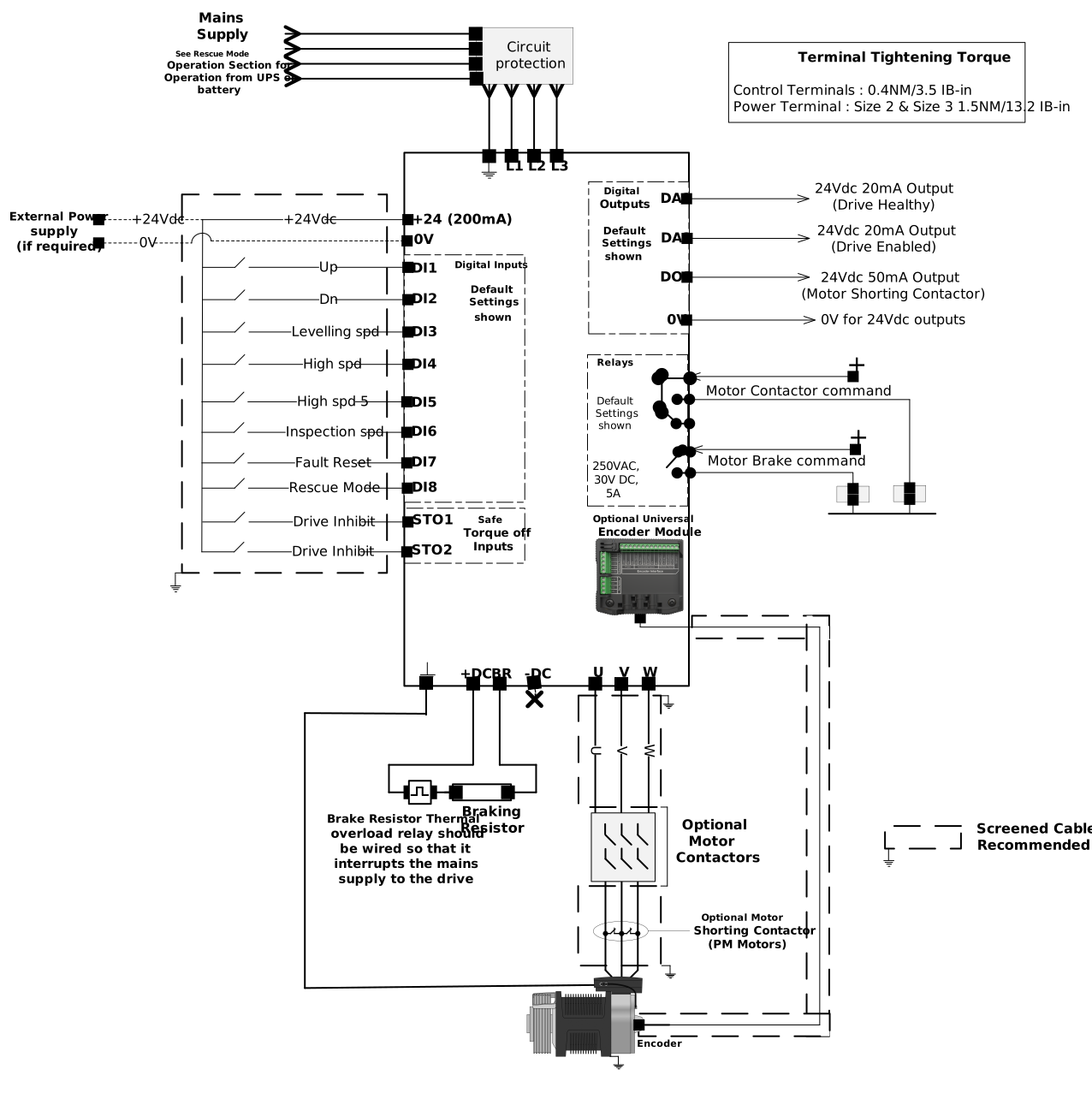
For details on the Control terminals electrical specification refer to the Topic Control Terminals Specification.
For a guide on installing the control terminals refer to the Topic Control Terminals Installation.
Control Terminal Layout & Functions
This Topic provides detail on the drive's control terminals and each terminals electrical specification as well as the associated parameters to program each terminal.
When wiring the drive control terminals refer to the Standard Control Terminals Connection Diagram for reference.
Control Terminals - Relay 1 Motor Contactor
Type of Terminal | Terminal Name | Terminal Label | Function Parameter | Function (Specification) | |
|---|---|---|---|---|---|
 | Programmable Relay (Relay 1) | Relay Output 1 Common | 1-C | P1-30 (Relay 1 Function Select) | Relay contacts, 8A/250VAC 10A/30VDC 20 Programmable Functions |
Relay Output 1 Normally Open | 1NO | ||||
Relay Output 1 Normally Closed | 1NC |
Control Terminals - Relay 2 Motor Brake
Type of Terminal | Terminal Name | Terminal Label | Function Parameter | Function (Specification) | |
|---|---|---|---|---|---|
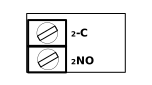 | Motor Brake Relay (Relay 2) | Relay Output 2 Common | 2-C | N/A - Fixed as Motor Brake | Relay contacts, 6A/250VAC 6A/30VDC |
Relay Output 2 Normally Open | 2NO |
Control Terminals - Digital/Analog Inputs & Outputs
Type of Terminal | Terminal Name | Terminal Label | Function Parameter | Function (Specification) | |
|---|---|---|---|---|---|
 | Digital Inputs / Analog Inputs | Digital Input 1 | DI1 | P12-01 | Digital Input: 8 – 30 Vdc Analog Input Voltage Mode: -10 to10V Analog Input Current Mode: 0 to 20mA Logic Selected via P1-43 (Positive/Negative Logic Select) |
Digital Input 2 | DI2 | P12-02 | |||
Digital Input 3 | DI3 | P12-03 | |||
Digital Input 4 / Analog Input 1 | DI4 | P12-04 | |||
Digital Input 5 / Analog Input 2 | DI5 | P12-05 | |||
Digital Input 6 | DI6 | P12-06 | |||
Digital Input 7 | DI7 | P12-07 | |||
Digital Input 8 | DI8 | P12-08 | |||
Optional Digital Inputs | Digital input 9 | Daux1 | P12-09 | Only available on the Universal Encoder Module | |
Digital Input 10 | Daux2 | P12-10 | |||
Digital / Analog Outputs | Digital / Analog Output 1 | DA1 | Digital / Analog Type: P1-14 Digital Function: P1-15 Digital Logic: P1-16 Analog Function: P1-17 Analog Logic: P1-18 | Digital Output: 0 - 24Vdc Analog Output Voltage Mode: 0 to 10V Analog Output Current Mode: 0 to 20mA | |
Digital / Analog Output 2 | DA2 | Digital / Analog Type: P1-21 Digital Function: P1-22 Digital Logic: P1-23 Analog Function: P1-24 Analog Logic: P1-25 | |||
Digital Output 3 | DO3 | Digital Function: P1-28 Digital Logic: P1-29 |
Control Terminals - IO User Supply
Type of Terminal | Terminal Name | Terminal Label | Function Parameter | Function (Specification) |
|---|---|---|---|---|
IO User Supply | +24Vdc Input/Output supply | +24V | N/A | +24Vdc, 200mA current User Input/Output |
0 Volt Common | 0V | |||
0 Volt Common | 0V | |||
+ 10 Volt User Output | +10 | N/A | + 10 Volt User Output |
Control Terminals - Safe Torque Off
Type of Terminal | Terminal Name | Terminal Label | Function Parameter | Function (Specification) | |
|---|---|---|---|---|---|
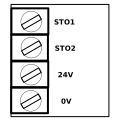 | Safe Torque Off | Safe Torque Off 1 | STO1 | N/A - Logic fixed to PNP Will not change with P1-43 | Nominal Range: 0 - 24Vdc Operating Range: 18 - 30Vdc Maximum Voltage: 30Vdc |
Safe Torque Off 2 | STO2 | ||||
Safe Torque Off 24Vdc Supply | 24V | ||||
Safe Torque Off 0V Common | 0V |
Control Terminals Installation
Electrical Installation - Control Terminals Cable Sizing
Drive Model Code | Maximum Cables Size | Screw Type | Recommended Screw Tightening Torque | ||
|---|---|---|---|---|---|
Units | mm2 | AWG/ Kcmil | Nm | Ibf.in | |
All Models | 3.3 | 12 | M5 Phillips | 0.4 | 3.5 |
The following points should be followed when wiring the Control Terminals for a proper installation:
All analog signal cables should be suitably shielded. Twisted pair cables are recommended.
All Control Terminals are Screw type and require a terminal screwdriver to install and remove.
Power and Control Signal cables should be routed separately where possible, and must not be routed parallel to each other.
Signal levels of different voltages e.g. 24 Volt DC and 110 Volt AC, should not be routed together and should be separated.
The Control Terminals are designed to accept the following termination methods:
Bare conductor
Ferrule

Use the Table in this Section for full details of cable size and tightening torques
The Elevator Core offers dual logic control terminals. The Drive can be used in PNP or NPN logic.
By default the drive is configured to use PNP logic.
To change the logic of the Drive follow the steps below:
Disable the drive (Open the STO1 & STO2 terminals)
Caution
If you do not disable the drive by opening the STO ports before changing the logic there is a risk of the drive starting as soon as you change the logic.
Adjust your wiring to reflect the change in logic
Set P1-43 to either 0 or 1 (0 = PNP) (1 = NPN)
For more information on changing the logic of the drives Control Terminals see the Topic: I/O Logic Select - Topic List.