Group 1 Parameter Descriptions
Group 1.1 - User IO - Primary Command Source Selection
Parameter Number | Parameter Name | Units | Default | Available Settings | Access | Change During Run | Scaling | Size (Bytes) | CAN Register | CAN Sub Index | Modbus Register |
|---|---|---|---|---|---|---|---|---|---|---|---|
P1-01 | Primary Command Source | N/A | 0: Terminal | 0: Terminal 1: Modbus RTU 2: CANopen 3: Reserved | RW | N | N/A | 1 | 2065h | 0 | 101 |
Select the command source for the drive.
Setting | Drive Display | Function |
|---|---|---|
0 : Terminal | tEr | The drive responds directly to control signals applied to the drive control terminals. Terminal designations assigned with parameter P1-02. |
1 : Modbus RTU | rtu | The drive only responds to Modbus RTU commands sent to the RJ45 port on the drive. |
2 : CANopen | CAn | The drive only responds to CAN bus commands sent to the RJ45 port on the drive. |
3: Reserved | - | Reserved |
Note
When using either Modbus RTU or CANopen no Digital Input needs to be closed (High) for the drive to run.
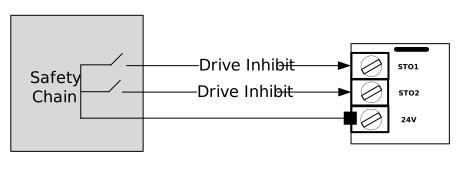
However the drive will not start unless the Safe Torque Off terminals STO1 and STO2 are closed.
Group 1.2 - User IO - Control Terminal Function Select
Parameter Number | Parameter Name | Units | Default | Available Settings | Access | Change During Run | Scaling | Size (Bytes) | CAN Register | CAN Sub Index | Modbus Register |
|---|---|---|---|---|---|---|---|---|---|---|---|
P1-02 | Control Terminal Function Select | N/A | 1: Macro 1 | 0: Macro 0 1: Macro 1 2: Macro 2 3: Macro 3 4: Macro 4 5: Macro 5 6: Macro 6 7: Macro 7 8: Macro 8 9: Macro 9 10: Macro 10 11: Macro 11 12: Macro 12 | RW | N | N/A | 1 | 2066h | 0 | 102 |
This parameter provides a terminal macro system to pre-define how each control terminal operates. Select the one most appropriate to the elevator control and feedback signals that your system has.
If set to 0 the terminal designations are freed off in parameter Group 12 (made read/write) to allow the user to define their own terminal functions using Parameters P12-01 to P12-10.
For details on each Macro see the Macro Table below.
When the Primary Command Source (P1-01) is set to 0, the setting of Parameter P1-02 defines the function of each of the drives control terminals.
Use the Macro table below to select an appropriate value of P1-02 to match the elevator controller output signals.
The status of the control terminals can be monitored using parameter P0-01 and P0-02.
P0-01 Display value | 0 | 0 | 0 | 0 | 0 |
|---|---|---|---|---|---|
Function | Digital Input 1 status | Digital Input 2 status | Digital Input 3 status | Digital Input 4 status | Digital Input 5 status |
P0-02 Display value | 0 | 0 | 0 | 0 | 0 |
|---|---|---|---|---|---|
Function | Digital Input 6 status | Digital Input 7 status | Digital Input 8 status | Daux 1 Input status | Daux 2 Input status |
The Macro tables are used by P1-02 to select the function of each IO Input. P1-02 parameter can be found here.
P1-02 Setting | DI1 | DI2 | DI3 | DI4 | DI5 | DI6 | Speed Source | DI7 | DI8 |
|---|---|---|---|---|---|---|---|---|---|
0 | User Configurable using Group 12 | ||||||||
1 | Open = Disabled Closed = Run Forward | Open = Disabled Closed = Run Reverse | Open = Disabled Closed = Levelling Speed (P8-05) | Open = Disabled Closed = High Speed (P8-06) | Open = Disabled Closed = High Speed 5/Relevelling Speed (P8-12) | Open = Disabled Closed = Inspection Speed (P8-08) | If more than 1 speed selection input is high the largest speed value will be used. | Fault Reset | Open = Mains Mode Closed = Rescue Mode Activate |
2 | Open = Disabled Closed = Run Forward | Open = Disabled Closed = Run Reverse | Open = Disabled Closed = Levelling Speed (P8-05) | Open = Disabled Closed = High Speed (P8-06) | Open Available Functions =
Closed = Ok | Open = Disabled Closed = Inspection Speed (P8-08) | Open = Mains Mode Closed = Rescue Mode Activate | Fault Reset | |
For settings 1 and 2 above, the drive will only start if all the below conditions are met:
| |||||||||
3 | Open = Disabled Closed = Run Forward | Open = Disabled Closed = Run Reverse | 1 | 0 | 0 | Open Available Functions =
Closed = Ok | P8-06 High Speed | Fault Reset | Open = Mains Mode Closed = Rescue Mode Activate |
0 or 1 | 0 | 1 | P8-07 Intermediate Speed | ||||||
0 or 1 | 1 | 0 or 1 | P8-08 Inspection Speed | ||||||
0 | 0 | 0 | P8-05 Levelling Speed | ||||||
4 | Open = Disabled Closed = Run Forward | Open = Disabled Closed = Run Reverse | 1 | 0 | Open Available Functions =
Closed = Ok | 0 | P8-06 High Speed | Fault Reset | Open = Mains Mode Closed = Rescue Mode Activate |
0 or 1 | 0 | 1 | P8-07 Intermediate Speed | ||||||
0 or 1 | 1 | 0 or 1 | P8-08 Inspection Speed | ||||||
0 | 0 | 0 | P8-05 Levelling Speed | ||||||
5 | Open = Disabled Closed = Run Forward | Open = Disabled Closed = Run Reverse | 0 | 0 | 0 | No Function | P8-05 Levelling Speed | Fault Reset | Open = Mains Mode Closed = Rescue Mode Activate |
1 | 0 | 0 | P8-06 High Speed | ||||||
0 | 1 | 0 | P8-07 Intermediate Speed | ||||||
1 | 1 | 0 | P8-08 Inspection Speed | ||||||
0 | 0 | 1 | P8-09 Speed 2 | ||||||
1 | 0 | 1 | P8-10 Speed 3 | ||||||
0 | 1 | 1 | P8-11 Speed 4 | ||||||
1 | 1 | 1 | P8-12 High Speed 5/Relevelling Speed | ||||||
6 | Open = Disabled Closed = Run Forward | Open = Disabled Closed = Run Reverse | No Function | Speed Reference from Analogue input | Open Available Functions =
Closed = Ok | Open Available Functions =
Closed = Ok | Analog input Reference level | Fault Reset | Open = Mains Mode Closed = Rescue Mode Activate |
7 | Open = Disabled Closed = Run Forward | Open = Disabled Closed = Run Reverse | Open = Disabled Closed = Levelling Speed (P8-05) | Torque Sensor Input | Open = Disabled Closed = High Speed (P8-06) | Open = Disabled Closed = Inspection Speed (P8-08) | If more than 1 speed selection input is high the highest speed will be used. | Fault Reset | Open = Mains Mode Closed = Rescue Mode Activate |
For settings 3,4,5,6,7 above, the drive will only start if all the below conditions are met and in the correct sequence
| |||||||||
8 | Open = Disabled Closed = Run Forward | Open = Disabled Closed = Run Reverse | 0 | 0 | Brake Release Monitor Input 1 (Only Active if P5-04 Brake Release Monitoring Enable is set to a value of 2) | Brake Release Monitor Input 2 (Only Active if P5-04 Brake Release Monitoring Enable is set to a value of 2) | P8-05 Levelling Speed | Fault Reset | Open = Mains Mode Closed = Rescue Mode Activate |
1 | 0 | P8-06 High Speed | |||||||
0 | 1 | P8-07 Intermediate Speed | |||||||
1 | 1 | P8-08 Inspection Speed | |||||||
For setting 8 above, the drive will only start if all the below conditions are met and in the correct sequence.
| |||||||||
*9 | Open = Disabled Closed = Run Forward | Open = Disabled Closed = Run Reverse | Open = Mains Mode Closed = Rescue Mode Activate | 0 | 0 | 0 | P8-05 Levelling Speed | Brake Release Monitor Input 1 (Only Active if P5-04 Brake Release Monitoring Enable is set to a value of 2) | Open = Disabled Closed = Drive Enabled |
1 | 0 | 0 | P8-06 High Speed | ||||||
0 | 1 | 0 | P8-07 Intermediate Speed | ||||||
1 | 1 | 0 | P8-08 Inspection Speed | ||||||
0 | 0 | 1 | P8-09 Speed 2 | ||||||
1 | 0 | 1 | P8-10 Speed 3 | ||||||
0 | 1 | 1 | P8-11 Speed 4 | ||||||
1 | 1 | 1 | P8-12 High Speed 5/Relevelling Speed | ||||||
*Setting 9 above has a different operation (in terms of Motor contactor control) to all other operating modes. When a direction command is given the motor contactor relay will close and normal contactor sequence will begin, however the drive will not start until STO inputs are closed and then Digital Input 8 (Drive Enable signal) has been given. | |||||||||
10 | Open = Disabled Open = Disabled | Open = Disabled Closed = Run Reverse | 0 | 0 | Open Available Functions =
Closed = Ok | Open Available Functions =
Closed = Ok | P8-05 Levelling Speed | Open Available Functions =
Closed = Ok | Open = Mains Mode Closed = Rescue Mode Activate |
1 | 0 | P8-06 High Speed | |||||||
0 | 1 | P8-07 Intermediate Speed | |||||||
1 | 1 | P8-08 Inspection Speed | |||||||
*11 | Open = Disabled Open = Run Forward | Open = Disabled Closed = Run Reverse | Open = Mains Mode Closed = Rescue Mode Activate | 0 | 0 | 0 | P8-05 Levelling Speed | Brake Release Monitor Input 1 (Only Active if P5-04 Brake Release Monitoring Enable is set to a value of 2) | No Function |
1 | 0 | 0 | P8-06 High Speed | ||||||
0 | 1 | 0 | P8-07 Intermediate Speed | ||||||
1 | 1 | 0 | P8-08 Inspection Speed | ||||||
0 | 0 | 1 | P8-09 Speed 2 | ||||||
1 | 0 | 1 | P8-10 Speed 3 | ||||||
0 | 1 | 1 | P8-11 Speed 4 | ||||||
1 | 1 | 1 | P8-12 High Speed 5/Relevelling Speed | ||||||
*Setting 11 above has a different operation (in terms of Motor contactor control) to all other operating modes: When a direction command is given the motor contactor relay will close and normal contactor sequence will begin, however the drive will not start until STO inputs are closed. | |||||||||
12 | Open = Disabled Closed = Run Forward | Open = Disabled Closed = Run Reverse | 1 | 0 | Open = Coast to Stop Closed = No Action | No Function | P8-06 High Speed | Fault Reset | Open = Mains Mode Closed = Rescue Mode |
0 or 1 | 1 | P8-08 = Inspection Speed | |||||||
0 | 0 | P8-05 = Levelling Speed | |||||||
Motor Contactor Sequence
The table below defines for each macro setting what signals are required at the drive terminals to close the motor contactor and in what sequence as shown in (x)
Macro Number (P1-02) | Safe Torque Off signals | Direction Signal | Speed Source Signal | Motor Contactor state (As driven by Relay 1) |
|---|---|---|---|---|
1,2,3,4,5,6,7,8,10,12 | On (1st) | On (2nd) | On (3rd) | Closed |
9,11 | On/Off | On | On/Off | Closed (Driven By Direction Signal only) |
Group 1.3 - User IO - Analog Input 1 (DI4) configuration
Parameter Number | Parameter Name | Units | Default | Available Settings | Access | Change During Run | Scaling | Size (Bytes) | CAN Register | CAN Sub Index | Modbus Register |
|---|---|---|---|---|---|---|---|---|---|---|---|
P1-03 | DI4 Analog Input 1 Format | N/A | 0: U 0-10 | 0 ... 9 | RW | N | N/A | 1 | 2067h | 0 | 103 |
P1-04 | DI4 Analog Input 1 Offset | % | 0.0% | -500.0 ... 500.0% | RW | Y | 1 = 0.1% | 2 | 2068h | 0 | 104 |
P1-05 | DI4 Analog Input 1 Scaling | % | 100.0% | -500.0 ... 500.0% | RW | Y | 1 = 0.1% | 2 | 2069h | 0 | 105 |
P1-06 | DI4 Analog Input 1 Filter | sec | 0.00s | 0.00 ... 2.00s | RW | Y | 1 = 0.01s | 1 | 206Ah | 0 | 106 |
P1-07 | DI4 Analog Input Signal Loss Reaction | N/A | 0: No Reaction | 0 ... 2 | RW | Y | N/A | 1 | 206Bh | 0 | 107 |
P1-08 | DI4/DI5 Analog Input Signal Loss Speed | % | 80.00% | 0.00 ... 100.00% | RW | Y | 1 = 0.01% | 1 | 206Ch | 0 | 108 |
Select the configuration for Analog Input 1. Digital Input 4 only operates as an Analog Input when P1-02 is set to 6 or 7 or configured via Group 12 when using Macro 0.
Setting | Drive Display | Input Format |
|---|---|---|
U 0-10 | U 0-10 | 0 to 10 Volt Signal (Uni-polar |
U 10-0 | U 10-0 | 10 to 0 Volt Signal (Uni-polar) |
-10 - 10 | - 10- 10 | -10 to +10 Volt Signal (Bi-polar) |
A 0-20 | A 0-20 | 0 to 20mA Signal |
A 20-4 | A 20-0 | 20 to 0mA Signal |
t 4-20 | A 4-20 | 4 to 20mA Signal (4-20F trip if signal falls below 3mA) |
t 20-4 | A 20-4 | 20 to 4mA Signal (20-4F trip if signal falls below 3mA) |
PrE-t | PrE-t | Pre-Torque Input (Bipolar -10V to +10V) |
Ptc-th | Ptc-th | Motor PTC thermistor input |
tY-th | ty-th | Motor KTY84 thermistor input |
When Terminal DI4 is operating as an Analog Input this parameter allows an offset to be set, the value is set as a percentage of the full-scale range of the input, which is applied to the Analog Input signal.
When Terminal DI4 is operating as an Analog Input this parameter scales the Analog Input by this factor, e.g. if P1-03 is set for U 0–10, and the scaling factor is set to 200.0%, a 5 Volt input at the control terminal DI4 will result in the drive running at maximum speed (P8-01).
The pre and post scaling values can be viewed in parameters P0-56 and P0-57.
This filter helps in situations where the Analog Input is used for the speed reference or from a Torque sensor and the source signal is noisy which would result in oscillation in speed.
The filters primary aim is to make the signal smoother to the internal speed reference but will result in less responsiveness.
Set the reaction when the Analog Input signal is lost, when terminal DI4 is used as Analog Input speed reference. Speed reference loss is defined as the point when the speed reference falls below a % (as per set in P1-07) of the previous reference for a period of 500ms.
Setting | Reaction |
|---|---|
0 | No Reaction |
1 | Run at speed in P1-08 (Analog Input Signal Loss speed) and return to the original speed reference when the signal is reinstated. |
2 | Ramp to Stop using P8-04 (Deceleration ramp time) and trip Ai-LoS |
Used in conjunction with P1-07 (DI4/DI5 Analog Input Signal Loss Reaction) and P1-13 (Analog Input 2) Signal Loss Reaction setting 1 and is set as a % of the speed reference prior to the speed reference loss.
Group 1.4 User IO - Analog Input 2 (DI5) configuration
Parameter Number | Parameter Name | Units | Default | Available Settings | Access | Change During Run | Scaling | Size (Bytes) | CAN Register | CAN Sub Index | Modbus Register |
|---|---|---|---|---|---|---|---|---|---|---|---|
P1-09 | DI5 Analog Input 2 Format | N/A | 0: U 0-10 | 0 ... 9 | RW | Y | N/A | 1 | 206Dh | 0 | 109 |
P1-10 | DI5 Analog Input 2 Offset | % | 0.0% | -500.0 ... 500.0% | RW | Y | 1 = 0.1% | 2 | 206Eh | 0 | 110 |
P1-11 | DI5 Analog Input 2 Scaling | % | 100.0% | -500.0 ... 500.0% | RW | Y | 1 = 0.1% | 2 | 206Fh | 0 | 111 |
P1-12 | DI5 Analog Input 2 Filter | sec | 0.00s | 0.00 ... 2.00s | RW | Y | 1 = 0.01s | 1 | 2070h | 0 | 112 |
P1-13 | DI5 Analog Input 2 Signal Loss Reaction | N/A | 0: No Reaction | 0 ... 2 | RW | Y | N/A | 1 | 2071h | 0 | 113 |
Below are the analog configurations available for Analog Input 2.
Setting | Drive Display | Input Format |
|---|---|---|
U 0-10 | U 0-10 | 0 to 10 Volt Signal (Uni-polar |
U 10-0 | U 10-0 | 10 to 0 Volt Signal (Uni-polar) |
-10 - 10 | - 10- 10 | -10 to +10 Volt Signal (Bi-polar) |
A 0-20 | A 0-20 | 0 to 20mA Signal |
A 20-4 | A 20-0 | 20 to 0mA Signal |
t 4-20 | A 4-20 | 4 to 20mA Signal (4-20F trip if signal falls below 3mA) |
t 20-4 | A 20-4 | 20 to 4mA Signal (20-4F trip if signal falls below 3mA) |
PrE-t | PrE-t | Pre-Torque Input (Bipolar -10V to +10V) |
Ptc-th | Ptc-th | Motor PTC thermistor input |
tY-th | ty-th | Motor KTY84 thermistor input |
When Terminal DI5 is operating as an Analog Input this parameter allows an offset to be set, the value is set as a percentage of the full-scale range of the input, which is applied to the Analog Input signal.
When Terminal DI5 is operating as an Analog Input scales the Analog Input by this factor, e.g. if P1-09 is set for U 0–10, and the scaling factor is set to 200.0%, a 5 Volt input at the control terminal DI5 will result in the drive running at Maximum Speed (P8-01).
The pre and post scaling values can be viewed in parameters P0-58 and P0-59.
This filter helps in situations where the Analog Input is used for the speed reference or from a Torque sensor and the source signal is noisy which would result in oscillation in speed.
The filters primary aim is to make the signal smoother to the internal speed reference but will result in less responsiveness.
Set the reaction when the Analog Input signal is lost, when terminal DI5 is used as Analog Input speed reference. Speed reference loss is defined as the point when the speed reference falls below a % (as per set in P1-07) of the previous reference for a period of 500ms.
Setting | Reaction |
|---|---|
0 | No Reaction |
1 | Run at speed in P1-08 (Analog Input Signal Loss speed) flashing Ai-LoS and return to speed reference when signal is reinstated. |
2 | Ramp to Stop using P8-04 (Deceleration ramp time) and trip Ai-LoS or F-Ptc or F-tY depending on P1-09 setting. |
Group 1.5 - User IO - DA1 Output 1 Configuration
Parameter Number | Parameter Name | Units | Default | Available Settings | Access | Change During Run | Scaling | Size (Bytes) | CAN Register | CAN Sub Index | Modbus Register |
|---|---|---|---|---|---|---|---|---|---|---|---|
P1-14 | DA1 Output 1 Type | N/A | 0: Digital Output | 0 ... 1 | RW | Y | N/A | 1 | 2072h | 0 | 114 |
P1-15 | DA1 Digital Output 1 Function Select | N/A | 1: Drive Healthy | 0 ... 20 | RW | Y | N/A | 1 | 2073h | 0 | 115 |
P1-16 | DA1 Digital Output 1 Invert | N/A | 0: Standard | 0: Standard 1: Inverted | RW | Y | N/A | 1 | 2074h | 0 | 116 |
P1-17 | DA1 Analog Output 1 Source Select | N/A | 0 : Output Frequency | 0 ... 5 | RW | Y | N/A | 1 | 2075h | 0 | 117 |
P1-18 | DA1 Analog Output 1 Format | N/A | 0: U 0-10 | 0 ... 5 | RW | Y | N/A | 1 | 2076h | 0 | 118 |
P1-19 | DA1 Analog Output 1 Scaling | % | 100.0% | 0.0 ... 500.0 % | RW | Y | 1 = 0.1% | 1 | 2077h | 0 | 119 |
P1-20 | DA1 Analog Output 1 Offset | % | 0.0% | -500.0 ... 500.0 % | RW | Y | 1 = 0.1% | 2 | 2078h | 0 | 120 |
Sets if the output terminal DA1 is to operate as a Digital Output (24Vdc) or as an Analog Output. In analog mode, the type of Analog Output (voltage/current) is defined by P1-18 Analog Output 1 Format and the data source is given by P1-17. In digital mode, the output is controlled by P1-15.
Setting | DA1 Output Type |
|---|---|
0 | Digital Output |
1 | Analog Output |
This defines the output function when terminal DA1 is configured in digital mode (P1-14 = 0).
Setting | Status/Function Source | Conditions for Status |
|---|---|---|
0 | Drive Enabled (Running) | Logic 1 when Drive is enabled and output stage is on |
1 | Drive Healthy | Logic 1 when no Fault condition exists on the drive. (“InHibit” is not included as a fault) |
2 | Motor Below Minimum Speed | Logic 1 when motor speed is </=minimum output frequency (P8-02) or </= DC injection at stop speed (P9-15) |
3 | Motor at Target Speed | Logic 1 when the output frequency matches the setpoint speed |
4 | Motor Speed > 0 | Logic 1 when the motor runs above zero speed |
5 | Motor Speed ≥ Limit | Logic 1 when the motor speed exceeds the adjustable limit as set in P1-31 and P1-32 |
6 | Motor Current ≥ Limit | Logic 1 when the motor speed exceeds the adjustable limit as set in P1-31 and P1-32 |
7 | Motor Torque ≥ Limit | Logic 1 when the motor speed exceeds the adjustable limit as set in P1-31 and P1-32 |
8 | STO Status | Logic 1 when both STO inputs are present, and the drive is able to be operated |
9 | Rescue Mode Active | Logic 1 when the drive is operating in Rescue Mode |
10 | 2nd Anip > limit | Logic 1 when the signal applied to terminal DI5 (Analog Input 2) exceeds the adjustable limits set in speed P1-31 and P1-32 |
NoteWhen using settings 5, 6, 7, 10, parameters P1-31 and P1-32 must be used together to control the behaviour. The output will switch to Logic 1 when the selected signal exceeds the value programmed in P1-31 and return to Logic 0 when the signal falls below the value in P1-32. | ||
11 | Motor Contactor control | Used to control the operation of a motor contactor. Logic 1 when motor contactor is closed by the drive. |
12 | Motor Shorting Contactor Control | Used to control the operation of a motor shorting contactor. |
13 | Direction of Travel | Logic 1 when direction down, Logic 0 when stopped or direction up. (Fwd command given and speed is positive): Up direction means a forward command has been given and motor turns clockwise (Looking at the shaft) and motor speed is positive. |
14 | Service Indicator | Logic 1 when service time interval set in P11-17 has been met. |
15 | Brake Control | Logic 1 when Relay is closed (Motor Brake Released) |
16 | Door Zone | Logic 1 when motor speed equals (P10-02 Early Door Opening Speed Threshold). |
17 | Light Load direction | Logic 0 = Easiest direction is up. Logic 1 = Easiest direction is downwards. |
18 | Travel limit counter reached | Logic 1 when Travel Direction Change Counter limit P10-05 has been reached. |
19 | Set speed and actual speed > P1-42 | Logic 1 when the % difference (as set in Speed following error P1-42) is exceeded between set speed and the actual speed (estimated speed in open loop/encoder speed in closed loop-with encoder) |
20 | Alarm | Logic 1 when an alarm is active, e.g P3-07 has been set to 2. |
Inverts the logic of DA1 output when operating in digital output mode (P1-14 = 0).
Setting | Function |
|---|---|
0 | Standard |
1 | Inverted |
This defines the output source when DA1 is configured in analog mode.
Setting | Status Source | Signal Source |
|---|---|---|
0 | Output Frequency (Motor Speed) -Estimated | 0 to P8-01 (Maximum Frequency) |
1 | Output (Motor) current | 0 to 200% of P4-03 |
2 | Motor Torque | 0 to 200% of motor rated torque |
3 | Electrical Output power | 0 to 200% of drive rated power |
4 | Output Speed From Encoder | 0 to 200% of P8-01 (Maximum Frequency) |
5 | DC Bus voltage | 0 to 1000Vdc |
Sets the format for DA1 when in Analog Mode selected by P1-14.
Setting | Output Format |
|---|---|
U 0-10 | 0 to 10V |
U 10-0 | 10 to 0V |
A 0-20 | 0 to 20mA |
A 20-0 | 20 to 0mA |
A 4-20 | 4 to 20mA |
A 20-4 | 20 to 4mA |
Defines the scaling percentage of DA1.
Defines the scaling factor as a %, where output value = (Input value-Offset P1-20) *Scaling factor P1-19
Group 1.6 - User IO - DA2 Output 2 configuration
Parameter Number | Parameter Name | Units | Default | Available Settings | Access | Change During Run | Scaling | Size (Bytes) | CAN Register | CAN Sub Index | Modbus Register |
|---|---|---|---|---|---|---|---|---|---|---|---|
P1-21 | DA2 Output 2 Type | N/A | 0: Digital Output | 0 ... 1 | RW | Y | N/A | 1 | 2079h | 0 | 121 |
P1-22 | DA2 Digital Output 2 Function Select | N/A | 0: Drive Enabled (Running) | 0 ... 20 | RW | Y | N/A | 1 | 207Ah | 0 | 122 |
P1-23 | DA2 Digital Output 2 Invert | N/A | 0: Standard | 0: Standard 1: Inverted | RW | Y | N/A | 1 | 207Bh | 0 | 123 |
P1-24 | DA2 Analog Output 2 Source Select | N/A | 0: Output Frequency | 0 ... 5 | RW | Y | N/A | 1 | 207Ch | 0 | 124 |
P1-25 | DA2 Analog Output 2 Format | N/A | 0: U 0-10 | 0 ... 5 | RW | Y | N/A | 1 | 207Dh | 0 | 125 |
P1-26 | DA2 Analog Output 2 Scaling | % | 100.0% | 0.0 ... 500.0 % | RW | Y | 1 = 0.1% | 2 | 207Eh | 0 | 126 |
P1-27 | DA2 Analog Output 2 Offset | % | 0.0% | -500.0 ... 500.0 % | RW | Y | 1 = 0.1% | 2 | 207Fh | 0 | 127 |
Sets if the output from terminal DA2 is to operate as a Digital Output (24V dc) or as an Analog Output, the Analog type is defined in P1-25 DA2 Analog Output 2 Format.
Setting | Output Type |
|---|---|
0 | Digital Output |
1 | Analog Output |
Selects the function of the DA2 output when configured in digital mode.
Setting | Status/Function Source | Conditions for Status |
|---|---|---|
0 | Drive Enabled (Running) | Logic 1 when Drive is enabled and output stage is on |
1 | Drive Healthy | Logic 1 when no Fault condition exists on the drive. (“InHibit” is not included as a fault) |
2 | Motor Below Minimum Speed | Logic 1 when motor speed is </=minimum output frequency (P8-02) or </= DC injection at stop speed (P9-15) |
3 | Motor at Target Speed | Logic 1 when the output frequency matches the setpoint speed |
4 | Motor Speed > 0 | Logic 1 when the motor runs above zero speed |
5 | Motor Speed ≥ Limit | Logic 1 when the motor speed exceeds the adjustable limit as per set in P1-33 and P1-34 |
6 | Motor Current ≥ Limit | Logic 1 when the motor speed exceeds the adjustable limit as per set in P1-33 and P1-34 |
7 | Motor Torque ≥ Limit | Logic 1 when the motor speed exceeds the adjustable limit as per set in P1-33 and P1-34 |
8 | STO Status | Logic 1 when both STO inputs are present, and the drive is able to be operated |
9 | Rescue Mode Active | Logic 1 when the drive is operating in Rescue Mode |
10 | 2nd Anip > limit | Logic 1 when the signal applied to terminal DI5 (Analog Input 2) exceeds the adjustable limits set in speed P1-33 and P1-34 |
NoteWhen using settings 5, 6, 7, 10, parameters P1-33 and P1-34 must be used together to control the behaviour. The output will switch to Logic 1 when the selected signal exceeds the value programmed in P1-33 and return to Logic 0 when the signal falls below the value in P1-34. | ||
11 | Motor Contactor control | Used to control the operation of a motor contactor. Logic 1 when motor contactor is closed by the drive. |
12 | Motor Shorting Contactor Control | Used to control the operation of a motor shorting contactor. |
13 | Direction of Travel | Logic 1 when direction down, Logic 0 when stopped or direction up. (Fwd command given and speed is positive): Up direction means a forward command has been given and motor turns clockwise (Looking at the shaft) and motor speed is positive. |
14 | Service Indicator | Logic 1 when service time interval set in P11-17 has been met. |
15 | Brake Control | Logic 1 when Relay is closed (Motor Brake Released) |
16 | Door Zone | Logic 1 when motor speed equals (P10-02 Early Door Opening Speed Threshold). |
17 | Light Load direction | Logic 0 = Easiest direction is up. Logic 1 = Easiest direction is downwards. |
18 | Travel limit counter reached | Logic 1 when Travel Direction Change Counter limit P10-05 has been reached. |
19 | Set speed and actual speed > P1-42 | Logic 1 when the % difference (as set in Speed following error P1-42) is exceeded between set speed and the actual speed (estimated speed in open loop/encoder speed in closed loop-with encoder) |
20 | Alarm | Logic 1 when an alarm is active, e.g P3-07 has been set to 2. |
Inverts the logic of DA2 output when operating in digital output mode.
Setting | Function |
|---|---|
0 | Standard |
1 | Inverted |
This defines the output source when DA2 is configured in analog mode.
Setting | Status Source | Signal Source |
|---|---|---|
0 | Output Frequency (Motor Speed) -Estimated | 0 to P8-01 (Maximum Frequency) |
1 | Output (Motor) current | 0 to 200% of P4-03 |
2 | Motor Torque | 0 to 200% of motor rated torque |
3 | Electrical Output power | 0 to 200% of drive rated power |
4 | Output Speed From Encoder | 0 to 200% of P8-01 (Maximum speed rpm) |
5 | DC Bus voltage | 0 to 1000Vdc |
Defines the format of Analog Output 2
Setting | Output Format |
|---|---|
U 0-10 | 0 to 10V |
U 10-0 | 10 to 0V |
A 0-20 | 0 to 20mA |
A 20-0 | 20 to 0mA |
A 4-20 | 4 to 20mA |
A 20-4 | 20 to 4mA |
Inverts the logic of DA2 output when operating in digital output mode.
Defines the scaling factor as a %, where output value = (Input value-Offset P1-27)*Scaling factor P1-26.
Group 1.7 - User IO - Digital Output 3 Configuration
Parameter Number | Parameter Name | Units | Default | Available Settings | Access | Change During Run | Scaling | Size (Bytes) | CAN Register | CAN Sub Index | Modbus Register |
|---|---|---|---|---|---|---|---|---|---|---|---|
P1-28 | DO3 Digital Output 3 Function Select | N/A | 12: Motor Shorting Contactor | 0 ... 20 | RW | Y | N/A | 1 | 2080h | 0 | 128 |
P1-29 | DO3 Digital Output 3 Invert | N/A | 0: Standard | 0: Standard 1: Inverted | RW | Y | N/A | 1 | 2081h | 0 | 129 |
The settings of the DO3 terminal are listed below:
Setting | Status/Function Source | Conditions for Status |
|---|---|---|
0 | Drive Enabled (Running) | Logic 1 when Drive is enabled and output stage is on |
1 | Drive Healthy | Logic 1 when no Fault condition exists on the drive. (“InHibit” is not included as a fault) |
2 | Motor Below Minimum Speed | Logic 1 when motor speed is </=minimum output frequency (P8-02) or </= DC injection at stop speed (P9-15) |
3 | Motor at Target Speed | Logic 1 when the output frequency matches the setpoint speed |
4 | Motor Speed > 0 | Logic 1 when the motor runs above zero speed |
5 | Motor Speed ≥ Limit | Logic 1 when the motor speed exceeds the adjustable limit as per set in P1-38 and P1-39 |
6 | Motor Current ≥ Limit | Logic 1 when the motor speed exceeds the adjustable limit as per set in P1-38 and P1-39 |
7 | Motor Torque ≥ Limit | Logic 1 when the motor speed exceeds the adjustable limit as per set in P1-38 and P1-39 |
8 | STO Status | Logic 1 when both STO inputs are present, and the drive is able to be operated |
9 | Rescue Mode Active | Logic 1 when the drive is operating in Rescue Mode |
10 | 2nd Anip > limit | Logic 1 when the signal applied to terminal DI5 (Analog Input 2) exceeds the adjustable limits set in speed P1-38 and P1-39 |
NoteWhen using settings 5, 6, 7, 10, parameters P1-38 and P1-39 must be used together to control the behaviour. The output will switch to Logic 1 when the selected signal exceeds the value programmed in P1-38 and return to Logic 0 when the signal falls below the value in P1-39. | ||
11 | Motor Contactor control | Used to control the operation of a motor contactor. Logic 1 when motor contactor is closed by the drive. |
12 | Motor Shorting Contactor Control Contactor control | Used to control the operation of a motor shorting contactor. |
13 | Direction of Travel | Logic 1 when direction down, Logic 0 when stopped or direction up. (Fwd command given and speed is positive): Up direction means a forward command has been given and motor turns clockwise (Looking at the shaft) and motor speed is positive. |
14 | Service Indicator | Logic 1 when service time interval set in P11-17 has been met. |
15 | Brake Control | Logic 1 when Relay is closed (Motor Brake Released) |
16 | Door Zone | Logic 1 when motor speed equals (P10-02 Early Door Opening Speed Threshold). |
17 | Light Load direction | Logic 0 = Easiest direction is up. Logic 1 = Easiest direction is downwards. |
18 | Travel limit counter reached | Logic 1 when Travel Direction Change Counter limit P10-05 has been reached. |
19 | Set speed and actual speed > P1-42 | Logic 1 when the % difference (as set in Speed following error P1-42) is exceeded between set speed and the actual speed (estimated speed in open loop/encoder speed in closed loop-with encoder) |
20 | Alarm | Logic 1 when an alarm is active, e.g P3-07 has been set to 2. |
Inverts the logic of DO3 output terminal.
Setting | Function |
|---|---|
0 | Standard |
1 | Inverted |
Group 1.8 - User IO - User Relays
Parameter Number | Parameter Name | Units | Default | Available Settings | Access | Change During Run | Scaling | Size (Bytes) | CAN Register | CAN Sub Index | Modbus Register |
|---|---|---|---|---|---|---|---|---|---|---|---|
P1-30 | Relay 1 Function Select | N/A | 11: Motor Contactor Control | 0 ... 20 | RW | Y | N/A | 1 | 2082h | 0 | 130 |
The settings of Relay 1 are listed below.
Setting | Status/Function Source | Conditions for Status |
|---|---|---|
0 | Drive Enabled (Running) | Logic 1 when Drive is enabled and output stage is on |
1 | Drive Healthy | Logic 1 when no Fault condition exists on the drive. (“InHibit” is not included as a fault) |
2 | Motor Below Minimum Speed | Logic 1 when motor speed is </=minimum output frequency (P8-02) or </= DC injection at stop speed (P9-15) |
3 | Motor at Target Speed | Logic 1 when the output frequency matches the setpoint speed |
4 | Motor Speed > 0 | Logic 1 when the motor runs above zero speed |
5 | Motor Speed ≥ Limit | Logic 1 when the motor speed exceeds the adjustable limit as per set in P1-35 and P1-36 |
6 | Motor Current ≥ Limit | Logic 1 when the motor current exceeds the adjustable limit as per set in P1-35 and P1-36 |
7 | Motor Torque ≥ Limit | Logic when the motor torque exceeds the adjustable limit as per set in P1-35 and P1-36 |
8 | STO Status | Logic 1 when both STO inputs are present, and the drive is able to be operated |
9 | Rescue Mode Active | Logic 1 when the drive is operating in Rescue Mode |
10 | 2nd Anip > limit | Logic 1 when the signal applied to terminal DI5 (Analog Input 2) exceeds the adjustable limit as per set in P1-35 and P1-36 |
NoteWhen using settings 5, 6, 7, 10, parameters P1-35 and P1-36 must be used together to control the behaviour. The output will switch to Logic 1 when the selected signal exceeds the value programmed in P1-35 and return to Logic 0 when the signal falls below the value in P1-36. | ||
11 | Motor Contactor control | Used to control the operation of a motor contactor. Logic 1 when motor contactor is closed by the drive. |
12 | Motor Shorting Contactor Control Contactor control | Used to control the operation of a motor shorting contactor. |
13 | Direction of Travel | Logic 1 when direction down, Logic 0 when stopped or direction up. (Fwd command given and speed is positive): Up direction means a forward command has been given and motor turns clockwise (Looking at the shaft) and motor speed is positive. |
14 | Service Indicator | Logic 1 when service time interval set in P11-17 has been met. |
15 | Brake Control | Logic 1 when Relay is closed (Motor Brake Released) |
16 | Door Zone | Logic 1 when motor speed equals (P10-02 Early Door Opening Speed Threshold). |
17 | Light Load direction | Logic 0 = Easiest direction is up. Logic 1 = Easiest direction is downwards. |
18 | Travel limit counter reached | Logic 1 when Travel Direction Change Counter limit P10-05 has been reached. |
19 | Set speed and actual speed > P1-42 | Logic 1 when the % difference (as set in Speed following error P1-42) is exceeded between set speed and the actual speed (estimated speed in open loop/encoder speed in closed loop-with encoder) |
20 | Alarm | Logic 1 when an alarm is active, e.g P3-07 has been set to 2. |
Group 1.9 - User IO - Hysteresis
Parameter Number | Parameter Name | Units | Default | Available Settings | Access | Change During Run | Scaling | Size (Bytes) | CAN Register | CAN Sub Index | Modbus Register |
|---|---|---|---|---|---|---|---|---|---|---|---|
P1-31 | DA1 Threshold Upper Limit | % | 100.0% | P1-32 ... 200.0 % | RW | Y | 1 = 0.1% | 1 | 2083h | 0 | 131 |
P1-32 | DA1 Threshold Lower Limit | % | 0.0% | 0.0 ... P1-31 | RW | Y | 1 = 0.1% | 1 | 2084h | 0 | 132 |
P1-33 | DA2 Threshold Upper Limit | % | 100.0% | P1-34 ... 200.0 % | RW | Y | 1 = 0.1% | 1 | 2085h | 0 | 133 |
P1-34 | DA2 Threshold Lower Limit | % | 0.0% | 0.0 ... P1-33 | RW | Y | 1 = 0.1% | 1 | 2086h | 0 | 134 |
P1-35 | Relay 1 Threshold Upper Limit | % | 100.0% | 0.0 ... 200.0 % | RW | Y | 1 = 0.1% | 1 | 2087h | 0 | 135 |
P1-36 | Relay 1 Threshold Lower Limit | % | 0.0% | 0.0 ... 100.0 % | RW | Y | 1 = 0.1% | 1 | 2088h | 0 | 136 |
P1-37 | Digital/Relay Output Hysteresis Band | % | 0.3% | 0.0 ... 25.0 % | RW | Y | 1 = 0.1% | 1 | 2089h | 0 | 137 |
P1-38 | DO3 Threshold Upper Limit | % | 100.0% | 0.0 ... 200.0% | RW | Y | 1 = 0.1% | 1 | 208Ah | 0 | 138 |
P1-39 | DO3 Threshold Lower Limit | % | 0.0% | 0.0 ... 100.0% | RW | Y | 1 = 0.1% | 1 | 208Bh | 0 | 139 |
Used in conjunction with settings 5,6,7,10 of Parameter P1-15 (DA1 Digital Output Function Select).
The table below shows the specific settings of P1-15 and the parameter that P1-31/P1-32 look at for the % to change the state of the Digital Output.
Setting | Status/Function Setting | Parameter monitored for Relay State Change |
|---|---|---|
4 | Motor Speed > 0 | P0-15 Post-ramp Speed Controller Reference |
5 | Motor Speed ≥ Limit | P0-15 Post-ramp Speed Controller Reference |
6 | Motor Current ≥ Limit | P0-25 Motor Current |
7 | Motor Torque ≥ Limit | P0-28 Output Torque |
Used in conjunction with settings 5,6,7,10 of Parameter P1-15 DA1 Digital Output 1 Function Select to set the lower limit of Digital Output 1.
Used in conjunction with settings 5,6,7,10 of Parameter P1-22 (DA2 Digital Output Function Select).
The table below shows the specific settings of P1-22 and the parameter that P1-31/P1-32 look at for the % to change the state of the Digital Output.
Setting | Status/Function Setting | Parameter monitored for Relay State Change |
|---|---|---|
4 | Motor Speed > 0 | P0-15 Post-ramp Speed Controller Reference |
5 | Motor Speed ≥ Limit | P0-15 Post-ramp Speed Controller Reference |
6 | Motor Current ≥ Limit | P0-25 Motor Current |
7 | Motor Torque ≥ Limit | P0-28 Output Torque |
Used in conjunction with settings 5,6,7,10 of Parameter P1-22 DA1 Digital Output 2 Function Select to set the lower threshold of Digital Output 2.
Used in conjunction with settings 5,6,7,10 of Parameter P1-30 (Relay 1 Source Selector)
The table below shows the settings of P1-30 and the parameter that P1-35/P1-36 look at for the % to change the state of the Relay.
Setting | Status/Function Setting | Parameter monitored for Relay State Change |
|---|---|---|
4 | Motor Speed > 0 | P0-15 Post-ramp Speed Controller Reference |
5 | Motor Speed ≥ Limit | P0-15 Post-ramp Speed Controller Reference |
6 | Motor Current ≥ Limit | P0-25 Motor Current |
7 | Motor Torque ≥ Limit | P0-28 Output Torque |
Used in conjunction with settings 5,6,7,10 of Parameter P1-30 (Relay 1 Source Selector) to set the lower threshold of Relay 1.
This parameter works in conjunction with P1-15, P1-22, P1-28, P1-30 = 2 or 3 to set a band around the Motor at Target Speed (e.g. P1-15 = 3) or Motor at Zero speed (e.g. P1-15 = 2). When the speed is within this band, the drive is considered to be at Target speed or Zero speed. This function is used to prevent “chatter” on the relay/Digital output if the operating speed coincides with the level at which the digital / relay output changes state. e.g. if P1-30 = 3, P8-01 = 50Hz and P1-36 = 5%, the relay contacts close above 2.5Hz.
Used in conjunction with settings 5,6,7,10 of Parameter P1-28 DO3 Digital Output 3 Function Select to set the upper limit of the threshold.
Used in conjunction with settings 5,6,7,10 of Parameter P1-28 DO3 Digital Output 3 Function Select
Group 1.9 - User IO - Logic Control
Parameter Number | Parameter Name | Units | Default | Available Settings | Access | Change During Run | Scaling | Size (Bytes) | CAN Register | CAN Sub Index | Modbus Register |
|---|---|---|---|---|---|---|---|---|---|---|---|
P1-40 | Start Mode Select / Automatic Restart | N/A | 0: Edge-r | 0 ... 6 | RW | Y | N/A | 1 | 208Ch | 0 | 140 |
P1-41 | Auto-reset delay time | sec | 20s | 1 ... 60s | RW | Y | N/A | 1 | 208Dh | 0 | 141 |
P1-42 | Speed Following Error | % | 5.0% | 0.0 ... 50.0% | RW | Y | 1 = 0.1% | 2 | 208Eh | 0 | 142 |
P1-43 | Positive/Negative Logic Select | N/A | 0: Positive Logic | 0: Positive Logic 1: Negative Logic | RW | N | N/A | 1 | 208Fh | 0 | 143 |
Defines the behaviour of the drive relating to the Direction / Enable Digital Input and configures the Automatic Restart function.
Setting | Behaviour |
|---|---|
Edge-r | Following power on or reset, the drive will not start if a Direction Input remains closed. The Input must be closed after a power on or reset to start the drive. |
Auto-0 | Following a power on or Reset, the drive will automatically start if the start conditions are met, without the need to seeing a rising edge. |
Auto-1 to Auto-5 | Following a power on or Reset, the drive will automatically start if the start conditions are met, without the need to seeing a rising edge. Also following a trip, the drive will make up to 5 attempts to restart at 20 second intervals. The drive must be powered down to reset the counter. The number of restart attempts are counted, and if the drive fails to start on the final attempt, the drive will display a fault message, and will require the user to manually reset the fault. NoteThe default reset time is 20 seconds and can be modified using parameter P1-41. |
Sets the delay time which will elapse between consecutive drive reset attempts when Auto Reset is enabled in P1-40.
Note
This parameter is only applicable if the other run conditions are fulfilled. For example even if P1-40 is set to Auto-1 and the direction input is closed the drive will not start if the Safety Chain is not closed.
Used in conjunction with Setting 19: Set speed and actual speed > P1-42 in parameters P1‑15, P1‑22, P1‑28 and P1‑30 as the % error difference between set speed and the actual speed.
Setting | Status/Function Source | Conditions for Status |
|---|---|---|
19 | Set speed and actual speed > P1-42 | Logic 1 when the % difference (as set in Speed following error P1-42) is exceeded between set speed and the actual speed (estimated speed in open loop/encoder speed in closed loop-with encoder) |
Changes the control logic for all Digital Inputs (including the Universal Encoder module terminals Daux1 and Daux2).
Setting | Logic |
|---|---|
0 | Positive Logic |
1 | Negative Logic |
Note
STO1 and STO2 Inputs are always positive logic.