Motor Brake Control Torque/Speed Method
Motor Brake Control - Torque Speed Method
The Elevator Core can use both torque and speed as a reference to release the brake so the motor brake will never release without enough torque. In addition this prevents the drive holding zero speed during brake release.
This method should be used when the Elevator Core needs to accelerate away from 0 speed as quickly as possible.
This method is only used during the brake release for the brake apply the same conditions as the time based method are used. More information on brake apply (stopping) can be found in the topic Motor Brake Control Applying the Brake.
How to set the Torque Speed Method to be used for the Brake Control
To enable the Torque Speed Brake method the table below lists the conditions that must be fulfilled.
Condition | Steps |
|---|---|
Brake Release time Must be set to 0.0 | Set P5-01 to 0.0 |
The Relay controlling the Motor Brake must be set to the Brake Control setting | If Motor Brake connected to Relay 1 - Set P1-30 to 15 If Motor Brake connected to Relay 2 - No Action Required |
Either a Speed or Torque reference Must be set > 0. | Set P5-08 > 0 for Speed Reference Set P5-09 > 0 for Torque Reference Set P5-08 & P5-09 > 0 for Speed & Torque Reference |
Note
If any of these conditions are not met then the drive will use the time based method to control the motor brake.
Torque Speed Method - Brake Release Conditions
There are three different conditions for the brake to release depending on the settings of P5-08 & P5-09 which are shown in the table below:
Parameters | Release Condition | Timing Diagram |
|---|---|---|
Speed Only P5-08 > 0 | When P0-15 value is greater than the value set in P5-08 then the motor brake will release |  |
Torque Only P5-09 > 0 | When P0-28 value is greater than the value set in P5-09 then the motor brake will release | 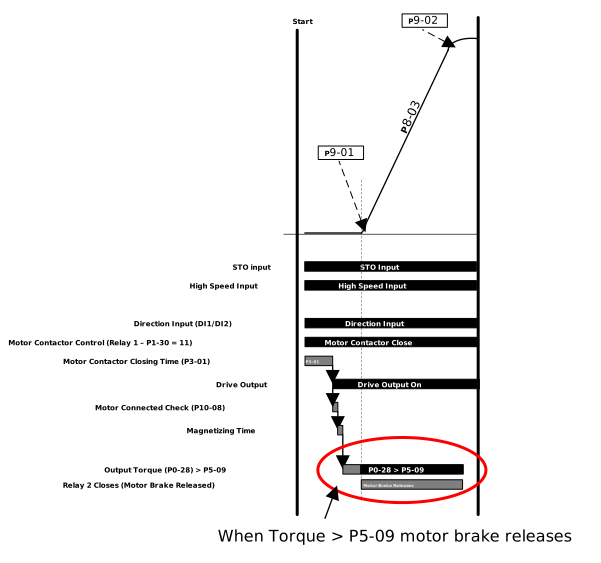 |
Speed & Torque P5-08 & P5-09 > 0 | When both Conditions below are true the motor brake will release:
| 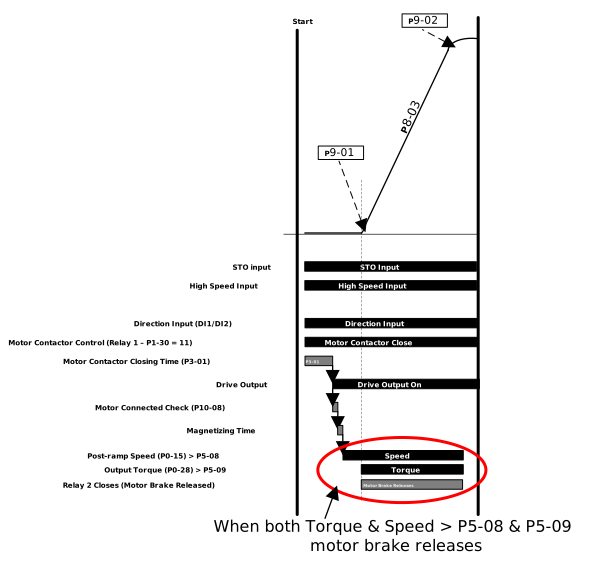 |
Torque Speed Method - Setup Guidance
The torque speed method setup is application dependent based on the load and speeds required. This section gives general guidance for parameterisation and troubleshooting.
When using torque and speed as values to release the brake the best results should yield a travel where the load does not drop when the brake is released while also having a smooth acceleration profile with no bumps or jerks in the car.
The table below list common problems and solutions when using this method.
Problem | Cause | Solution |
|---|---|---|
Brake does not release |
| As a starting point in Geared Induction systems use the slip speed of the motor as a target for the speed in P5-08. Reduce the target speed in P5-08 to allow the brake to release before to much torque is built up. If you are not using speed as a reference reduce the value in P5-09 so the drive can reach the required torque before entering torque or current limit. |
| Check that the Drive Relay has not been damaged and is still operational | |
| If you are using Relay 1 to control the motor brake P1-30 MUST be set to 15: Brake Control | |
Drive trips Sp-Err during start |
| Reduce the values in P5-08 & P5-09 so the brake releases before the drive enters current or torque limit NoteThe real-time current & torque values can be monitored with P0-25 & P0-28 respectively |
| Increase the values in P6-11 or P6-12 to allow for a larger window for the speed to deviate. The travel of the elevator needs tuning for smoother operation. Follow the guide in this section for tuning and comfort optimisation. | |
Motor Sheave snaps forward when the brake released |
| As the torque demand for the brake to release in P5-09 increases the drive must have a longer starting jerk to compensate. Increase P9-01 to lengthen the starting jerk to smooth out the travel curve. |
| Setup the starting speed loop gains by entering a value in the transition speed during acceleration parameter P9-25. This value should be after the oscillations at start have stopped and the travel curve is smooth. Change the values in P9-23 & P9-24 to reduce oscillations in the travel curve at start. TipWhen changing the speed loop gains in P9-23 & P9-24 start with the P-Gain in P9-23 and change the value in increments of 10% until you get the best results, there will be a point where the performance worsens when you change the value at that point stop and go back to the previous value. Then do the same for the I-Gain in P9-24 until the travel curve has been smoothed. | |
Rollback as the brake is released |
| Increase the value in P5-08 to provided more torque at start when the brake is released. Increase in increments of 5% until the load can be accelerated without rollback. |
Using the torque speed method additional protections are provided to prevent unintended car movement when the brake is released which are detailed in the table below.
Protection | Protection function | Parameters |
|---|---|---|
Torque Timeout | If the load stalls and is unable to accelerate as the torque or current limits in either parameter P4-18/P4-19 or P4-03 have been reached or the brake does not release the drive will trip Sp-Err preventing the load from dropping | P4-18 & P4-19 |
Disable holding at 0 speed | When using the Torque Speed method the drive does not use brake release time (P5-01) or DC Injection time at start (P9-11) so the load is never held at zero while the brake is released. As soon as the conditions to release the drive are met the motor starts to accelerate to the target speed rather than holding zero. | P5-01 & P9-11 |
Parameter Number | Parameter Name | Units | Default | Available Settings | Access | Change During Run | Scaling | Size (Bytes) | CAN Register | CAN Sub Index | Modbus Register |
|---|---|---|---|---|---|---|---|---|---|---|---|
P5-08 | Brake Release Speed | Hz / rpm / Linear | 0.00 | 0.00 ... 10.00Hz | RW | Y | 1 = 0.01 | 2 | 21FCh | 0 | 508 |
P5-09 | Brake Release Torque | % | 0.0% | 0.0 ... 100.0% | RW | Y | 1 = 0.1% | 2 | 21FDh | 0 | 509 |
Set this to the speed at which you want the Motor Brake to be released. Once P5-08 & P5-09 values have been met the brake will be released.
This parameter is only active if P5-01 is set to 0 & both P5-08 & P5-09 have a value > 0.
Set this to the torque value at which you want the Motor Brake to be released. Once P5-08 & P5-09 values have been met the brake will be released.
This parameter is only active if P5-01 is set to 0 & both P5-08 & P5-09 have a value > 0.