CANopen Setup & Connecting to the Drive
CANopen - Physical Connection & Wiring
The drive has a built-in RJ45 port for connection of a CANopen network, this is highlighted by the circle in the image below.
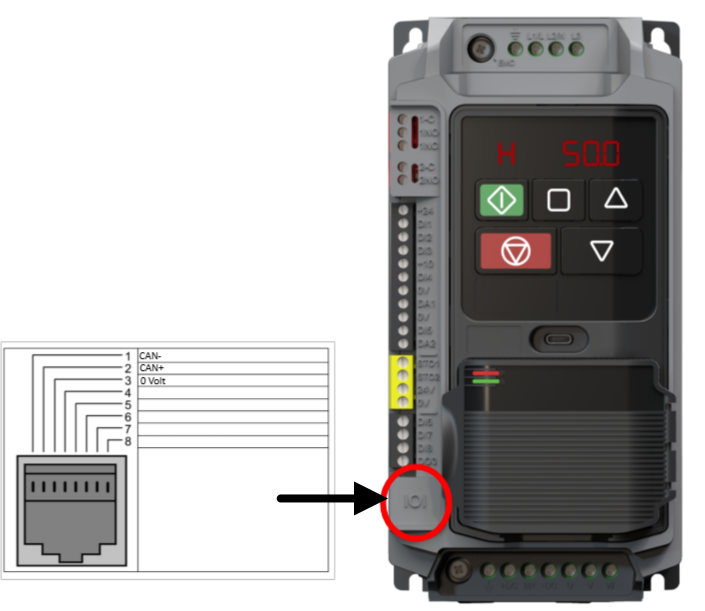 CautionAlways ensure 0V connection is present. NoticeA Network terminating resistor (120Ω) may be used at the end of the network to reduce noise. |
Check | Notes | |||||||||
|---|---|---|---|---|---|---|---|---|---|---|
Checking the Drives RJ45 port/ connection cable | Measure the CAN+ & CAN- pins voltage between 0V to check if they are working.
|
CANopen - Parameter Access Reading/Writing Parameters
All parameters can be accessed over CAN communication regardless of setting in P1-01 - Primary Command Source.
Access Parameter Groups 1 - 12 Information
To read or write to drive parameters you need to know the Object ID of that parameter. There are 3 different ways to find the Object ID of a parameter:
Documentation - Elevator Core Parameter Technical Reference Guide / Parameter Lists & Descriptions
Electronic Data Sheet (EDS) downloadable file from Invertek Drives Ltd website: CANopen EDS File
Using the formula below: Access Parameter Groups 1 - 12 Formula
Each parameter has it's own specific Object ID that can be calculated by the formula:
Object ID = 2000h + (Group * 100) + Parameter Number.
For example using the above formula to calculate P8-01 (Maximum Frequency) Object Number:
Hexadecimal Version: 2000h + (8h * 64h) + 1h = 2321h
Decimal Version: 8192 + (8 * 100) + 1 = 8993
So if you were using Hexadecimal to write the Object ID you would enter 2321h or 8993 if using decimal.
CANopen - Communication & Drive Control Setup Parameters
The following Parameters must be set in the drive for CANopen communication to read & write to Parameters:
Set the CANopen Address in P2-07.
Parameter Number
Parameter Name
Units
Default
Available Settings
Access
Change During Run
Scaling
Size (Bytes)
CAN Register
CAN Sub Index
Modbus Register
P2-07
CANopen Address
N/A
1
1 ... 127
RW
N
N/A
1
20CFh
0
207
Set the CANopen Baud Rate in P2-08.
This value must match the other devices on the systems values.
Parameter Number
Parameter Name
Units
Default
Available Settings
Access
Change During Run
Scaling
Size (Bytes)
CAN Register
CAN Sub Index
Modbus Register
P2-08
CANopen Baud Rate
N/A
2: 500kbps
0: 125kbps
1: 250kbps
2: 500kbps
3: 1Mbps
RW
N
N/A
1
20D0h
0
208
The following Parameters must be set up to control the drive via CAN in addition to the communication Parameters P2-07 & P2-08.
Set the drive control source to 2:CANopen in P1-01
Parameter Number
Parameter Name
Units
Default
Available Settings
Access
Change During Run
Scaling
Size (Bytes)
CAN Register
CAN Sub Index
Modbus Register
P1-01
Primary Command Source
N/A
0: Terminal
0: Terminal
1: Modbus RTU
2: CANopen
3: Reserved
RW
N
N/A
1
2065h
0
101