UPS Drive Operation
Rescue Mode Activation and Running Conditions with UPS Supply
Conditions to Activate Rescue Mode powered from UPS Supply | |
|---|---|
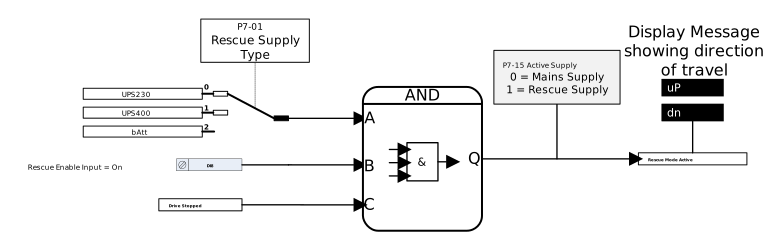 WarningBefore Entering Rescue Mode the user must ensure that the UPS has been installed in accordance with the information in the Topic: UPS Supply Connection Method. |
NoteIf the drive is running and the Rescue Mode Digital Input is closed then on the next stop the drive will go into rescue mode.
|
To run in Rescue Mode the following conditions must be fulfilled:
Rescue Mode Running Conditions in UPS Mode | |
|---|---|
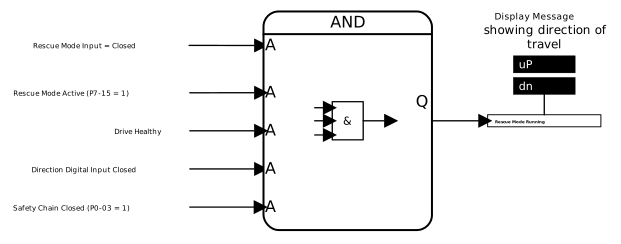 | Each of the following conditions must be met for the drive to run in Rescue Operation with a UPS supply (P7-01 = 0 or 1):
NoteA Speed Reference or Enable Digital Input is not needed in Rescue Mode |
UPS Protection Function
When using a UPS supply there are two different protection functions to prevent damage to the UPS or excessive draw on the UPS. These are Power limit and Current limit, each function is detailed in the sections below.
UPS Protection - Power
The drive can be used to protect the external UPS unit. By using P7-04 and P7-16 to set the UPS power rating and overload time respectively the drive can protect the UPS from collapsing/overloading.
The function works by:
Set UPS power rating (in kW) in P7-04 and Overload time limit in P7-16.
Important
If P7-04 is set to 0 then this function is disabled.
When the drive is run in rescue mode if the value in P0-30 exceeds the value set in P7-04 for the total time in P7-16 the drive will trip UPS-L and immediately stop.
Important
The time in P7-16 is total cumulative time during running not consecutive time.
For example if the time in P7-04 is set at 2 seconds. When the drive is run and P0-30 is > P7-04 for 1 second then is below P7-04 for 2 seconds then above P7-04 again for 1 second the drive will trip as the total cumulative time has reached the 2 seconds set in P7-04.
To restart the drive the fault will need to be cleared and a new direction command issued.
UPS Protection Power Function - Timing Diagram 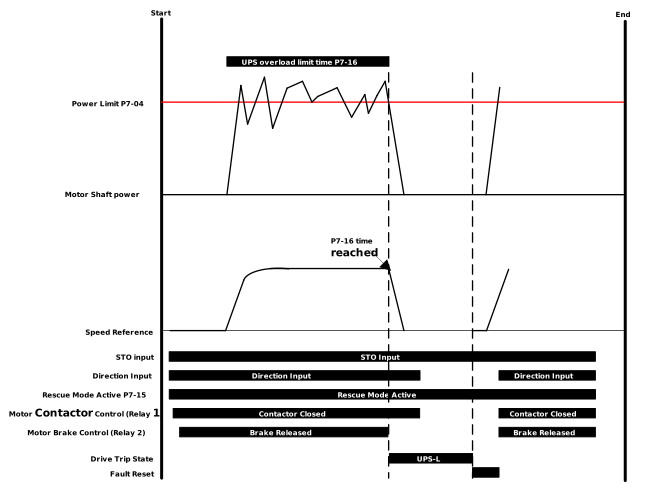 | UPS Protection Power Function - Example Scope Traces 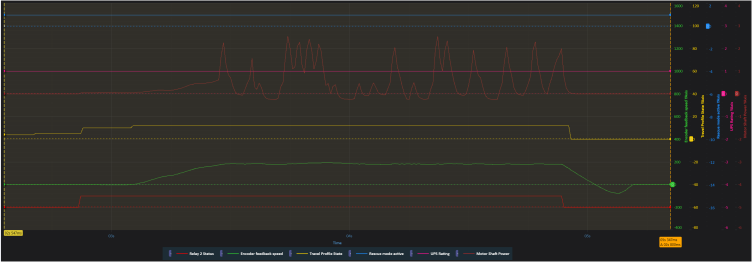 |
UPS Protection - Current
The current limit during operation can be set in P7-05. This parameter limits the current operation while running in rescue mode to a percentage of P4-06 (Motor Rated Current), with 100% (default) being the value of P4-06.
Note
P7-05 value is only active in Rescue Mode.
Parameter Number | Parameter Name | Units | Default | Available Settings | Access | Change During Run | Scaling | Size (Bytes) | CAN Register | CAN Sub Index | Modbus Register |
|---|---|---|---|---|---|---|---|---|---|---|---|
P7-04 | UPS Rating | kW | 0.0kW | 0.0 ... 65535kW | RW | Y | 1 = 0.1kW | 2 | 22C0h | 0 | 704 |
P7-05 | Rescue Mode Current Limit | % | 100.0% | 0.0 ... 200.0% | RW | Y | 1 = 0.1% | 2 | 22C1h | 0 | 705 |
P7-16 | UPS overload time limit | sec | 2.0s | 0.0 ... 10.0s | RW | N | 1 = 0.1s | 1 | 22CCh | 0 | 716 |
Used to protect overloading/ collapsing of voltage of the UPS power supply which could cause a motor stall condition.
When the output power to the motor exceeds this value for the time set in parameter (P7-16) UPS Overload Time Limit, the drive will ramp down to Stop, apply brakes (if controlled by the drive) and trip on “UPS-L”, to restart a new direction command will need to be provided by the controller.
If value is set to 0.0 then this function is disabled.
Sets the current limit during rescue mode operation. If the drive current exceeds this value then the speed will be reduced until the current level falls below this value.
Used in conjunction with parameter P7-04 (UPS rating).
When the value in P7-04 is exceeded for the cumulative time set in this parameter the drive will trip UPS-L.
Note
If P7-04 = 0 UPS Protection is disabled and the time in this parameter is not used.