UPS Installation
Rescue Operation UPS Supply Requirements
The Elevator Core is designed to operate with a Single Phase 230V UPS supply with lower input voltage thresholds which are shown in the table below. The values below are only applicable while in Rescue Mode.
If the drive is not in Rescue Mode then the normal operating specifications must be used, these can be found in Turn On/Off Levels Specification.
Rescue Power Supply Type | Required Connections | Nominal Rating | Minimum Voltage | Maximum Voltage | Current Requirements |
|---|---|---|---|---|---|
UPS Power Supply | UPS must be connected to terminals L1 and L2 | 230VAC 1Ph | 160VAC (226Vdc) | 280VAC | Motor Rated current (P4-03) and considering overload, typically no greater than 200% |
Note
The drive can also be operated from 2 phase 400V in case a phase is lost.
UPS Supply Connection Method
The connection method below details how the drive should be connected to a single phase UPS supply.
UPS Supply Connections | Required Contactor Sequencing |
|---|---|
Example UPS Supply Connection 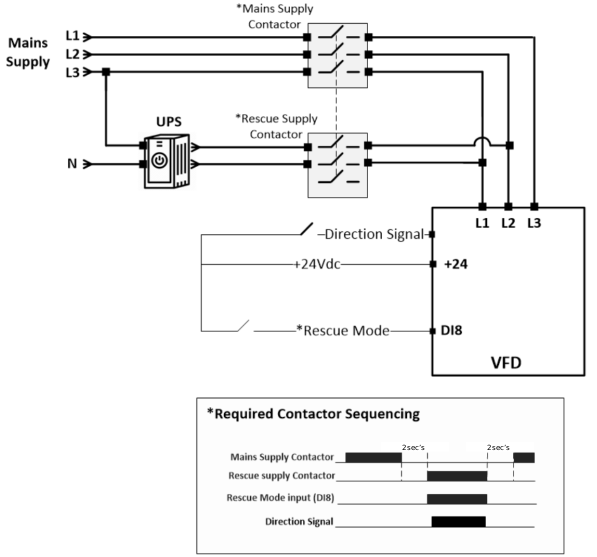 The image shows an example UPS power supply connection to the drive that provides a supply voltage during rescue operation. |
WarningCircuit protection must be provided. |
NoteAny Digital Input can be used to activate rescue mode not just Digital Input 8 (DI8). To change the Digital Input for Rescue Mode use P1-02 to select a different Macro or set P1-02 to 0 and create your own Macro using Group 12 to define the function of each Digital Input. | |