Torque Reduction during Stopping Feature
Torque Reduction During Stopping
During stopping when the motor brake applies and the motor current is immediately removed a noise can sometimes be heard in the lift cabin, to help solve this problem parameter P4-17 can be adjusted so that the current is ramped down rather than switching the current sharply off, this is used in Gearless Permanent Magnet motor applications.
Torque Reduction During Stopping - Operation
Setting Torque Reduction During Stopping
| Torque Reduction During Stopping Timing Diagram 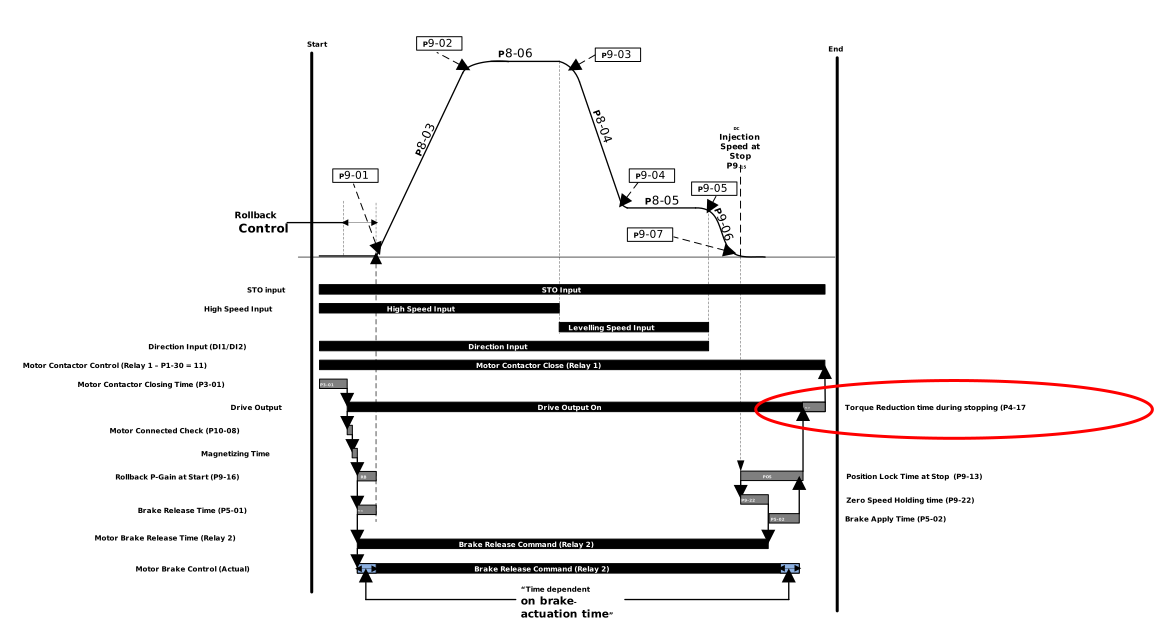 |
ImportantWhen operating with an Induction motor P4-01 = 0, 1 or 2, the drive uses an internal value of 100ms and P4-17 has no effect. | |
Parameter Number | Parameter Name | Units | Default | Available Settings | Access | Change During Run | Scaling | Size (Bytes) | CAN Register | CAN Sub Index | Modbus Register |
|---|---|---|---|---|---|---|---|---|---|---|---|
P4-17 | Torque Reduction time during stopping | sec | 1.0s | 0.0 ... 10.0s | RW | Y | 1 = 0.1s | 1 | 21A1h | 0 | 417 |
Setting the parameter to 0.0s means the function is disabled. This parameter helps in reducing the noise in the lift car when the motor brake is applied due to the immediate removal of current. Increasing this value reduces audible noise, setting too high can result in reduced torque and rollback during stopping.
This parameter has no effect when operating in an IM or V/F control mode (P4-01 = 0, 1 or 2) and the torque reduction time is fixed at 100ms.
Below is the answers to some commonly asked questions about the Torque Reduction during Stopping function.
Question | Answer |
|---|---|
How do I change the length of the torque drop off time? | Use P4-17 to set the time of the torque drop off |
How to tell when the drive is performing torque reduction? | Normally the torque drop off is the last step in the sequence. The exact time can be viewed with the Travel Profile State in Parameter P0-35. The state for Torque Reduction is 49. |
Why does the drive trip STO-L before the torque drop off time has finished | If the torque reduction time in P4-17 is set to long then the controller may open the safety chain before the torque reduction is finished being causing an STO-L trip. The solution to this is to reduce the time in P4-17. |