Digital Output 3
The drive has one Output that only functions as a Digital Output bringing the total number of available Digital Outputs to 3 (2 Digital/Analog Outputs and one Digital).
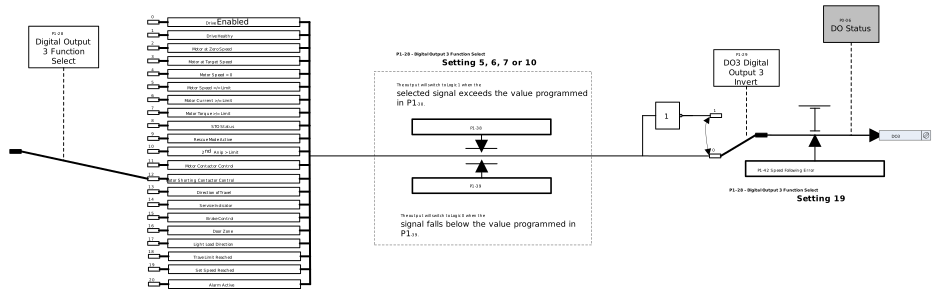
This Digital Output can be used to send signals from the drive to the elevator controller depending on the function selected. For example parameter P1-28 Setting 8 is STO Status, this setting has a Logic of 0 (0V output) when the Safety Chain (P0-03) is open and a Logic of 1 (24V) when closed. This can be used to tell the controller when the drives Safety Chain is open or closed.
Below is the configuration to setup terminal DO3 for use as a Digital Output.
Parameter Number | Parameter Name | Units | Default | Available Settings | Access | Change During Run | Scaling | Size (Bytes) | CAN Register | CAN Sub Index | Modbus Register |
|---|---|---|---|---|---|---|---|---|---|---|---|
P1-28 | DO3 Digital Output 3 Function Select | N/A | 12: Motor Shorting Contactor | 0 ... 20 | RW | Y | N/A | 1 | 2080h | 0 | 128 |
P1-29 | DO3 Digital Output 3 Invert | N/A | 0: Standard | 0: Standard 1: Inverted | RW | Y | N/A | 1 | 2081h | 0 | 129 |
P1-38 | DO3 Threshold Upper Limit | % | 100.0% | 0.0 ... 200.0% | RW | Y | 1 = 0.1% | 1 | 208Ah | 0 | 138 |
P1-39 | DO3 Threshold Lower Limit | % | 0.0% | 0.0 ... 100.0% | RW | Y | 1 = 0.1% | 1 | 208Bh | 0 | 139 |
P1-42 | Speed Following Error | % | 5.0% | 0.0 ... 50.0% | RW | Y | 1 = 0.1% | 2 | 208Eh | 0 | 142 |
The settings of the DO3 terminal are listed below:
Setting | Status/Function Source | Conditions for Status |
|---|---|---|
0 | Drive Enabled (Running) | Logic 1 when Drive is enabled and output stage is on |
1 | Drive Healthy | Logic 1 when no Fault condition exists on the drive. (“InHibit” is not included as a fault) |
2 | Motor Below Minimum Speed | Logic 1 when motor speed is </=minimum output frequency (P8-02) or </= DC injection at stop speed (P9-15) |
3 | Motor at Target Speed | Logic 1 when the output frequency matches the setpoint speed |
4 | Motor Speed > 0 | Logic 1 when the motor runs above zero speed |
5 | Motor Speed ≥ Limit | Logic 1 when the motor speed exceeds the adjustable limit as per set in P1-38 and P1-39 |
6 | Motor Current ≥ Limit | Logic 1 when the motor speed exceeds the adjustable limit as per set in P1-38 and P1-39 |
7 | Motor Torque ≥ Limit | Logic 1 when the motor speed exceeds the adjustable limit as per set in P1-38 and P1-39 |
8 | STO Status | Logic 1 when both STO inputs are present, and the drive is able to be operated |
9 | Rescue Mode Active | Logic 1 when the drive is operating in Rescue Mode |
10 | 2nd Anip > limit | Logic 1 when the signal applied to terminal DI5 (Analog Input 2) exceeds the adjustable limits set in speed P1-38 and P1-39 |
NoteWhen using settings 5, 6, 7, 10, parameters P1-38 and P1-39 must be used together to control the behaviour. The output will switch to Logic 1 when the selected signal exceeds the value programmed in P1-38 and return to Logic 0 when the signal falls below the value in P1-39. | ||
11 | Motor Contactor control | Used to control the operation of a motor contactor. Logic 1 when motor contactor is closed by the drive. |
12 | Motor Shorting Contactor Control Contactor control | Used to control the operation of a motor shorting contactor. |
13 | Direction of Travel | Logic 1 when direction down, Logic 0 when stopped or direction up. (Fwd command given and speed is positive): Up direction means a forward command has been given and motor turns clockwise (Looking at the shaft) and motor speed is positive. |
14 | Service Indicator | Logic 1 when service time interval set in P11-17 has been met. |
15 | Brake Control | Logic 1 when Relay is closed (Motor Brake Released) |
16 | Door Zone | Logic 1 when motor speed equals (P10-02 Early Door Opening Speed Threshold). |
17 | Light Load direction | Logic 0 = Easiest direction is up. Logic 1 = Easiest direction is downwards. |
18 | Travel limit counter reached | Logic 1 when Travel Direction Change Counter limit P10-05 has been reached. |
19 | Set speed and actual speed > P1-42 | Logic 1 when the % difference (as set in Speed following error P1-42) is exceeded between set speed and the actual speed (estimated speed in open loop/encoder speed in closed loop-with encoder) |
20 | Alarm | Logic 1 when an alarm is active, e.g P3-07 has been set to 2. |
Inverts the logic of DO3 output terminal.
Setting | Function |
|---|---|
0 | Standard |
1 | Inverted |
Used in conjunction with settings 5,6,7,10 of Parameter P1-28 DO3 Digital Output 3 Function Select to set the upper limit of the threshold.
Used in conjunction with settings 5,6,7,10 of Parameter P1-28 DO3 Digital Output 3 Function Select
Used in conjunction with Setting 19: Set speed and actual speed > P1-42 in parameters P1‑15, P1‑22, P1‑28 and P1‑30 as the % error difference between set speed and the actual speed.
Setting | Status/Function Source | Conditions for Status |
|---|---|---|
19 | Set speed and actual speed > P1-42 | Logic 1 when the % difference (as set in Speed following error P1-42) is exceeded between set speed and the actual speed (estimated speed in open loop/encoder speed in closed loop-with encoder) |