Universal Encoder Module Installation
Universal Encoder Module - Electrical Installation
The encoder module is able to accept bare wire or bootlace ferrules.
The table below lists the terminal details for every terminal on the Universal Encoder Module.
Cable Termination Method | Cable Gauge Size | Screw Type | Recommended Screw Tightening Torque | ||
|---|---|---|---|---|---|
mm² | AWG | Length (mm) | |||
Bootlace Ferrule 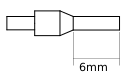 | 1.5 | 14 | 6 | Slotted Head M2 | 0.2Nm |
Bare Cable 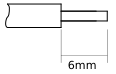 | 1 | 14 | 6 | Slotted Head M2 | 0.2Nm |
Encoder Inputs | ||
|---|---|---|
Terminal Layout | Terminal Label | Terminal Function |
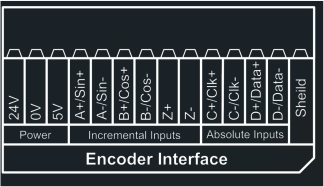 | 24V | 24V Supply |
0V | 0V common for encoder | |
5V | 5V Supply | |
A+/Sin+ | A+ or Sin+ terminal | |
A-/Sin- | A- or Sin- terminal | |
B+/Cos+ | B+ or Cos+ terminal | |
B-/Cos- | B- or Cos- terminal | |
Z+ | Z+ terminal | |
Z- | Z- terminal | |
C+/CLK+ | C+ or Clock+ terminal | |
C-/CLK- | C- or Clock- terminal | |
D+/DATA+ | D+ or DATA+ terminal | |
D-/DATA- | D- or DATA- terminal | |
Shield | Encoder Shield terminal | |
Simulated Encoder Outputs | ||
Terminal Layout | Terminal Label | Terminal Function |
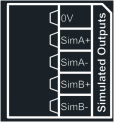 | 0V | Simulated Output 0V common |
SimA+ | A+ Output (simulated) terminal | |
SimA- | A- Output (simulated) terminal | |
SimB+ | B+ Output (simulated) terminal | |
SimB- | B- Output (simulated) terminal | |
Additional Digital Inputs | ||
Terminal Layout | Terminal Label | Terminal Function |
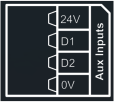 | 24V | 24V Supply |
DAUX1 | Digital Input 9 | |
DAUX2 | Digital Input 10 | |
0V | Digital Input 0V common | |
To connect your motor's encoder to the universal module it is important to understand which cable should be plugged into which terminal. Below is a table that details how each encoder should be wired into the Universal Encoder Module:
Encoder Type | 24V | 0V | 5V | A+/Sin+ | A-/Sin- | B+/Cos+ | B-/Cos- | C+/CLK+ | C-/CLK- | D+/DATA+ | D-/DATA- | Shield |
|---|---|---|---|---|---|---|---|---|---|---|---|---|
Incremental TTL Differential | 0V | 5V | A+ | A- | B+ | B- | Cable Shield | |||||
Incremental HTL Differential | 24V | 0V | A+ | A- | B+ | B- | ||||||
Incremental TTL | 0V | 5V | A | Connect to 0V | B | Connect to 0V | ||||||
Incremental HTL | 24V | 0V | A | Connect to 0V | B | Connect to 0V | ||||||
SinCos (ERN 1387) | 0V | 5V | A+ | A- | B+ | B- | C+ | C- | D+ | D- | ||
Endat with Incremental Signals | 0V | 5V | A+ | A- | B+ | B- | CLOCK | /CLOCK | DATA | /DATA | ||
Endat without Incremental Signals | 0V | 5V | CLOCK | /CLOCK | DATA | /DATA |
Important
The shield must be connected to the Universal Encoder Module to prevent noise interference.
Universal Encoder Module - Mechanical Installation
If you have ordered the Universal Encoder Module as a separate option module or removed the module you will need to mechanically install the module before operation.
Installation Guide | |
|---|---|
How to connect the Universal Encoder Module to the drive
If the Module is fitted to the drive correctly when the drive has mains power the top LED should be a solid Red. | 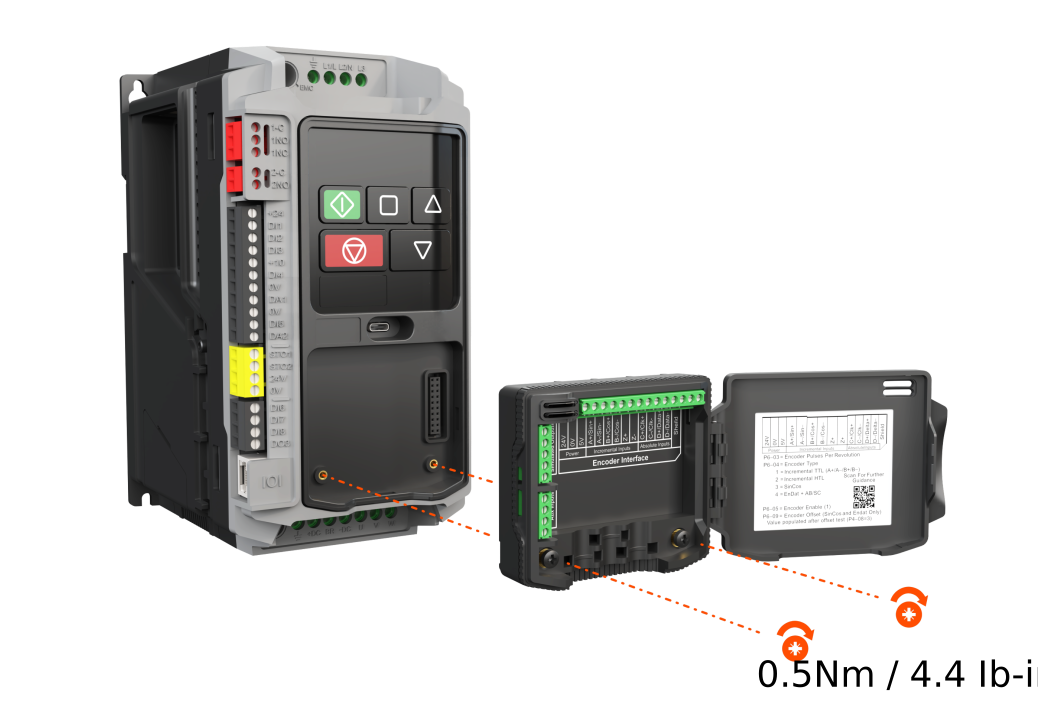 |