UPS Mode Functions
Basic Rescue Mode
Basic Rescue Mode is available when using either a UPS or Battery supply and is enabled by setting P7-02 to 0.
When using Basic Rescue Mode the drive will simply follow the direction commands given by the Lift Controller (based on the Selected Primary Command Source chosen in parameter P1-01 i.e. Direction Digital Input, Modbus RTU Commands, or CANopen Commands). The drive will run until that command is removed.
When the drive is running forward the display will show uP and when running in reverse the display will show dn.
This function should be selected if the controller always selects the running direction of motor when in Rescue Mode.
How to Setup Basic Rescue Mode Function
This guide assumes you have matched the Rescue Mode supply type in parameter P7-01 to the actual supply type connected and have correctly commissioned the drive for operation.
Basic Rescue Mode Function Diagram
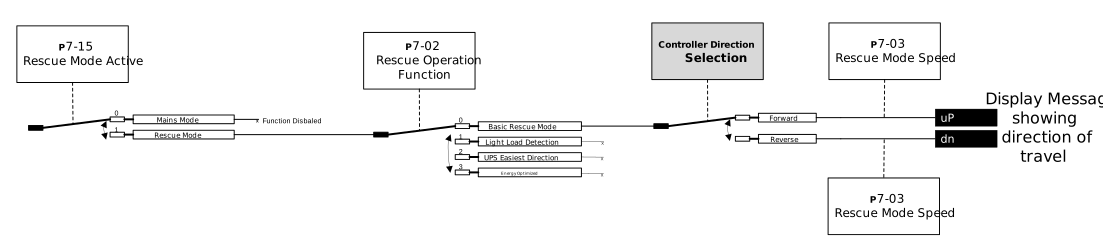
The image above shows how to program the drive to use Basic Rescue Mode:
Set P7-02 to 0 (Basic Rescue Mode)
Set your target Rescue Mode speed in P7-03
Now when the controller gives a direction command the drive will run in that direction.
Trave curve in both directions using Basic Rescue Mode
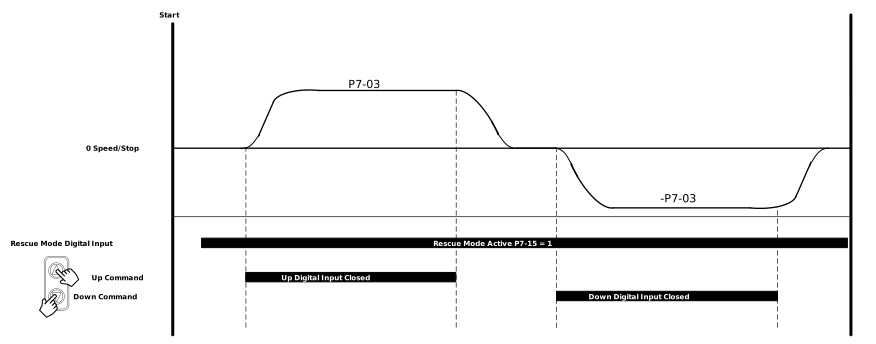
The image above shows how the direction command selects the running direction:
Switch the drive to Rescue Mode using the relevant Digital Input (Factory Default is DI8)
Make sure all conditions (Shown in Note below) to run are met
The controller gives either an Up or Down command
The drive will run in the direction of the command
Note
The I/O conditions to run in Rescue Mode are:
Rescue input closed (factory default is DI8)
Safety Chain (terminals STO1 & STO2) closed
A Run Direction Signal needs to be given based on the selected primary command source chosen in P1-01 which is one of the following - Direction Digital Input, Modbus RTU run command or CANopen run command
Parameter Number | Parameter Name | Units | Default | Available Settings | Access | Change During Run | Scaling | Size (Bytes) | CAN Register | CAN Sub Index | Modbus Register |
|---|---|---|---|---|---|---|---|---|---|---|---|
P7-03 | Rescue Mode Speed | Hz / rpm / Linear | 5.00Hz | P8-02 ... P8-01 | RW | Y *Does not take effect until next travel | 1 = 0.1Hz | 2 | 22BFh | 0 | 703 |
P7-02 | Rescue Operation Function | N/A | 0: Basic Rescue Mode | 0: Basic Rescue Mode | RW | N | N/A | 1 | 22BEh | 0 | 702 |
P7-06 | Rescue Mode Proportional Speed Loop Gain | % | 10.0% | 0.0 ... 400.0% | RW | Y | 1 = 0.1% | 2 | 22C2h | 0 | 706 |
P7-07 | Rescue Mode Integral Speed Loop Gain | ms | 50ms | 0 ... 1000ms | RW | Y | 1 = 0.1ms | 2 | 22C3h | 0 | 707 |
P7-15 | Rescue mode active | N/A | 0: Mains Supply | 0: Mains Supply 1: Rescue Supply | RO | N | N/A | 1 | 22CBh | 0 | 715 |
Setting | Function |
|---|---|
0 | Basic Rescue Mode |
P7-02 lets you set the type running mode while in Rescue Mode.
If the controller is to choose the direction of travel, then P7-02 should be set to Mode 0 (Basic Rescue Mode) should be used.
This parameter defines the motor speed during Rescue Mode operation (when Rescue Mode Input is activated), the value is also controlled internally by the power limit function based on the UPS rating entered into parameter P7-04.
The actual achievable speed will be limited depending on a number of factors such as DC bus voltage level, motor, travel speed, system efficiencies, estimated value can be calculated as follows:

It should also be noted that the level of motor load will affect the available DC bus Voltage; in some cases it may be necessary to reduce the Rescue Speed further in order to prevent nuisance Under Voltage (“U-volt”) trips.
Sets the Rescue Mode P-Gain to improve speed stability during rescue operation.
Sets the Rescue Mode I-Gain to improve speed stability during rescue operation.
Displays the active supply that the drive is being operated from.
Setting | Supply |
|---|---|
0 | Mains Supply |
1 | Rescue Supply |
While running the drive will indicate direction of travel by the keypad either display uP or dn. When the display shows uP this indicates forward direction and dn indicates a reverse direction. The drive will show the travel speed in Hz on the display next to uP or dn.
All Group 0 monitoring parameters are available to be monitored through the keypad or OptiTools Pro while running in Basic Rescue Mode.
In Rescue Mode the drive uses different parameters for the running gains. Use parameters P7-06 (Rescue Mode Proportional Speed Loop Gain) and P7-07 (Rescue Mode Integral Speed Loop Gain) to improve the travel comfort in the same way you would use the normal gains.
These may need to be adjusted to smooth out ride quality and subsequently draw less current, persevering the UPS / Battery Supply.
Light Load Detection
Light Load Detection is a function that is available when the drive is in Rescue Mode (P7-15 = 1). It is used to run in the direction with the smallest load to minimize power consumption from the External UPS or Battery supply.
The Light Load Detection function works by running a test at the start of each travel in Rescue Mode to determine the easiest running direction. Then after the test is finished the drive runs in the selected direction without needing an additional run command.
To select the Light Load Detection function set P7-02 = 1.
Light Load Detection Test Procedure
Below is the operating procedure of the Light Load Detection function:
| Timing Diagram for the Light Load Detection function 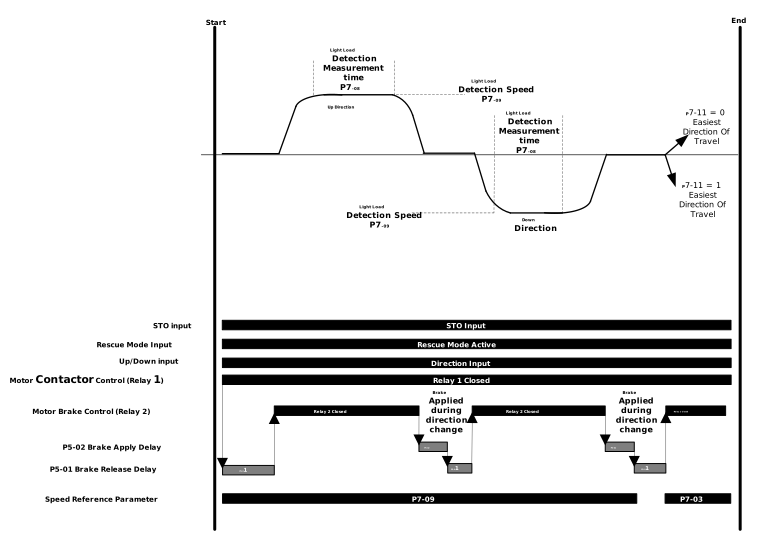 |
NoteThe first direction during the test is always forward (clockwise) regardless of the direction selected from the controller. If the Direction command is removed at any point during the test period the drive will stop. | |
While running the drive will indicate direction of travel by the keypad showing either display uP or dn.
After the Light Load Detection test has been completed the result can be viewed with either:
P7-11 - Light Load Detection Results - (0 = Forward (Clockwise) / 1 = Downwards (Anti-clockwise) / 2 = Balanced)
Digital Output / Relay Output Function set to Setting 17: Light Load Direction - Output status - 0 = Easiest Direction is up or balanced / 1 = Easiest Direction is down
Note
Any Output terminals which are set to Setting 17 will change state during the test when a change in the easiest direction is detected by the drive.
Parameter Number | Parameter Name | Units | Default | Available Settings | Access | Change During Run | Scaling | Size (Bytes) | CAN Register | CAN Sub Index | Modbus Register |
|---|---|---|---|---|---|---|---|---|---|---|---|
P7-02 | Rescue Operation Function | N/A | 0: Basic Rescue Mode | 1: Light Load Detection | RW | N | N/A | 1 | 22BEh | 0 | 702 |
P7-08 | Light Load Detection Measurement time | sec | 1.0s | 0.0 ... 10.0s | RW | Y | 1 = 0.1s | 1 | 22C4h | 0 | 708 |
P7-09 | Light Load Detection Speed | Hz / rpm / Linear | 5.00Hz | P8-02 ... P8-01 | RW | Y *Does not take effect until next travel | 1 = 0.1Hz | 2 | 22C5h | 0 | 709 |
P7-11 | Light Load Detection Results | N/A | 0: Light direction is clockwise | 0: Light direction is clockwise 1: Light direction is Anti-clockwise 2: Balanced | RO | N | N/A | 1 | 22C7h | 0 | 711 |
Setting | Function |
|---|---|
1 | Light Load Detection |
P7-02 lets you set the type running mode while in Rescue Mode.
If a test is required to find the easiest direction to run in then P7-02 should be set to Mode 1 (Light Load Detection). This mode performs a test after each run command to measure which is the easiest direction of travel to consume the least amount of energy from the UPS/Battery. Mode 1 (Light Load Detection) selects the easiest direction while in Rescue Operation.
This parameter sets the time that the drive runs for in each direction during the Light Load Detection test after enable. SO if P7-08 is set to 2s then the drive will run forward for 2 seconds then reverse for 2 seconds after a start command is given. The speed the test is conducted at is set via P7-09.
This parameter sets the motor speed ONLY during the Light Load Detection test in each direction. After the test and a direction has been chosen this speed is no longer used and the speed used after the result is set in P7-03.
Shows the result of either the Light Load Detection Test (P7-02 = 1) or the UPS Easiest direction based on measurement result (P7-02 = 2).
Value | Result |
|---|---|
0 | Light direction is clockwise |
1 | Light direction is Anti-clockwise |
2 | Balanced |
UPS Easiest Direction based on Measurement
UPS Easiest Direction is a operation mode that is available when the drive is in Rescue Mode (P7-15 = 1). The UPS Easiest Direction function uses a combination of Mains Mode and Rescue Mode.
While in Mains mode during each run command the drive stores the easiest travel direction so when the drive switches to Rescue Mode operation the easiest direction is already measured.
Light Load Detection Test Procedure
Below is the operating procedure of the UPS Easiest Direction function:
| Timing Diagram for the UPS Easiest Direction function 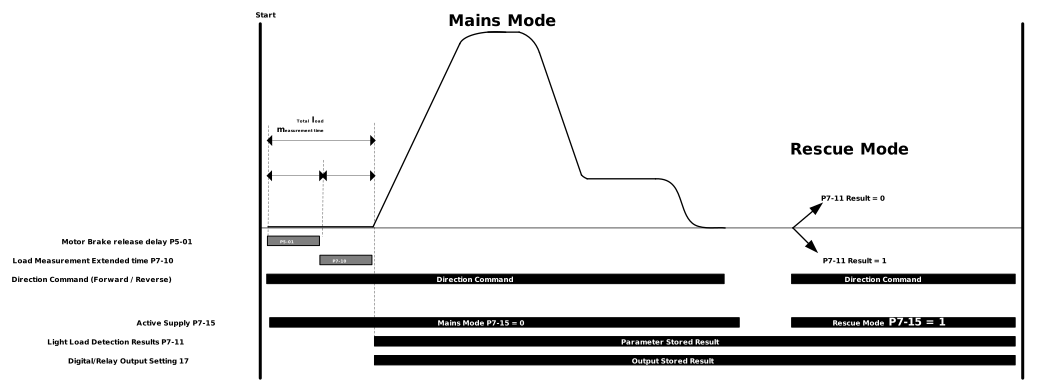 |
ImportantIf a balanced scenario occurs (P7-11 = 2), the drive will automatically switch to a different function of P7-02 depending on the motor control mode selected in P4-01. The balanced scenarios for each motor type are:
| |
While running the drive will indicate direction of travel by the keypad either display uP or dn.
After the measurement in mains mode has been completed the result can viewed in either:
P7-11 - Light Load Detection Results - (0 = Forward (Clockwise) / 1 = Downwards (Anti-clockwise) / 2 = Balanced)
Digital Output / Relay Output Function set to Setting 17: Light Load Direction - Output status - 0 = Easiest Direction is up or balanced / 1 = Easiest Direction is down
Parameter Number | Parameter Name | Units | Default | Available Settings | Access | Change During Run | Scaling | Size (Bytes) | CAN Register | CAN Sub Index | Modbus Register |
|---|---|---|---|---|---|---|---|---|---|---|---|
P7-02 | Rescue Operation Function | N/A | 0: Basic Rescue Mode | 2: UPS Easiest Direction based on Load Measurement | RW | N | N/A | 1 | 22BEh | 0 | 702 |
P7-03 | Rescue Mode Speed | Hz / rpm / Linear | 5.00Hz | P8-02 ... P8-01 | RW | Y *Does not take effect until next travel | 1 = 0.1Hz | 2 | 22BFh | 0 | 703 |
P7-10 | Load Measurement extended time | sec | 0.0s | 0.0 ... 10.0s | RW | Y | 1 = 0.1s | 1 | 22C6h | 0 | 710 |
P7-11 | Light Load Detection Results | N/A | 0: Light direction is clockwise | 0: Light direction is clockwise 1: Light direction is Anti-clockwise 2: Balanced | RO | N | N/A | 1 | 22C7h | 0 | 711 |
Setting | Function |
|---|---|
2 | UPS Easiest Direction based on Load Measurement |
P7-02 lets you set the type running mode while in Rescue Mode.
If a test is required to find the easiest direction to run in then P7-02 should be set to Mode 2 (UPS Easiest Direction based on Load Measurement). This mode lets the drive measure which is the easiest direction of travel to consume the least amount of energy from the UPS/Battery before entering Rescue Mode. Mode 2 should be used if the drive should know the easiest direction to run in before entering Rescue Mode.
This parameter defines the motor speed during Rescue Mode operation (when Rescue Mode Input is activated), the value is also controlled internally by the power limit function based on the UPS rating entered into parameter P7-04.
The actual achievable speed will be limited depending on a number of factors such as DC bus voltage level, motor, travel speed, system efficiencies, estimated value can be calculated as follows:
It should also be noted that the level of motor load will affect the available DC bus Voltage; in some cases it may be necessary to reduce the Rescue Speed further in order to prevent nuisance Under Voltage (“U-volt”) trips.
Sets the extended measurement time which starts of P5-01 has finished.
Increasing this value can help improve the measurement accuracy of the feature.
Shows the result of either the Light Load Detection Test (P7-02 = 1) or the UPS Easiest direction based on measurement result (P7-02 = 2).
Value | Result |
|---|---|
0 | Light direction is clockwise |
1 | Light direction is Anti-clockwise |
2 | Balanced |
Energy Optimized
Energy Optimized is a function that is available when the drive is in Rescue Mode (P7-15 = 1).
Sometimes referred to as Gravity Mode, Energy Optimized mode switches off the output and controls the Elevator Car by opening and closing the brake via Relay 2 (or Relay 1 if P1-30 = 15) at set intervals using the value in P5-02 to control the Elevator Car speed, rather than via a speed control reference.
To select Energy Optimized function set P7-02 = 3.
Energy Optimized Function - Operation
The operation sequence for Energy Optimized mode is as follows:
ImportantIf a balanced scenario occurs (P7-11 = 2), the drive will automatically switch to a different function of P7-02 depending on the motor control mode selected in P4-01. The balanced scenarios for each motor type are:
| |
Target Speed Reached 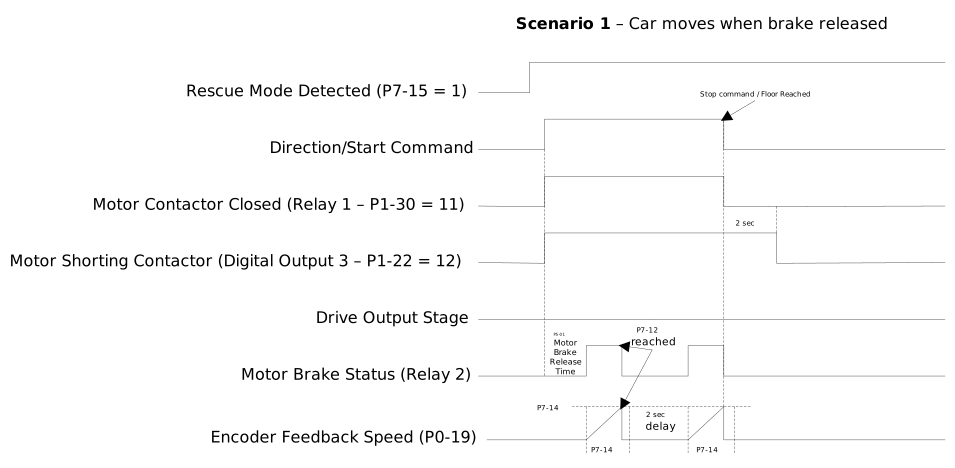 | Balanced Scenario 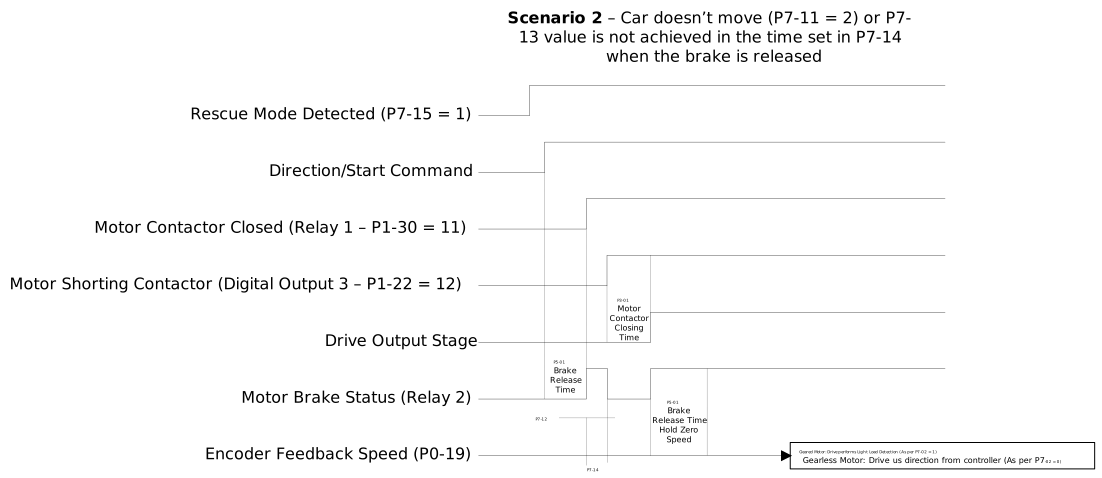 |
Parameter Number | Parameter Name | Units | Default | Available Settings | Access | Change During Run | Scaling | Size (Bytes) | CAN Register | CAN Sub Index | Modbus Register |
|---|---|---|---|---|---|---|---|---|---|---|---|
P7-02 | Rescue Operation Function | N/A | 0: Basic Rescue Mode | 3: Energy Optimized | RW | N | N/A | 1 | 22BEh | 0 | 702 |
P7-12 | Energy Saving Rescue Unbalancing Max speed | Hz / rpm / Linear | 5.00Hz | P8-02 ... P8-01 | RW | Y | 1 = 0.01Hz | 2 | 22C8h | 0 | 712 |
P7-13 | Energy Saving Rescue Minimum Speed | Hz / rpm / Linear | 5.00Hz | P8-02 ... P8-01 | RW | Y | 1 = 0.01Hz | 2 | 22C9h | 0 | 713 |
P7-14 | Energy Saving Rescue Minimum Speed Time | sec | 0.0s | 0.0 ...10.0s | RW | Y | 1 = 0.1s | 1 | 22CAh | 0 | 714 |
Setting | Function |
|---|---|
3 | Energy Optimized |
P7-02 lets you set the type running mode while in Rescue Mode.
If no drive output is required then P7-02 should be set to Mode 3 (Energy Optimised). This when the drive output should be switched off and controlled only by the motor brake.
This is the maximum allowable speed when the drive is operating in rescue mode and with P7-02 = 3, when this value is reached the drive will command the motor brake to apply.
This is the minimum speed that must be achieved when Energy saving mode is active, further this speed must be achieved within the time set in P7-14, otherwise the drive will apply the brake and automatically carry out the Light Load Detection test (as per P7-02 = 1) on Geared motors (P4-01 = 0 or 1) or use direction from controller (P7-02 = 0) on gearless motors (P4-01 = 3).
This parameter is used in conjunction with P7-13, when Energy Saving mode (P7-02 = 3) is active the speed must be at least the value in P7-13 within the time set in P7-14.