Modbus RTU Connecting to the Drive
Modbus RTU - Physical Connectivity
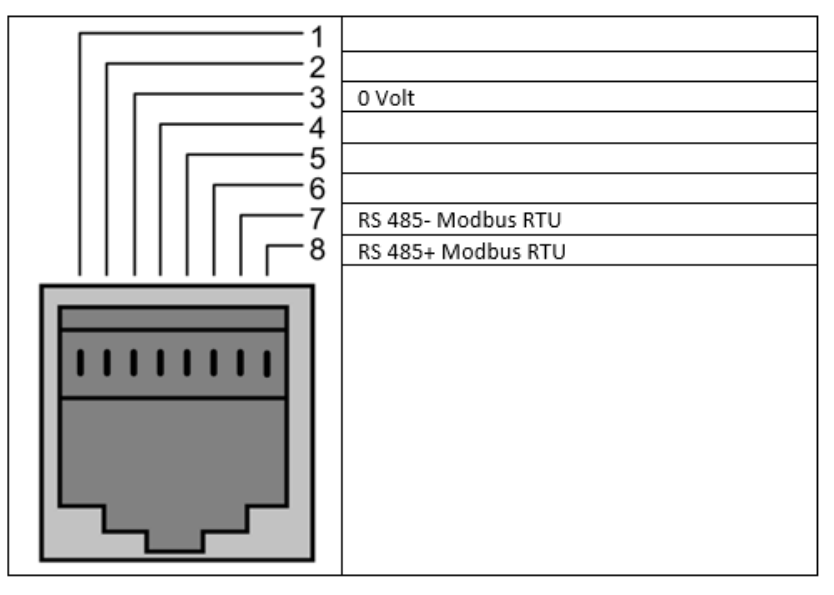
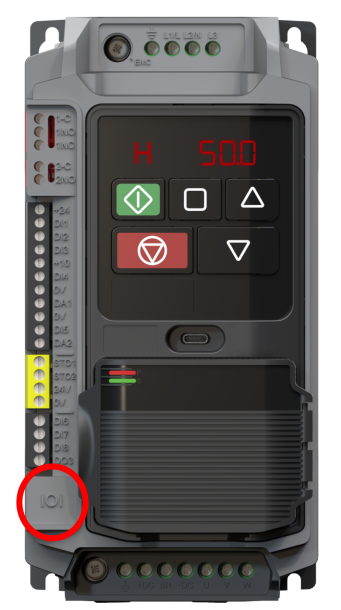
The drive has a built-in RJ45 port for connection to Modbus RTU networks, this is highlighted in the table below.
Modbus Cable Pin Connections
Caution
Always ensure 0V connection is present on the RJ45 cable.
Important
A network terminating resistor (120Ω) may be used at the end of the network to reduce noise.
Below details common issues faced when trying to connect to the drive via Modbus
Problem | Solutions | Note |
|---|---|---|
Drive will not connect to controller |
| See diagram above for pin assignment |
| Not connecting the 0V pin can cause port damage | |
Telegrams are being dropped |
| Excessive nosie can cause messages to be dropped |
| resistor should be 120Ω |
Modbus RTU - Reading and Writing Parameters
All parameters within the drive can be accessed over Modbus RTU regardless of the setting of P1-01 - Primary Control Source.
For a full register map see the Parameter List Topics: Parameter Lists & Descriptions.
Below are examples of how to read and write to each parameter group over Modbus:
Reading/Writing Group 1 - 12 Parameters
Non Group 0 parameters can be accessed as per the following examples:
All parameter values can be read from the drive and written to, regardless of the operation state of the drive.
When accessing a drive parameter via Modbus, the Register number for the parameter is the same as the parameter number.
E.g. Parameter P1-01 = Modbus Register 101.
Reading Group 0 Parameters
The rule for reading Group 0 parameters is: Register Number = 10000 + Paramater Number
Example: Reading P0-32 over Modbus:
To read the value in parameter P0-32 (Back EMF measured value), read register 10000 + 32 = 10032.
Reading Group 0 Parameters with Sub Indexes
Rule for reading Sub Indexes is: Register = 11000 + (Par x 10) + Index
Example reading P0-38 Sub Index 4 over Modbus:
Register = 11000 + (38*10) + 4 = 11384
Warning
Sub indexes can only be read for Group 0.
Below is a list of common problems with solutions:
Problem | Solutions | Note |
|---|---|---|
Wrong parameter is changing |
| Check if the software uses 0 or 1 based addressing if 0 based is used all registers must have 1 subtracted from their original value. |
Value Written not accepted |
| Some parameters have a dynamic range to will change depending on other settings. For example parameters P8-05 - P8-12 range will change depending on the settings of parameters P8-01 & P8-02. |
Modbus RTU - Communication Setup Parameters
The following Parameters must be set in the drive for Modbus RTU communication to read & write to Parameters:
Set the Modbus Slave Address in P2-01.
The addresses of multiple devices on a network must not match each drive or device should have a different address.
Parameter Number
Parameter Name
Default
Available Settings
Access
Change During Run
Modbus Register
P2-01
Modbus Slave Address
1
0 ... 247
RW
N
201
Set the Modbus Baud Rate in P2-02 to match the connected controller.
Parameter Number
Parameter Name
Default
Available Settings
Access
Change During Run
Modbus Register
P2-02
Modbus RTU Baud Rate
4: 115200bps
0: 9600bps
1: 19200bps
2: 38400bps
3: 57600bps
4: 115200bps
RW
N
202
Set the Modbus RTU Data Format in P2-03 to match the connected controller.
Parameter Number
Parameter Name
Default
Available Settings
Access
Change During Run
Modbus Register
P2-03
Modbus RTU Data Format
0: n-1
0: n-1
1: n-2
2: 0-1
3: E-1
RW
N
203
Set the Modbus Response Delay.
Parameter Number
Parameter Name
Default
Available Settings
Access
Change During Run
Modbus Register
P2-06
Modbus RTU Response Delay
0 char
0 ... 16 char
RW
N
206
Parameter can be Read/Write regardless of the drives command source in Parameter P1-01.
When accessing a drive parameter via Modbus, the Register number for the parameter is the same as the parameter number so for example to access P1-02 the Modbus Register is 102.
The following Parameters must be set up to control the drive via Modbus RTU in addition to the communication Parameters in P2-01 - P2-06.
Set the drive control source to 1:Modbus RTU in P1-01
Parameter Number
Parameter Name
Units
Default
Available Settings
Access
Change During Run
Scaling
Size (Bytes)
CAN Register
CAN Sub Index
Modbus Register
P1-01
Primary Command Source
N/A
0: Terminal
0: Terminal
1: Modbus RTU
2: CANopen
3: Reserved
RW
N
N/A
1
2065h
0
101