Motor Brake Control Apply
Motor Brake Control Applying the Brake
Both of the drives brake release methods, the Time Based Method and the Torque Speed Method use the same brake apply method which is detailed below for safety and consistency.
Drive Stopping Sequence - When does the Motor Brake Apply?
There are two different options to control when the motor brake applies. Both are detailed in this section.
Standard Sequence
From default the motor brake will apply when the motor has stopped and the travel sequence has reached the brake apply step.
The sequence is detailed below:
Setting the Brake Apply Delay Using this method the Brake Apply Delay (P5-02) should be set to enough time for the actual mechanical brake to apply. This time may be available from the manufactures data sheet. | 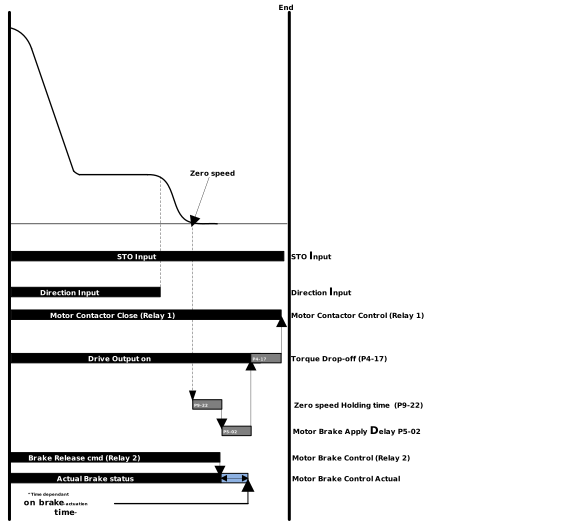 |
Apply at Speed
There is the option for the brake to be applied before the drive reaches zero speed. This can be used to avoid rollback at stop.
Setting the Brake Apply Speed Set parameter P5-03 (Brake Apply Speed) to the speed the brake should apply at. Once this is set during stopping the brake will apply once this speed is reached. In addition the Brake Apply Delay in Parameter P5-02 needs to be set to allow the actual motor brake to close. | 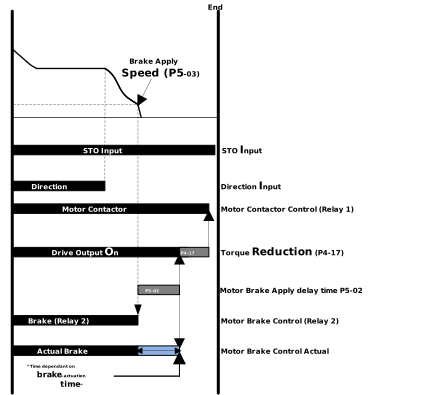 |
NoteWhen using P5-03 both Position Lock / DC Injection at Stop parameters (P9-13 - P9-15) & Zero Speed Holding time (P9-22) are ignored. | |
Note
If P5-03 = 0 the standard sequence will be used for the brake apply.
Motor Brake Apply - Setup Guidance
Motor Brake Apply Delay (P5-02)
When setting the Motor Brake Apply Delay in P5-02 this value should be set to a value that is sufficient for the motor brake to fully apply before this time has elapsed. This data can be obtained from the manufacturer's data sheet.
Brake Apply Speed (P5-03)
This value should be set so no rollback occurs with minimal bumps in the elevator car when the brake applies
A good starting point is 5% of your leveling speed and can be increased if there is still rollback at stop and reduced if there is a bump in the elevator car when the brake applies.
The stopping conditions for the drive are defined in parameter P8-13 Action of Zero Reference:
P8-13 - Action on Zero Reference
This parameter defines the stopping conditions for the Drive.
When set to 0 the stopping condition is direction command removed. If a zero speed reference is given the drive will stay enabled at zero speed until the direction command is removed.
When set to 1 an extra stopping condition is added. The stopping conditions become a direction removed OR a zero speed reference. This setting is used to stop the drive sitting at 0 speed for a prolonged period of time. For the zero speed reference condition to be fulfilled both the Pre-ramp and Post-ramp needs to be at 0 for at least 100ms.
Setting | Stopping Condition |
|---|---|
0 | Direction Input Removed |
1 | Direction Input Removed OR Zero Speed Reference |
Parameter Number | Parameter Name | Units | Default | Available Settings | Access | Change During Run | Scaling | Size (Bytes) | CAN Register | CAN Sub Index | Modbus Register |
|---|---|---|---|---|---|---|---|---|---|---|---|
P5-02 | Brake Apply Delay | sec | 0.2s | 0.0 ... 5.0s | RW | Y | 1 = 0.1s | 1 | 21F6h | 0 | 502 |
P5-03 | Brake Apply Speed | Hz / rpm / Linear | 0.00 | 0.00 ... P8-01 | RW | Y | 1 = 0.01Hz | 2 | 21F7h | 0 | 503 |
P8-13 | Action on Zero Reference | N/A | 0: Direction Removed | 0: Direction Removed 1: Direction Removed or Zero Speed Reference | RW | N | N/A | 1 | 232Dh | 0 | 813 |
Sets the delay time, for the motor brake to apply (Relay 2 to open).
Sets the speed at which the drive will open Relay 2 and apply the motor brake.
If P5-03 has a value > 0 then DC Injection at Stop (P9-13) is not active in Geared Induction open loop control (P4-01 = 0 or 1).