Rope Wear Counter Feature
Rope Wear Counter
The Rope Wear Counter counts the number of direction changes, to indicate rope lifetime and when maintenance/replacement of ropes is required.
Compared to the Travel Counter the Rope Wear Counter will only increase if the travel direction command is different to the previous travel.
When the Rope Wear Counter limit in parameter P10-05 is reached then any Digital/Relay Output with it's function set to Setting 18 will change status to 1.
Rope Wear Counter - Operation
Steps for the Rope Wear Counter to Increase | Rope Wear Counter Timing Diagram |
|---|---|
Setting the Rope Wear Counter Limit A travel limit can be set with Parameter P10-05 so when P10-04 reaches that value a Digital/Relay Output with its function set to setting 18: Travel Counter Limit Reached will be changed to 1 to indicate the travel limit set in Parameter P10-04 has been reached. | 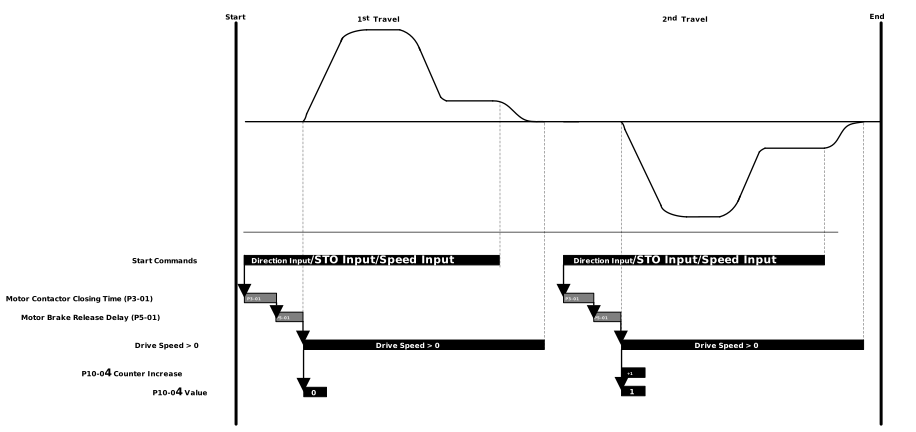 |
TipTo reset the Rope Wear Counter to 0 set P10-06 to 1, this will reset P10-04 back to 0. Use this when new ropes are installed. | |
When the Rope Wear Counter Limit set in P10-05 is reached Digital/Relay Outputs can be used to send a signal from the drive to the controller. The settings are listed below
Output | Drive Terminal Labels | Parameters | Parameter Setting | |
|---|---|---|---|---|
Digital Output 1 | DA1 | P1-15 | 18: Travel Limit Counter Reached | Setting Travel Counter Limit Reached via OptiTools Pro 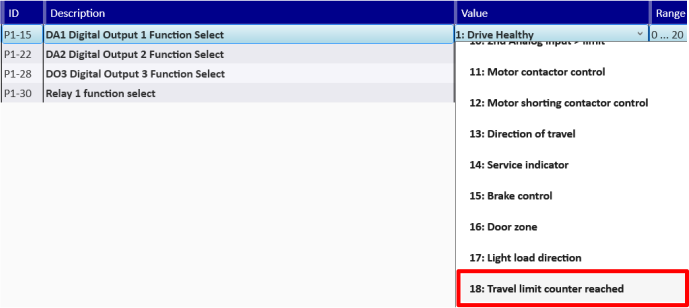 |
Digital Output 2 | DA2 | P1-22 | ||
Digital Output 3 | DO3 | P1-28 | ||
Relay 1 | 1-C 1NO or 1NC | P1-30 |
Note
In addition to the Output Status change parameter P10-13 will change to 1 when the travel direction change counter limit is reached.
When the travel direction change counter limit has been reached the following warning message will be shown on the drive display: tr-lt.
Parameter Number | Parameter Name | Units | Default | Available Settings | Access | Change During Run | Scaling | Size (Bytes) | CAN Register | CAN Sub Index | Modbus Register |
|---|---|---|---|---|---|---|---|---|---|---|---|
P10-04 | Travel Direction Change Counter | N/A | 0 | 0 ... 4294967295 | RO | N | N/A | 4 | 23ECh | 0 | 1004 |
P10-05 | Travel Direction Change Counter limit | N/A | 0 | 0 ... 1013995 | RW | Y | N/A | 4 | 23EDh | 0 | 1005 |
P10-06 | Reset motor direction change counter | N/A | 0: Disabled | 0: Disabled 1: Reset | RW | Y | N/A | 1 | 23EEh | 0 | 1006 |
P10-13 | Travel Direction Change Counter Limit Reached | N/A | 0 | 0 ... 1 | RO | N | N/A | 1 | 23F5h | 0 | 1013 |
Counts up by 1 every time there is a change in travel direction. This parameter can be reset with a factory/user default of the drive
When the value entered in this parameter has been reached a warning message (tr-lt) is shown on the drive display and a digital output or Relay will come on providing the output source is set for 18 - Travel Limit Counter Reached.
Resets the value in P10-05
Setting | Function |
|---|---|
0 | Keeps the travel counter value. |
1 | Resets the Travel counter value (Returns to 0 when completed) |
Used to detect if the travel counter limit in P10-05 has been reached or exceeded by P10-04.
Setting | Function |
|---|---|
0 | Travel direction change counter has not reached the limit |
1 | Travel direction change counter has reached or exceeded the limit. The drive will display the warning tr-lt and any Digital Output or Relay 1 with the Function 18: Travel limit Counter reached assigned to it will be set to 1. |