Motor Brake Control Time Based Method
Default Motor Brake Control Method - Time Based
The default method for releasing the brake is the time based brake control method which release the motor brake during the starting sequence after the drive has received a run command. The full start sequence is detailed in the section below.
For the time based method to be active P5-01 must have a value > 0.
Motor Brake Control - Time Based Method - Operation Guide
Motor Brake Time Based Method - Releasing the Brake Sequence | |||||
|---|---|---|---|---|---|
The image to the right shows when the Motor Brake is released in the starting sequence and is described below. When setting the Brake Release Time in parameter P5-01 the value needs to allow the brake to fully release before the motor starts. | Timing Diagram 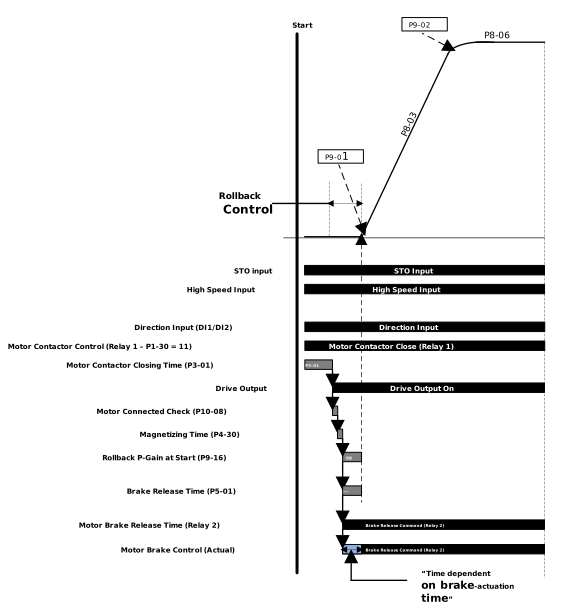 | ||||
|
Motor Brake Control - Time Based Method - Setup Guidance
The time based method uses a standard sequence to release the brake. This section details advice on how to setup the brake release for best performance and troubleshooting tips.
Problem | Cause | Solution |
|---|---|---|
Brake does not release |
| If you are using Relay 1 to control the motor brake P1-30 MUST be set to 15: Brake Control |
| Check that all of the start conditions are still active. These include direction input given, STO closed, the drive is healthy & a speed reference > 0. If one of these conditions is not fuffilledduring the start sequence the drive will stop. | |
| Check that the Drive Relay has not been damaged and is still operational | |
Brake releases to late |
| Parameter P5-01 should be set to the time it actually takes for the motor brake to mechanically release. This can be found from the manufactures data sheet. TipYou can monitor what state the drive is in by using P0-35 Travel profile state. The brake should release before State 10 has finished. |
Rollback after brake has released |
| Increase the brake release time to allow for a longer period that the rollback is active for. |
| Increase the value of the DC Injection level in parameter P9-12. If this does not work you may need to switch to the Torque Speed Brake Release Method. Reduce the time the drive is held at zero with the brake released by decreasing the time in P9-12 & optimising the time in P5-01 so the drive accelerates as soon as the brake is released rather than trying to hold the load at zero speed. | |
Speed oscillations during the start of acceleration |
| Setup the starting speed loop gains by entering a value in the transition speed during acceleration parameter P9-25. This value should be after the oscillations at start have stopped and the travel curve is smooth. Change the values in P9-23 & P9-24 to reduce oscillations in the travel curve at start. TipWhen changing the speed loop gains in P9-23 & P9-24 start with the P-Gain in P9-23 and change the value in increments of 10% until you get the best results, there will be a point where the performance worsens when you change the value at that point stop and go back to the previous value. Then do the same for the I-Gain in P9-24 until the travel curve has been smoothed. |