Motor Thermistor Protection Feature
Using a PTC or KTY Motor Thermistor
The drive supports either a PTC or KTY thermistor and must be connected to Analog Input 2 (terminal DA3).
Connecting the Motor Thermistor to the drive
Electrical connection for a PTC thermistor
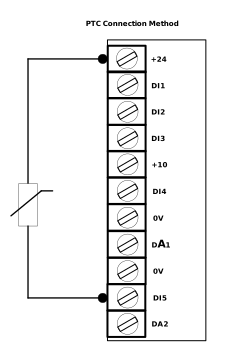
Connect Between terminals +24 and DI5
Electrical connection for a KTY thermistor
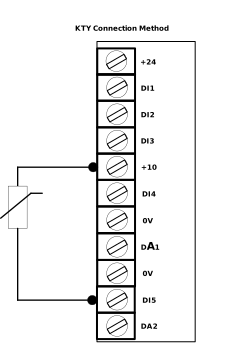
Connect Between terminals +10 and DI5
Note
The diagram shows the connection to Analog Input 2 (terminal DA3).
To set up the parameters for a motor thermistor follow the steps below:
Set the thermistor type in either parameter P1-03 or P1-09 depending on if you are using Analog 1 or 2 as the thermistor input.
Notice
For a PTC thermistor set Ptc-th or for a KTY thermistor set ty-th.
Set the thermistor trip reaction in P4-23.
Set the thermistor threshold levels for trip and reset in P11-20 & P11-21 respectively.
Select a Macro using parameter P1-02 that has the thermistor function available. Using standard Macros (P1-02 = 1 - 12) only Analog Input 2 is used as a thermistor input.
Note
If no Macro matches your needs you can use Group 12 for a User Defined Macro.
Motor Thermistor Setup - User Defined
If no standard Macro (P1-02 = 1 - 12) matches your requirement for operation while having a thermistor connected P1-02 can be set to 0 to enable the User Defined Macro. This allows the user to configure each Input to whatever function they would like.
Below is how to set either terminal DI4 or DI5 as a thermistor function:
Thermistor Terminal | Group 12 Parameter | Macro 0 Settings |
|---|---|---|
DI4 (AnaloU Input 1) | P12-04 - DI4 Input Function Select | 9: E-Trip Mode 1 22: E-Trip Mode 3 |
DI5 (Analog Input 2 | P12-05 - DI5 Input Function Select | 9: E-Trip Mode 1 22: E-Trip Mode 3 |
Note
For more information on User Defined settings see User Defined I/O - Drive Functions.
Depending on the settings of P4-23 the drive will either trip or show a warning message to indicate the motor has overheated.
When the drive trips on a thermistor fault the drive will display:
Display message | No. | Description | Corrective Action/Further information |
|---|---|---|---|
F-Ptc | 21 | Motor PTC Over Temperature | The connected motor PTC device has caused the drive to trip |
F-tY | 57 | Motor KTY84 Thermistor Fault | The connected motor KTY device has caused the drive to trip |
When the drive shows a warning message for motor overtemperature the drive will display:
Warning message | Description | Corrective Action/Further information |
|---|---|---|
Ot-Mm | Motor Overtemperature warning | Based on motor thermistor over temperature feedback via drive terminals. |
Parameter Number | Parameter Name | Units | Default | Available Settings | Access | Change During Run | Scaling | Size (Bytes) | CAN Register | CAN Sub Index | Modbus Register |
|---|---|---|---|---|---|---|---|---|---|---|---|
P1-03 | DI4 Analog Input 1 Format | N/A | 0: U 0-10 | 0 ... 9 | RW | N | N/A | 1 | 2067h | 0 | 103 |
P1-09 | DI5 Analog Input 2 Format | N/A | 0: U 0-10 | 0 ... 9 | RW | Y | N/A | 1 | 206Dh | 0 | 109 |
P4-23 | Motor Thermistor Trip Reaction | N/A | 0: Stop at Next stop command and show thermistor fault message | 0 ... 2 | RW | Y | N/A | 1 | 21A7h | 0 | 423 |
P11-20 | Motor Thermistor Trip Threshold | Ω | 2500Ω | 0 ... 5000Ω | RW | Y | 1 = 1Ω | 2 | 2460h | 0 | 1120 |
P11-21 | Motor Thermistor Reset Threshold | Ω | 1900Ω | 0 ... 5000Ω | RW | Y | 1 = 1Ω | 2 | 2461h | 0 | 1121 |
P1-03 - DI4 Analog Input 1 Format
Select the configuration for Analog Input 1. Digital Input 4 only operates as an Analog Input when P1-02 is set to 6 or 7 or configured via Group 12 when using Macro 0.
Setting | Drive Display | Input Format |
|---|---|---|
Ptc-th | Ptc-th | Motor PTC thermistor input |
tY-th | ty-th | Motor KTY84 thermistor input |
P1-09 - DI5 Analog Input 2 Format
Below are the analog configurations available for Analog Input 2.
Setting | Drive Display | Input Format |
|---|---|---|
Ptc-th | Ptc-th | Motor PTC thermistor input |
tY-th | ty-th | Motor KTY84 thermistor input |
Used to set the trip reaction when a motor thermistor fault occurs.
Setting | Reaction |
|---|---|
0 | Trip at next stop command and show thermistor fault message F-Ptc or F-tY depending on the setting of P1-03 or P1-09. |
1 | Trip Immediately and show thermistor fault message F-Ptc or F-tY depending on the setting of P1-03 or P1-09. |
2 | Continue running and show thermistor warning message Ot-Mm. |
Sets the trip threshold resistance for the connected motor thermistor.
Sets the trip reset threshold resistance for the connected motor thermistor.
Below is the answers to some commonly asked questions about the Motor Thermistor Protection.
Question | Answer |
|---|---|
Why is the drive not showing the correct fault code? | Make sure that the Analog Input is set to the correct thermistor setting. Make sure that the Macro in P1-02 being used has a thermistor function available. Make sure that the trip reaction in Parameter P4-23 is set to either 0 or 1. |
Where can I read the Motor Thermistor Resistance? | Use parameters P0-45 (Analog Input 1) & P0-46 (Analog Input 2). |