Torque Compensation during Start Feature
Torque Compensation during Start
Torque compensation during start is used to prevent rollback primarily in Gearless Permanent Magnet Motors.
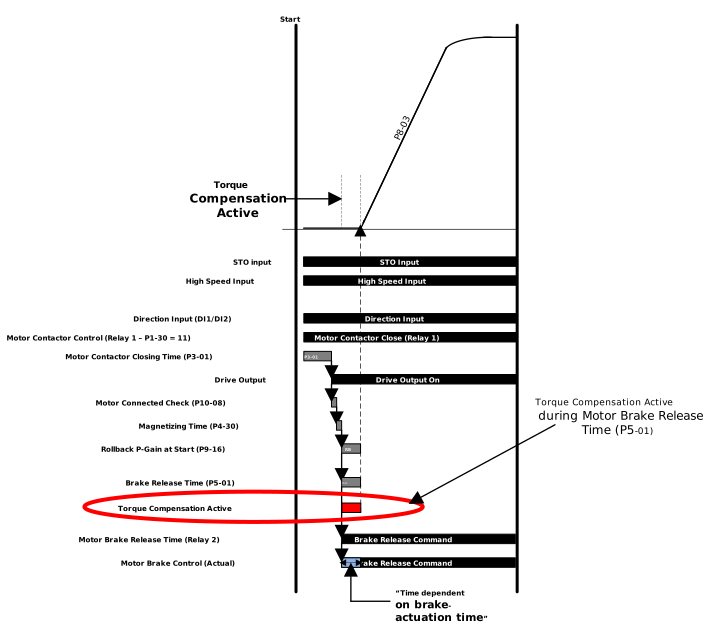
Below is the timing diagram for Torque Compensation during Start which shows when the function is active.
How to setup Torque Compensation during Start
Below is how to setup Torque Compensation during Start:
Step | Instruction | Details | ||||||||
|---|---|---|---|---|---|---|---|---|---|---|
1 | Select a torque compensation source using P9-39. This will define how the torque value during each start is set. The options are shown to the right -> |
| ||||||||
2 | Set the Motor Brake Release time in P5-01 | This time is to allow the motor brake to release but also the time which the torque compensation is active | ||||||||
3 | Set the correct torque level | When using settings 1 or 2 in P9-39 the torque is automatically calculated however when using setting 0 the sure must decide how much torque is needed. A short guide to set the values can be found below. |
Optimising the Torque Compensation values
Setting 0 of P9-39
When P9-39 is set to setting 0 the user must set the values in P9-36 & P9-37 for the torque levels at start.
These values should be enough to prevent rollback but not to high otherwise there will be a bump in the car during start. This must work for all loads of the elevator.
A good starting value is 5.0% with no load in the elevator car and then increase in increments of 5% until you get to the limit where there is no rollback and no bump.
This then needs to be repeated for full load to find a suitable value under the worse conditions.
Setting 1 of P9-39
When using setting 1 the drive assumes that an external torque sensor is beign used for feedback and uses that value to pre-laod the drive with sufficient torque. This torque is active during the Motor Brake Release Time (P5-01).
To use an external torque sensor P1-02 MUST be set to 7 and the torque sensor needs to be connected to Analog Input 1 (Terminal DI4). In addition P1-03 needs to be set to PrE-t (Pre-Torque Input (Bipolar -10V to +10V).
Setting 2 of P9-39
In this setting the drive automatically uses 50% torque from the previous run. This torque is active during the Motor Brake Release Time (P5-01).
The value for the torque reference is taken during stopping then pre-loaded for the next run.
Parameter Number | Parameter Name | Units | Default | Available Settings | Access | Change During Run | Scaling | Size (Bytes) | CAN Register | CAN Sub Index | Modbus Register |
|---|---|---|---|---|---|---|---|---|---|---|---|
P9-36 | Motor Pre-Torque in Clockwise Direction | % | 0.0% | -100.0 ... 100.0% | RW | Y | 1 = 0.1% | 2 | 23A8h | 0 | 936 |
P9-37 | Motor Pre-Torque in Counter-Clockwise Direction | % | 0.0% | -100.0 ... 100.0% | RW | Y | 1 = 0.1% | 2 | 23A9h | 0 | 937 |
P9-39 | Torque Feed forward Source | N/A | 0: Disabled | 0: Disabled 1: Torque Sensor 2: Pre-loaded value | RW | N | N/A | 1 | 23ABh | 0 | 939 |
Used to provide torque immediately as the drive starts. Used to stop rollback. Is active as the Torque Source if P9-39 is set to 0 and this parameter has a value > 0.
Used to provide torque immediately as the drive starts. Used to stop rollback. Is active as the Torque Source if P9-39 is set to 0 and this parameter has a value > 0.
Selects the torque feed forward source from the three options.
Setting | Function |
|---|---|
0 | Disabled parameters P9-36 and P9-37 are used as the torque feed forward source. If both P9-36 and P9-37 are 0 then there is no torque feed forward source. |
1 | Torque Sensor Input via an analog input which has the Torque Sensor function assigned to it. This is available in Macro 7. The Torque Sensor function can be assigned to Analog Input 1 or Analog Input 2 using P1-03 or P1-09 respectively. |
2 | Pre-loaded value of torque based on 50% of torque which was required at the last stop. |